How Can I remove the color from my infrared camera of RealSense D415?
Hello. I Have a question.
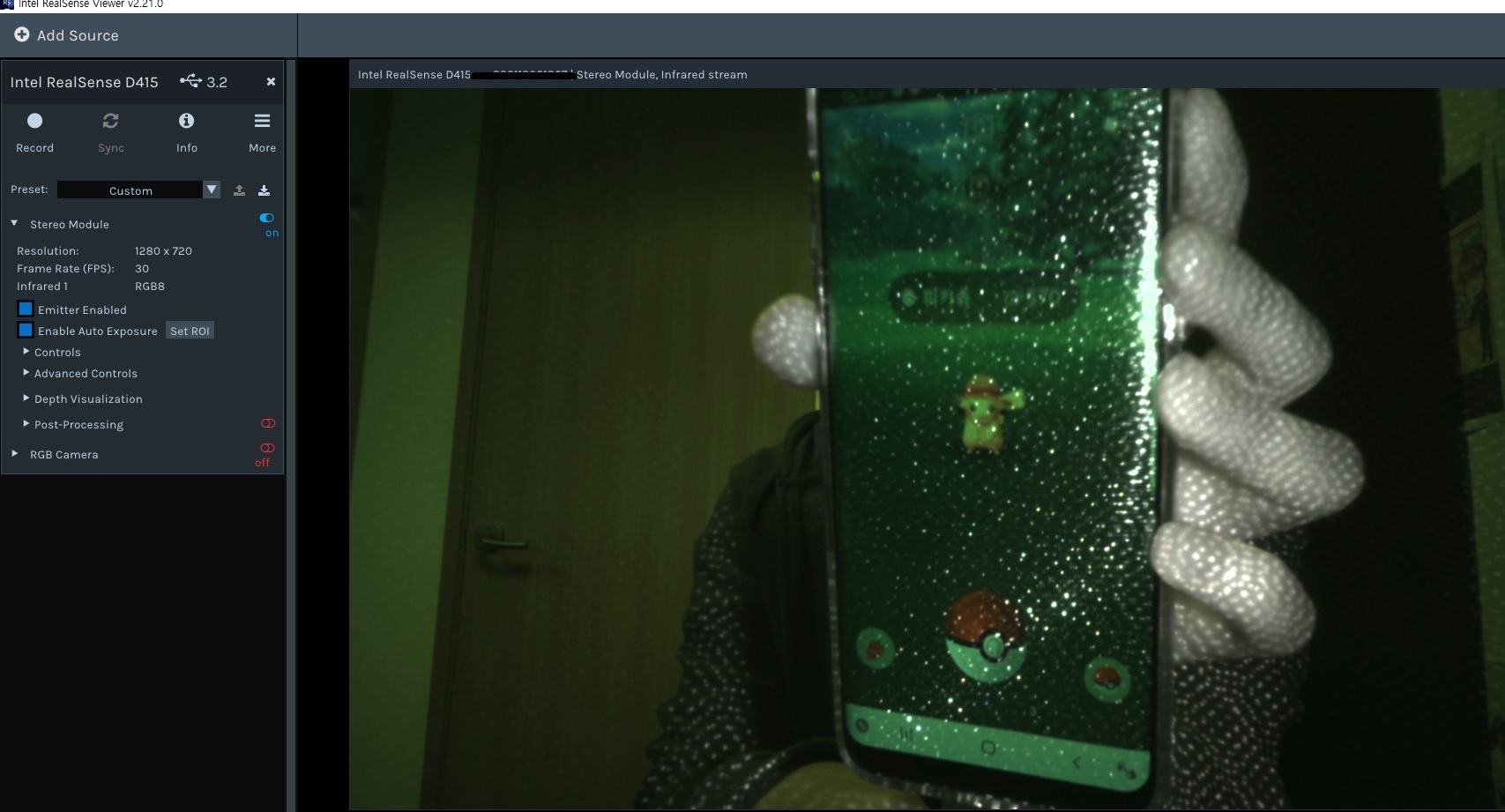
I installed 'Intel RealSense Viewer v2.21.0 ' and ran it.
And I ran an infrared camera.
And I found a problem.
The problem is that my cell phone screen comes out through the infrared camera.
I don't want infrared cameras to show pictures or cell phone screens.
How can I do this? Is there any options that i coulnd't find but actually works for this problem?
I look forward to your reply.
my os : window10
-
I attempted to replicate the scene in the image that you kindly provided. It is normal for there to be dots covering the phone's screen, as this is projected by the camera's IR Emitter onto objects / people n the scene. It is not normal though for color to be bleeding into the scene, as the IR stream is usually a monochrome image.
Could you try reducing the Laser Power slider setting under the 'Controls' section of the options side-panel please and see if that makes a difference.
Please sign in to leave a comment.
Comments
2 comments