CustomRW on raspbain OS
Hi,
How to do gold/factory reset on raspbian OS?
CustomRW on raspbain OS
-
Raspbian is based on the 'Debian' form of the Linux OS. Page 15 of the user guide for the calibration tools describes how to install the calibration tools package for Debian. The CustomRW program is part of that toolset.
-
I can't think of a reason why it would not work on Pi. The 400 Series cameras are extremely flexible with the hardware setups that they will work with. As long as the Librealsense SDK is compiled from source code on the particular hardware that it is being used with then it will run on virtually anything with an Intel or ARM processor as long as the memory needs of the SDK are met.
I do not personally have experience of running CustomRW headless, but as its interface is based on console text inputs rather than graphical elements such as tools in the SDK that need OpenGL, I would not expect a problem.
Speaking of a headless system, in the customization flags for building the SDK in CMake, it is recommended to set the BUILD_GRAPHICAL_EXAMPLES flag to 'false' for headless systems.
https://github.com/IntelRealSense/librealsense/wiki/Build-Configuration
-
We have built the SDK in headless debain 8 stretch and using already from past 6 months, we need the customRW to do factory reset in some remote location, since we don't have access to windows PC.
Our products runs debian stretch with linux kernel 4.14.79. we need customrw to reset since the sensor is providing junk information and error.
-
Intel sells an OEM calibration system in their online Click store that can calibrate 400 Series cameras remotely over a Linux server. It costs $1500 USD though. Most of that cost is the cost of manufacturing the physical calibration board. It has a special OEM version of the calibration software that can calibrate both extrinsics and intrinsics (the ordinary version of the calibration software can only do extrinsics).
https://store.intelrealsense.com/buy-intel-realsense-d400-cameras-calibration-target.html
If you do not need the physical calibration board, the OEM software can be requested by Intel customers who have a Non Disclosure Agreement (NDA). If you do not currently have an NDA, a member of Intel's support team should be able to provide guidance on starting the registration process for an NDA.
-
I recall that at some point in 2018, the compatibility of the consumer and OEM versions of the calibration software diverged so that if a calibration of the camera had previously been done with the consumer calibrator and then the OEM calibrator was used on the camera, it could cause problems. I do not know if that bug got fixed.
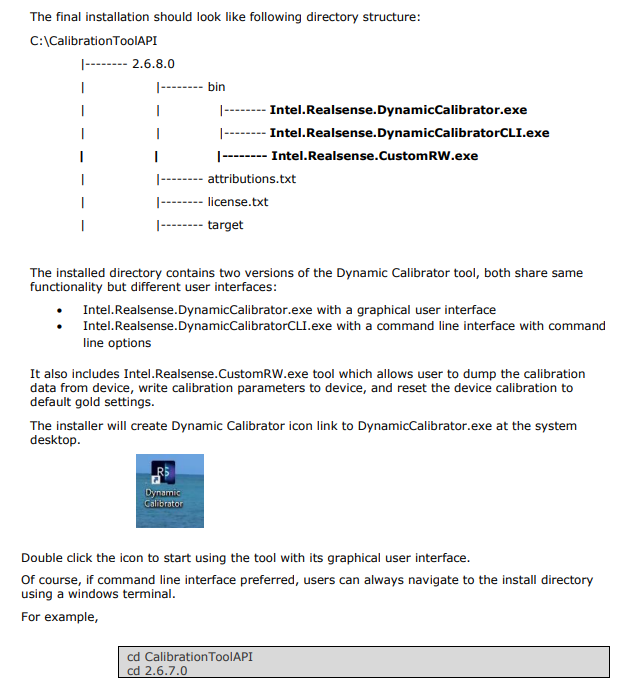
If you need to use CustomRW with Windows, this should not be a problem as it is included in the Windows version of the calibrator software too. Page 21 of the user guide for the calibrator software describes this.
I have extracted the information as an image below.
-
Okay, I understand. Thank you for the explanation.
Going back to your original question, you can use a terminal with the Debian installation to navigate to the directory where CustomRW is installed in the usr/bin folder. For example:
cd /usr/bin/Intel.RealSense.CustomRW
I would suggest giving it a try with your Raspbian installation and see if it works.
-
its failing here
sudo add-apt-repository "deb http://realsense-hw-public.s3.amazonaws.com/Debian/apt-repo xenial main" -u
-
I am not a Linux expert, so I apologize for that. The repository installation command for Debian in the instructions though is:
echo 'deb http://realsense-hw-public.s3.amazonaws.com/Debian/apt-repo xenial main' | sudo tee /etc/apt/sources.list.d/realsense-public.list
-
add-apt-repository "deb http://realsense-hw-public.s3.amazonaws.com/Debian/apt-repo xenial main" -u
Traceback (most recent call last):
File "/usr/bin/add-apt-repository", line 95, in <module>
sp = SoftwareProperties(options=options)
File "/usr/lib/python3/dist-packages/softwareproperties/SoftwareProperties.py", line 109, in __init__
self.reload_sourceslist()
File "/usr/lib/python3/dist-packages/softwareproperties/SoftwareProperties.py", line 599, in reload_sourceslist
self.distro.get_sources(self.sourceslist)
File "/usr/lib/python3/dist-packages/aptsources/distro.py", line 89, in get_sources
(self.id, self.codename))
aptsources.distro.NoDistroTemplateException: Error: could not find a distribution template for Raspbian/stretch
root@raspberrypi:~# add-apt-repository "deb http://realsense-hw-public.s3.amazonaws.com/Debian/apt-repo stretch main" -u
Traceback (most recent call last):
File "/usr/bin/add-apt-repository", line 95, in <module>
sp = SoftwareProperties(options=options)
File "/usr/lib/python3/dist-packages/softwareproperties/SoftwareProperties.py", line 109, in __init__
self.reload_sourceslist()
File "/usr/lib/python3/dist-packages/softwareproperties/SoftwareProperties.py", line 599, in reload_sourceslist
self.distro.get_sources(self.sourceslist)
File "/usr/lib/python3/dist-packages/aptsources/distro.py", line 89, in get_sources
(self.id, self.codename))
aptsources.distro.NoDistroTemplateException: Error: could not find a distribution template for Raspbian/stretch -
Try the Bionic repository (equivalent to Ubuntu 18 LTS) instead of the Xenial one (equivalent to Ubuntu 16 LTS) please
sudo add-apt-repository "deb http://realsense-hw-public.s3.amazonaws.com/Debian/apt-repo bionic main" -u
-
N: Skipping acquire of configured file 'main/binary-armhf/Packages' as repository 'http://realsense-hw-public.s3.amazonaws.com/Debian/apt-repo bionic InRelease' doesn't support architecture 'armhf'
Please sign in to leave a comment.
Comments
17 comments