D435 performance issues
Hello team,
We have been using a D435 for testing. After a few days we are seeing more and more black dots on the depth image.
This is what we originally had
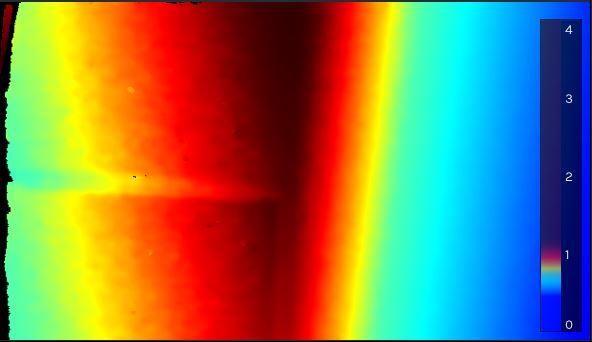
this is what we have now
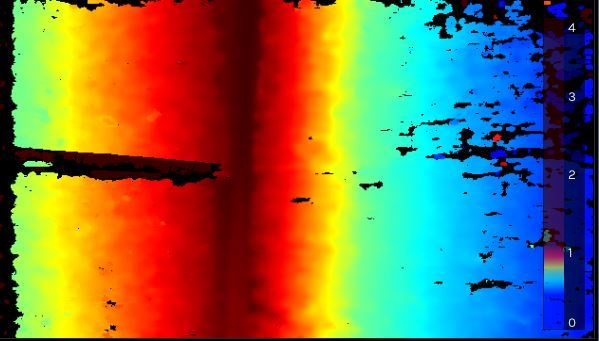
original image for reference

would you be able to tell me what could cause this and what can be done to prevent this?
Thank you
-
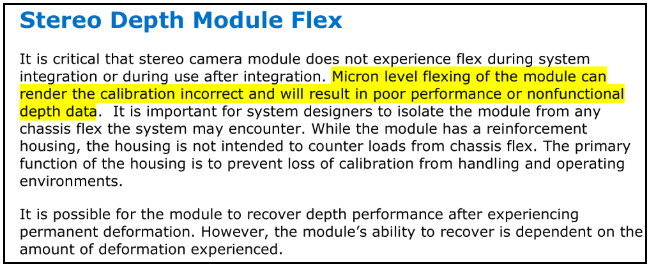
Black holes and gaps in the image, if the environment that the camera is in has not changed, may be symptomatic of the camera needing to be re-calibrated. RealSense cameras are calibrated at the factory, but may require re-calibration if they receive a physical shock such as a hard knock or a drop on the floor.
The cameras can be calibrated using the Dynamic Calibrator Tool for the 400 Series cameras.
-
we are using the camera on an outdoor robot, as you can imagine chassis deformation/vibrations are pretty common. Temperature above 50°C in sunlight as well.
I am thinking the camera should be put on vibration dampeners to avoid mechanical shocks and maybe a fan could be used to blow air directly on the case of the camera. Do you maybe have tips on how to integrate the D435 for our use?
-
Thanks for the information. Yes, I definitely classify severe vibration as 'physical shock'. Other users have experienced problems with bad vibration on drones and robots on rough terrain such as agricultural robots. I recommended to them the same thought that you had, that they use vibration dampening pads on the camera mounts that join the camera onto the frame.
The recommended maximum operating temperature of the 400 Series cameras is 35 degrees C when operating in still air. Like most situations of engineering theory versus real world, there is some flexibility. As Mr Scott from Star Trek once said, "A good engineer is always conservative on paper". Once the depth module temperature passes about 42 degrees during operation, that may be where problems are likely to set in.
Blowing air onto the cases of electronics is generally not a good idea, as the ventilation in a device is carefully designed to push the heat out of the case. If you blow into a grille then you may cause the warm air to circulate inside the case instead of escaping.
I am reminded of a video on the YouTube technology channel Linus Tech Tips, where host Linus cools a phone by putting water-cooling elements on the back of the phone's casing. An external solution like that may work if you want to use the D435 as-is without having to open up its casing.
https://www.youtube.com/watch?v=F91bGJBQLFc
Another approach would be to put a Depth Module in a custom casing, which would give you more options to fit internal fans, large heat-sink, etc.
-
this is what I was afraid, I think with our case use we reach the limits of what the camera was intented for. We will definitely have to take precautions mounting the camera, mechanically speaking we should be ok with the dampeners, cooling the module efficiently will take some more thinking. We might even have to go for a different camera...
thank you though for the great support! you sir have been a big help!
-
You are very welcome. :)
Although RealSense cameras are at a consumer price point, they are designed especially with industrial applications and harsh operating conditions in mind.
You are not the first person to have challenges with unusual temperature conditions. For example, there was a user recently who was concerned that the environment that they wanted to operate the camera in would be more humid and damp than the camera's specification was suited to. In that case too, some creative engineering of a custom casing was going to be the best chance for success.
I hope that you find a solution that enables you to keep using RealSense. Have a great weekend!
-
Hello MartyG,
I am looking for some more information.
I ran a D415 for 3 hours yesterday at 26° room temperature, realsense viewer reported asic temperature to be 41°, IR projector temperature was the same. Are those more or less the expected running temperatures?
They seem pretty high, as documentation gives a 35° max operating temperature for the D400 series.
Thank you
-
Whilst I do not have much data on real-world operating temperatures of the ASIC, 41 degrees is consistent with readouts that have been provided in the past by other users of the 400 Series cameras when having the camera running for a while.
Whilst 35 degrees is the official on-paper maximum, in the real world I would consider 42 to be the maximum temperature achievable before problems start setting in after that.
As long as the heat rises progressively and there is not a sudden large heat burst, you should be able to avoid damage to the camera. According to the data sheet document for the 400 Series cameras, "the depth module implements a laser safety control circuit that adjusts laser drive output. When laser power and depth streaming is enabled and if stereo depth module temperature is >60°, laser power is halved. If temperature is not lowered below temperature limit within a certain interval, the laser is shut off".
So you could try reducing the Laser Power setting of the camera and see if that reduces operating temperature. A primary effect of reducing laser power is that the dot-pattern projected by the camera's IR Projector component becomes less visible.
-
I just wanted to update you that the Intel Authorized Distributor company FRAMOS is releasing an own-brand industrial version of the RealSense D435 camera in September that has greater casing resistance against dust and water (rated at IP66 protection level), can operate in up to 55 degrees C temperature (compared to the 35 degrees C of the standard D435) and can operate in relative humidity (RH) of 90%. The camera is called the FRAMOS D435e.
-
Pratik The On-Chip Self Calibration system of the 400 Series cameras has a 'Health Check' function that can monitor the metrics of a camera over time. The self calibration system is fast and, unlike the Dynamic Calibration system, does not require a calibration target image. It can also do before and after calibration comparisons without committing to writing the changes to the camera
Intel have published a white paper document on the subject.
https://dev.intelrealsense.com/docs/self-calibration-for-depth-cameras
The On Chip Calibration can be launched from the 'More' option at the top of the options side-panel of the RealSense Viewer or accessed with C++, Python or LabVIEW script code examples that can be found in the appendices at the end of the white paper document.
There is also a recorded video webinar presentation about Self Calibration that you can register to view:
Please sign in to leave a comment.
Comments
15 comments