Python Box Dimensoner Not Working on a Large Scale
Hi there,
I am attempting to utilize the Python Box Dimensioner for a little project using the RealSense D455f. I have got the system set up nearly perfectly on a small scale, however I have been trying to scale up the project to be able to capture larger boxes which has been causing some major issues. I have created a grid that is 4x8 with the squares being 1 foot x 1 foot which the cameras will calibrate to properly, but when I put a box or object into view, the box is significantly larger in the length and width than it should be (see attached image). The height is almost perfect at this point but I cannot seem to fix the length and width. Also, the checkerboard does have a slight bit of height to it (around 4mm) so that could be causing issues, but I do think I figured out how to ignore that height. Any advice is welcome, I really hope I can figure this out!
Thanks for any help, Drew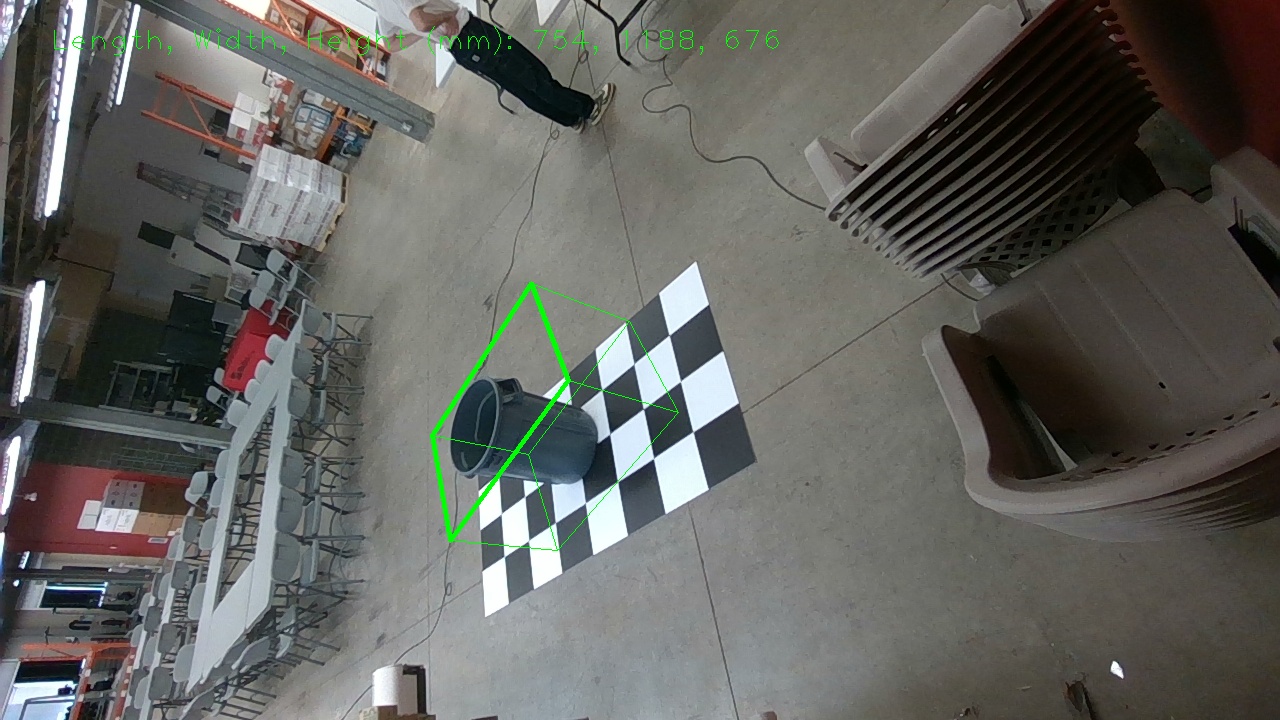
-
Hi Nerbascg The ideal 'sweet spot' distance to place the camera from the board in the box_dimensioner_multicam project is around 0.5 meters. Putting the camera nearer or further away can cause the green bounding box to become diagonal instead of aligning perfectly with the box.
If you create your own custom board instead of using the 6x9" one then you also need to edit board size and square size parameters in the lines of the box_dimensioner_multicam.py script highlighted at the link below.
-
I wonder whether the HighResHighAccuracyPreset.json 'High Accuracy' camera configuration preset used by line 112 of the box_dimensioner_multicam.py set may be unsuited to sensing objects at greater distances, as it tends to strip a lot of detail from the depth image.
I would suggest changing the json on this line to HighResMedDensityPreset.json which is the 'Medium Density' preset and gives a good balance between accuracy and the amount of detail on the depth image.
Please sign in to leave a comment.
Comments
3 comments