color of point cloud
I used the C++ program from SDK named "rs-pcl-color.cpp" to capture the point cloud. But I find the color is wrong. Objects that should be blue appear yellow. So I wonder how to solve this problem. Thankyou very much!
-
Hi Zhouyangjunjian In your rs-pcl-color.cpp script, have you modified line 169 (which defines the color stream)? It should use RGB8 format by default. But if the line had been modified to set the BGR8 format then the color could be reversed.
-
You could try applying post-processing filters to the depth data, such as the Spatial filter (which has a hole-filling function) or the Hole-Filling filter. There is a C++ tutorial script for setting up post-processing filters at the link below.
An alternative method of reducing holes, which I would recommend trying first before attempting post-processing, is to maximize the Laser Power setting's value in order to potentially increase the amount of detail on the depth image. An example of C++ code for doing so is below.
rs2::pipeline pipe;
rs2::pipeline_profile selection = pipe.start();
rs2::device selected_device = selection.get_device();
auto depth_sensor = selected_device.first<rs2::depth_sensor>();

if (depth_sensor.supports(RS2_OPTION_EMITTER_ENABLED))
{
    depth_sensor.set_option(RS2_OPTION_EMITTER_ENABLED, 1.f); // Enable emitter
}
if (depth_sensor.supports(RS2_OPTION_LASER_POWER))
{
    // Query min and max values:
    auto range = depth_sensor.get_option_range(RS2_OPTION_LASER_POWER);
    depth_sensor.set_option(RS2_OPTION_LASER_POWER, range.max); // Set max power
} -
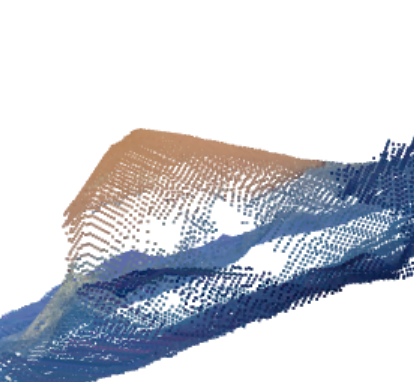
The problem about holes has been solved. thank you! But point clouds appear edges and corners (Object is smooth surface). What's more, I transform the coordinate of point clouds captured from different views to the robot base coordinate system. Point clouds are not overlap. But the point clouds captured through intel realsense view can overlap well with little error. What should I do to solve these problems?
-
If you set the Medium Density camera configuration preset then the sharp edges may be smoothed out. The link below has C++ code for setting the SDK's built-in presets.
To set The Medium Density preset using the code in that guide, change this part:
RS2_RS400_VISUAL_PRESET_HIGH_ACCURACY
to this:
RS2_RS400_VISUAL_PRESET_MEDIUM_DENSITY
In regard to overlapping multiple point clouds (or 'stitching' them together), if they have both their position and rotation set to a common set of values then they should successfully overlap. In the RealSene SDK, this can be done with an affine transform operation. The SDK instruction rs2_transform_point_to_point is an affine transform.
The SDK also has a C++ pointcloud stitching example at the link below.
https://github.com/IntelRealSense/librealsense/tree/master/wrappers/pointcloud/pointcloud-stitching
-
Edge rounding from the Medium Density preset may not be as clear on a 3D point cloud as it would be on a 2D depth image.
It is probable that if all of your individual point clouds have sharp edges then it is going to be even more noticeable when the point clouds are combined together into a single image.
The Default preset provides clean edges and reduces point cloud 'spraying', so it may be worth trying RS2_RS400_VISUAL_PRESET_DEFAULT
Please sign in to leave a comment.
Comments
8 comments