Apply the bodyscan preset to a C++ script for a D435 camera
I'm using the D435 camera to capture point clouds of human bodies, and I want to use the body scan preset, whose JSON is available at this link: D400 Series Visual Presets (intelrealsense.com)
So far, I'm able to use the default presets with the following code:
Has anyone found a solution to read the JSON file and add it to the camera's presets, and also verify if it's applied correctly? Keep in mind that I'm coding in C++.
Thanks in advance for your help.
-
Hi Clement Foreau The in-built Visual Presets are not able to be defined in a json, unfortunately. Visual Presets are another name for json files, so a json cannot be set within another json.
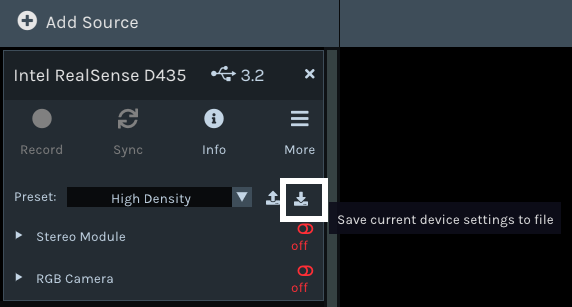
An alternative approach to loading the preset with C++ code may be to select the High Density preset in the RealSense Viewer tool's options side-panel and then click the json save option (highlighted in the image below) to export the High Density settings as a json text file.
-
In regard to checking whether the preset has been applied successfully, this could not be done when importing a json file, unless you query the value of one of the settings in the json file (such as exposure) that you know should be a particular value. If the value comes back as the one that you custom defined then you would know that the json had been applied.
With the C++ code that sets the built-in presets though, it should be possible to query which preset is currently set, as it is set with sensor.set_option and so its status should be able to be read with sensor.get_option
You could define a variable name such as visual_preset to store the query result in and then use an instruction like the one below to get the current preset.
visual_preset = sensor.get_option(RS2_OPTION_VISUAL_PRESET);
-
Regarding the first response, thank you for this, Marty. I have successfully retrieved this file in JSON format:
{"param-censususize": "9","param-censusvsize": "9","param-disableraucolor": 0,..."param-texturecountthresh": 28,"param-texturedifferencethresh": 0,"param-usersm": 1}So, this file is the bodyscan. I'm just trying to figure out how to open it in my script without using the already existing presets.
As for the second response, thank you for your solutions.
-
I compared the above list of parameters to the values for those parameters in the selection of downloadable json files on the Visual Presets page. In most cases the only parameters that were different values in your json are param-texturecountthresh and param-texturedifferencethresh.
Page 3 Section B. Depth Camera Settings of Intels white-paper guide for depth map improvement on drones explains these two functions.
-----------------------
These settings describe how much difference in intensity in the grayscale stereo image needs to be to determine a valid feature. In outdoor usage, the sky and clouds provide an almost similar color with only small deviations. Walls captured during inspection flights might have areas of the same color which do not make strong features. To increase the confidence on depth values, we increased the values of texturecountthresh, which sets how many pixels of evidence of texture are required from 0 to 4 and set the value of texturedifferencethresh, how big a difference is required for evidence of texture, to 50.
-----------------------
So it is possible that the camera's default values for these settings may be sufficient and there is therefore no need to use that body scan json.
It would be worth trying your C++ pre-built preset code and change the HIGH_DENSITY preset to MEDIUM_DENSITY, as the Medium Density preset provides a good balance between accuracy and the amount of detail on the depth image.
Please sign in to leave a comment.
Comments
4 comments