D455 Sometimes depth data is not updated.
Hi, I am using a RealSense D455.
I also use Python for taking pictures.
When I press the button, it takes a picture and displays the image and the depth data.
The shooting often works well, but sometimes only the depth data is not updated since the last time.
The frequency of occurrence is also variable, sometimes occurring only about 1% of the time and sometimes several dozen percent of the time.
Furthermore, once the depth data fails to update, it will not update for the rest of the day,
If the camera is reconnected, the depth data will be updated.
Otherwise, the same phenomenon occurred when the camera was left connected for several hours before taking a picture.
I do not know if these are caused by software or hardware.
I am using the following code. (Some parts are omitted.)
When the program is executed, "initialize_rs" is performed, and then "update_rs" is performed when the button is pressed.
Is there a problem somewhere in the code?
best regards
-----------------------------------------------------------------------------------------------------
-
Hi Kawasyuuqq Do you experience similar problems if you test the Python keypress capture script at the link below, please?
https://github.com/IntelRealSense/librealsense/issues/8388#issuecomment-782395443
-
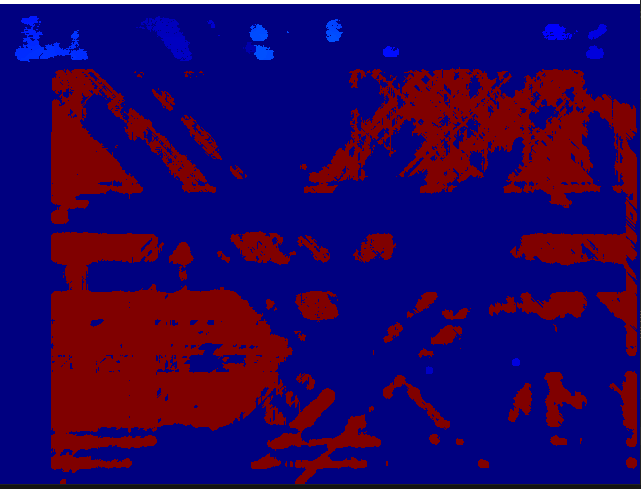
Hi MartyG, thank you for your response.
When I started this software, after a few seconds after startup, the following was repeated in a cycle of about 1 second.
1. the software will not be able to acquire depth data at all, as shown in the attached image.
2. The range where normal depths are acquired gradually expands.
The camera stayed in this state for a few minutes, but when I moved the object in the camera or moved my hand near the object, the depth camera suddenly returned to normal.
It did not happen every time. (It happens about 20~30% of the time when I start the software).
I trimmed only the depth data and posted it.
I took a picture of a stopped object. -
If the image freezes or severely deteriorates in quality but the recovers after the camera is moved or covered over with the hand then this can be symptomatic of the camera having been faced directly towards a strong light source such as the sun. Doing so can cause the sensors to become saturated with light. Covering the camera lenses for a moment or turning the camera away from the light can enable auto-exposure to perform a correction.
-
Sorry for the delay. And thanks for the reply.
I ran the program linked above again.
If I run the program approximately 5-10 times and each time I press the S key several times, the depth data stops updating once.
Once it stops, it does not move again no matter how many times the S key is pressed.
However, the color data never stopped.I initially used a long camera cable, but changing to the supplied cable did not fix this phenomenon.
I would like to use a longer cable if possible because of the distance between the PC and the camera. -
You are very welcome. It's no trouble at all. :)
If you need to use a longer USB cable then the cable should be a high quality one designed for handing data transfer. If the length is 5 meters or over then it is also recommendable to select one with active repeater components inside it so that the signal is boosted as it travels along the cable distance. A company called Newnex supply high quality RealSense-validated cables, and also fiber optic cabling for much longer RealSense connections.
-
Thanks. I will consider using that.
Another problem, as I mentioned in one of my previous posts, sometimes only the depth data is not updated, even when I run the capture script in the following link
https://github.com/IntelRealSense/librealsense/issues/8388#issuecomment-782395443
However, I have changed the following settings to see the depth data in detail.
resolution_width = 1280 # pixels
resolution_height = 720 # pixels
frame_rate = 5 # fpsSometimes the depth data stopped updating when I pressed the S key, and sometimes the depth data stopped updating a few seconds after startup even if I did not do anything.
It does not happen every time.
What do you think is the reason why only the depth data stops updating? -
I do not think that initialize_rs being called more than once and looping, otherwise there would be an error if the pipeline was attempted to be started when it was already active.
If depth stops working even when nothing is done then I would recommend looking at your keypress listener code. If you comment out the keypress listener mechanism and the program works okay when it is left to run without key input then that would be evidence that the problem is in the keypress code.
-
I commented out the keypress part and ran the script again.
However, the problem reappeared.
I ran the script again with the "Intel Real Sense Viewer" (v2.54.2) open.
At that time, a red square appeared on the right side of the screen, as shown in the image.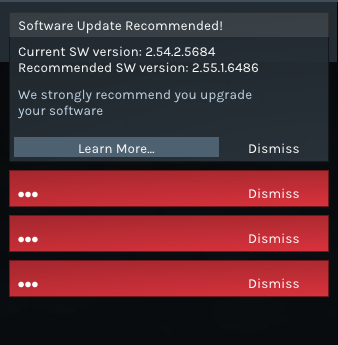
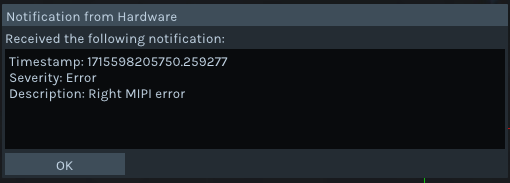 When I clicked on it, the first one said "Severity: Error Description: Right MIPI error".
The second one said "Severity: Error Description: Depth stream start failure.
The third message was the same as the first one.
Sometimes said "Severity: Error Description: REC error". -
Which firmware driver version is installed in your camera, please? You can find this information by clicking on the Info button near the top of the RealSense Viewer's options side-panel.
If your currently installed Viewer version is 2.54.2 then the firmware driver version that should be installed in your camera is 5.15.1.0. Using an older or newer firmware with 2.54.2 could result in errors occurring.
-
I checked the version and it was 5.15.1.0.
Both viewer and firmware versions were raised.
Viewer: v2.55.1
Firmware: 5.16.0.1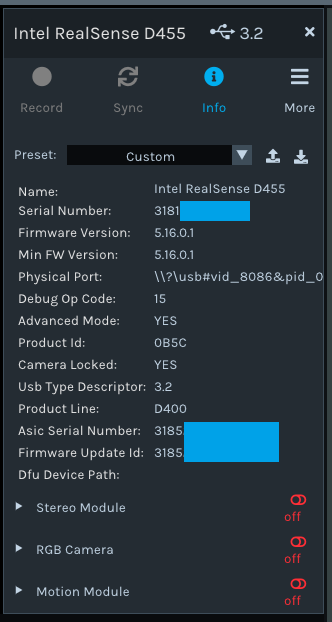
However, the problem still occurs.
I have also done some verifications. If you think this is not related to the matter of depth data not being updated, please ignore it.When I run "rs-multicam.exe", sometimes the depth data is messed up. (Same as 2 months ago).
Also, the white line of the gyro is pointing in different directions, even though the camera is fixed to face downwards.
When I run "rs-motion.exe", the camera turns around the red axis like a swing.
This problem does not seem to occur when I open the Motion Module in the Viewer.
I bought another camera of the same type, so I did the same verification. The result was the same as the first camera. -
Thank you, your computer's specification looks fine.
Is there any improvement if you reset the camera hardware to its default factory-new calibration using the instructions at the link below?
https://github.com/IntelRealSense/librealsense/issues/10182#issuecomment-1019854487
Please sign in to leave a comment.
Comments
14 comments