RealSense C# Api questions
Hi,
I'm using C# to connect to RealSense cameras and I'm having some problems sometimes.
If I force the camera by enabling and disabling streaming multiple times it seems to be hang (exception: frames didn't arrive in 2000 ms). And it's neccesary to reboot camera.
I have seen that I can use method HardwareReset().
Also I have some questions about context and pipeline entities and it's behaviour.
At the moment I'm using multiple contexts (one per each camera). But I don't know if this is correct or it's better to use only one context.
It's possible to enable or disable cameras in the context?
I have noticed that pipeline can manage disconnections. For example. If I disconnect camera while is in streaming mode at reconnect it continue streaming.
Another doubt that I have is how can I detect disconnections. Somethig like QueryDevices() at time period?
Sorry for the multiple questions but I'm doing tests and I'm seeing that maybe I didn't understand correctly the API or I'm not using it in the best way.
With regards,
-
Hi Juan Diezyanguas I must emphasize that my C# programming knowledge is limited, though I will do my best to be of assistance.
In regard to creating multiple contexts, at the link below a RealSense team member shares a simple C# multiple camera example script for automatically creating a separate pipeline for each attached camera.
https://github.com/IntelRealSense/librealsense/issues/3432#issuecomment-472570380
C++ and Python have a mechanism called set_devices_changed_callback for listening for USB connection and disconnection events. My understanding from past research of this subject is that C# does not have an implementation of this mechanism. However, a RealSense C# user at the link below took the approach of setting up an exception catch for QueryDevices() to handle a disconnection event.
https://github.com/IntelRealSense/librealsense/issues/6166#issuecomment-607190650
-
Thanks for your reply even if I'm using C#.
I have seen that also in C# there is an event called OnDevicesChanged it receives two parameters (DeviceList removed, DeviceList added).
It works well to see added devices because, but to see removed devices it doesn't work for me. I'm getting an exception when accesing to removed list.
I know that it's possible to create one context per each camera, but I wanted to know if it is a good practice or not. I have seen that frames object received when calling WaitForFrames() has the serialNumber of the sensor, so in theory it is possible to have only one context, but I don't know what is the recommended option. I supose that having one context per each camera is more easy to manage connections and disconnections and such other things.
With regards,
-
Thanks for the reminder about the OnDevicesChanged function in C#.
If you have one context and multiple cameras attached then you should be able to access individual cameras by their serial number. I believe that this would be a more common approach than having multiple contexts generated. Whilst multiple contexts is not necessarily a 'wrong' approach, a RealSense C# user at the link below thought that doing so was "messy".
-
Hi MartyG,
I'm using this already openned post with one more question...
I have seen in the C# Cookbook about the FrameQueue
https://github.com/IntelRealSense/librealsense/blob/master/wrappers/csharp/Documentation/cookbook.md
At the moment I'm not using it. I'm simply using the background task to get frames.
Task.Run(() =>
{
    while (!_cts.Token.IsCancellationRequested)
    {
        var frame = GetFrame();
    }
}, _cts.Token);

public CameraFrameSetEvtArgs GetFrame()
{
    try
    {
        using (var frames = _irsPipeline.WaitForFrames(2000)) // Before 2000
        {
            var colorFrame = frames.ColorFrame.DisposeWith(frames);
            var depthFrame = frames.DepthFrame.DisposeWith(frames);

            depthFrame = _depthFilterDecimation.Process<DepthFrame>(depthFrame).DisposeWith(frames);
            depthFrame = _depthFilterThreshold.Process<DepthFrame>(depthFrame).DisposeWith(frames);
            depthFrame = _depthFilterSpatial.Process<DepthFrame>(depthFrame).DisposeWith(frames);
            depthFrame = _depthFilterTemporal.Process<DepthFrame>(depthFrame).DisposeWith(frames);

            //Build OpenCvFrames
            //Use CopyTo byteArray
            //var mat = new UMat. Mat.SetTo(byteArray)
            return realSenseRequestFrames;
        }
    }
    catch (Exception ex)
    {
        return new CameraFrameSetEvtArgs(new CamManagerException(CameraErrorType.CameraApiError, ex));
    }
}
I have seen that the code inside using takes usually about 35ms, so maybe will be better to use FrameQueue, but the only step that will be accelerated is the WaitForFrames()
In the class which is using the frames I'm using a frame buffer with System.Threading.Channels, so I'm already using a producer consummer pattern.
So my question is if using FrameQueue from Intel.RealSense it's recommended or it will not give me any performance improvement.
With regards,
-
I have seen that in the RealSense viewfinder, even if you have 30fps set, it seems that it can't reach that speed at least in the viewer
The camera reaches 30fps but the viewfinder does not.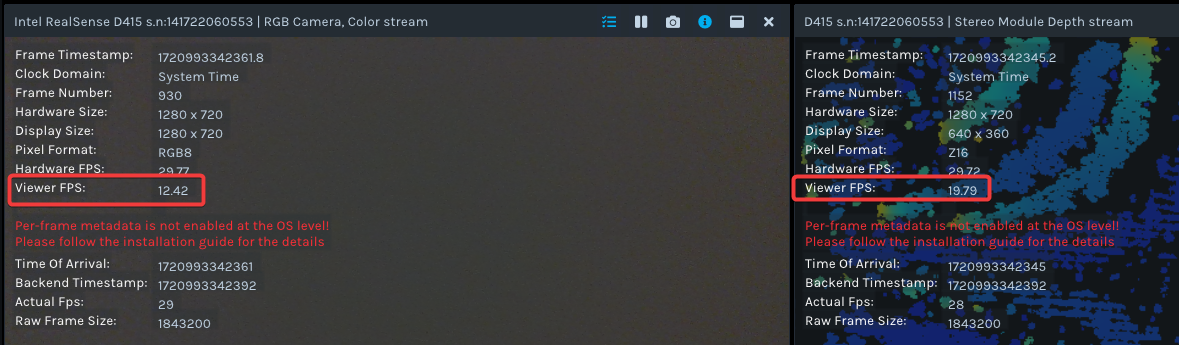
In my C# program I have observed a similar behavior. I have seen that in the lines of code that calling align, postprocess depth filters and create depth colored image, it takes approx 40-50ms, which is a time that does not allow to reach 30fps.
This is most part of my code running on the camera stream. After the frame event is triggered, the frame is added to a framebuffer, so no more code is running that can add more time after the event is triggered.
//Depth filters initialization
private void InitializeFilters()
{
    _alignFilter = new Align(Stream.Color);

    _depthFilterColorizer = new Colorizer();
    _depthFilterColorizer.Options[Option.MinDistance].Value = _camConfig.DepthPipelineCfg.MinDistance;
    _depthFilterColorizer.Options[Option.MaxDistance].Value = _camConfig.DepthPipelineCfg.MaxDistance;
    _depthFilterColorizer.Options[Option.VisualPreset].Value = 0; //Dynamic
    _depthFilterColorizer.Options[Option.ColorScheme].Value = 0; //Jet

    _depthFilterThreshold = new ThresholdFilter();
    _depthFilterThreshold.Options[Option.MinDistance].Value = _camConfig.DepthPipelineCfg.MinDistance;
    _depthFilterThreshold.Options[Option.MaxDistance].Value = _camConfig.DepthPipelineCfg.MaxDistance;

    _depthFilterDecimation = new DecimationFilter();
    _depthFilterSpatial = new SpatialFilter();
    _depthFilterTemporal = new TemporalFilter();
}

private void StreamingTask()
{
    _cts = new CancellationTokenSource();
    Task.Run(() =>
    {
       while (!_cts.Token.IsCancellationRequested)
       {
            var frame = GetFrame();

            var evtHandler = FrameReceived;
            evtHandler?.Invoke(this, frame);
       }
    }, _cts.Token);
}

public CameraFrameSetEvtArgs GetFrame()
{
    using (var frames = _irsPipeline.WaitForFrames(2000)) // Before 2000
    {
        var alignedFrames = _alignFilter.Process<FrameSet>(frames).DisposeWith(frames);
        var colorFrame = alignedFrames.ColorFrame.DisposeWith(frames);
        var depthFrame = alignedFrames.DepthFrame.DisposeWith(frames);
        ApplyDepthFilters(ref depthFrame, frames);
        var colorizedDepth = _depthFilterColorizer.Process<VideoFrame>(depthFrame).DisposeWith(frames);

        var rawDepthFrame = _frameFactory.GetRawDepthFrame(depthFrame); //Calling CopyTo
        var colorFrameDto = _frameFactory.GetImgFrame(colorFrame, FrameType.RgbFrame, _camConfig.RgbPipelineCfg.ColorFormat); //Calling CopyTo
        var depthFrameDto = _frameFactory.GetImgFrame(colorizedDepth, FrameType.DepthFrame, ColorFormat.Rgb); //Calling CopyTo

        var realSenseRequestFrames = new CameraFrameSetEvtArgs(colorFrameDto, depthFrameDto, rawDepthFrame);
        return realSenseRequestFrames;
    }
}

private void ApplyDepthFilters(ref DepthFrame depthFrame, ICompositeDisposable releaser)
{
    depthFrame = _depthFilterDecimation.Process<DepthFrame>(depthFrame).DisposeWith(releaser);
    depthFrame = _depthFilterThreshold.Process<DepthFrame>(depthFrame).DisposeWith(releaser);
    depthFrame = _depthFilterSpatial.Process<DepthFrame>(depthFrame).DisposeWith(releaser);
    depthFrame = _depthFilterTemporal.Process<DepthFrame>(depthFrame).DisposeWith(releaser);
}
Maybe using RealSense FrameQueue can give more speed because frame for my code inside "using" will be inside the queue and don't have to came from hardware. But I think maybe a nanoseconds, no more. The bottleneck here seems to be the actions performed inside the use to prepare frame to allow later work with it.
Do you think that my results are good or think that maybe there is more that I can do to speed it up?
-
I recommend ignoring the 'Viewer FPS' value in the frame metadata overlay. Instead, click on the 'i' icon on the same row of options to display the FPS value in real-time on top of the panel. That is the best FPS value to trust.
If the depth and RGB FPS at the top of their respective panels is still not equal, please go to the RGB section of the options side-panel, expand open the Controls and disable an option called Auto Exposure Priority by clicking on the blue box beside it to turn it to black. Then check the FPS values at the top of the panels to see if they have equalized.
It is recommended that the Threshold filter is placed at the bottom of your list of .process instructions, in the order Decimation > Spatial > Temporal > Threshold
depthFrame = _depthFilterDecimation.Process<DepthFrame>(depthFrame).DisposeWith(releaser);

depthFrame = _depthFilterSpatial.Process<DepthFrame>(depthFrame).DisposeWith(releaser);

depthFrame = _depthFilterTemporal.Process<DepthFrame>(depthFrame).DisposeWith(releaser);

depthFrame = _depthFilterThreshold.Process<DepthFrame>(depthFrame).DisposeWith(releaser);
If your FPS is still struggling then you could try commenting out the Spatial filter's .process line to prevent fhe filter from being applied, as the Spatial filter may provide the least benefit to the image but with a heavy processing time.
Your code is structured very well. My knowledge of C# is more limited than C++ and Python, but I do not see anything in your script that I would do differently myself.
Please sign in to leave a comment.
Comments
7 comments