Problems playing back recordings made with realsense_viewer for non-master cameras
I need to record RGB+D from 8 cameras independently (for later postprocessing), but I'm experimenting with 4 D455's at the moment (I won't have access to the other 4 until the event, in mid-January) to ensure that I end up with usable streams. Which - at the moment - I don't.
Each of the cameras is connected to a separate machine (Intel NUC, just powerful enough), all are set to 1280x720@15fps for both RGB and D. All postprocessing disabled and 2D views (to minimise the load). All auto-exposure and such disabled. Master camera set as sync master in realsense_viewer, slaves as slave.
Sync cables connected, I start the realsense_viewer to record on the slaves first (which then give a message about not recording yet because they don't have a sync signal), then start on the master.
After about 2 minutes I end up with 4 .bag files of around 9 GByte each. I copy these to a central machine.
The master camera recording plays back just fine, but the other three don't. I get the following message in realsense_viewer:
Failed to load file
/Volumes/Blue2TB2/volumetric-captures-vrbig/captures-rs455/disnuc103_20231220_155451.bag.
Reason: Io in rs2_context_add_device(ctx:0x6000018bc2b0, file:/):
Failed to create ros reader: Required 'op' field missing
I get a pretty similar message if I run my own reconstruction software.
I'm not 100% convinced that the bad recording has to do with sync slave/sync master, but it does seem to be the most likely cause. And I can't do further experiments until late next week (no access to the cameras over the Christmas break).
My first question is: is there any way I can fix the bag files? I've found some references, but nothing definite. As a first workaround this would be my preferred solution (because that means I can be reasonably sure that the recordings I make in three weeks time will be usable: this is a one-off opportunity, with a fair amount of budget being spent flying people in from all over Europe, renting space and actors, etc).
My second question is: am I doing anything wrong? Should I maybe start the recorders in a different order (master first)? That wouldn't have my preference because then I would have to manually sync them in post (with a recording of a film-clapper or something) but it's doable.
-
Hi Jack Jansen Yes, it is recommended that the master camera is started first.
Use of hardware sync is not always necessary for multiple camera projects, and this sounds like a project that would not be benefitting from it because of the cameras having to be started and stopped individually in the Viewer at different times.
.
Already recorded bag files with an internal problem that prevents playback cannot be repaired, unfortunately.
-
Would it be possible to take a film studio approach with the recording and do two 'takes' of the scene with the actors so that you have back-up recordings, and check playback after each take to confirm the integrity of the recording so that if a problem occurs then you can try to rectify it whilst still on location?
-
MartyG I'm using the sync cables because we'll have all the cameras "looking in" and we'll be capturing people (dancers and actors, in this case). And then in post we'll be registering the individual streams and create unified point cloud streams (and possibly other volumetric video formats). We're already doing this successfully live for quite some time (https://github.com/cwi-dis/cwipc), but we have found that we really need the sync cables, otherwise a fast moving limb will be captured at different points in time (and therefore space) by different cameras. And with hardware sync the only manual task would be to do temporal alignment on a frame basis (with a clapper).
But if all else fails I'll record without sync cables.
(And, aside, we'll already be doing multiple takes, quite a few. Because we'll be using various different capturing systems and we'll have the dancers repeat their routine with every system, and with variations of each system (for example putting the Realsense cameras further out, to see what the maximum distance is at which we can reconstruct the subject (and therefore what the maximum space is we can cover)).
-
The approach that Intel took to this capture process in a February 2018 demo at the Sundance Festival was to put each of four RealSense cameras on a separate PC like you did and hardware sync them, and then send the camera data from the individual PCs in real-time to a fifth PC to sync and post-process the data.
https://www.intelrealsense.com/intel-realsense-volumetric-capture/
Intel later demonstrated live volumetric capture on a larger scale at a large 100 camera dome of non-RealSense cameras and a set of computer servers at an LAX Airport facility called Intel Studios.
https://www.youtube.com/watch?v=76sehizdvjI
That facility was used to record a volumetric dance performance of a Grease song.
https://www.youtube.com/watch?v=zYOn2o0yhDc
The D455 camera model can record depth at up to 20 meters away, though the depth measurements may lack accuracy. RGB color and infrared streams do not have that distance limitation.
If your hardware sync cables are long then it is advisable to build antistatic discharge (ESD) components into them as described in the sync white-paper, otherwise ESD charge can build up in them and then discharge, causing the camera's frame counter to reset.
-
I have access to the lab again, and indeed if I start recording on the master camera everything seems to work fine. I can manually locate the common point in the per-camera recordings, and then seek each recording to that point in post.
One last question: by the "ESD components" do you mean the decoupling RC? I have those on my cables, but there's also a reference to an active circuit (which I don't have)... -
If the distance between cameras is less than 3 meters then the simple sync cable design in the image below is suggested, used with cables that are of the shielded twisted pair type. This should provide ESD protection.
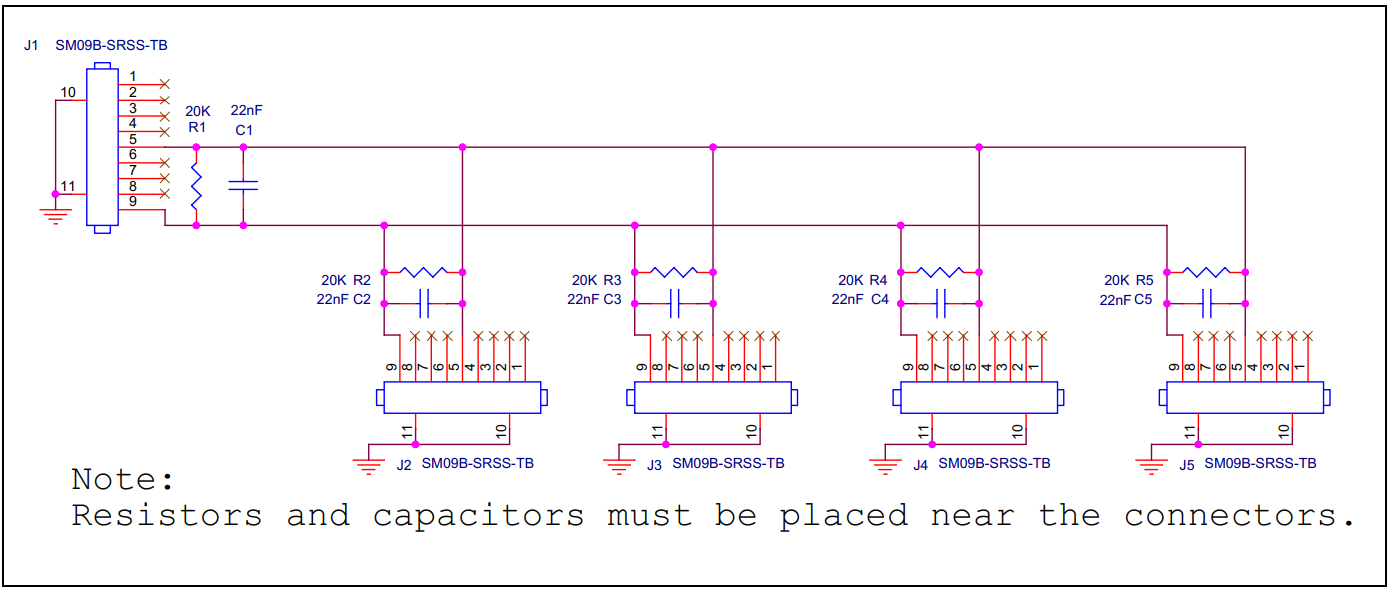
If the distance between cameras is greater than 3 meters then the more advanced active circuit below is recommended.
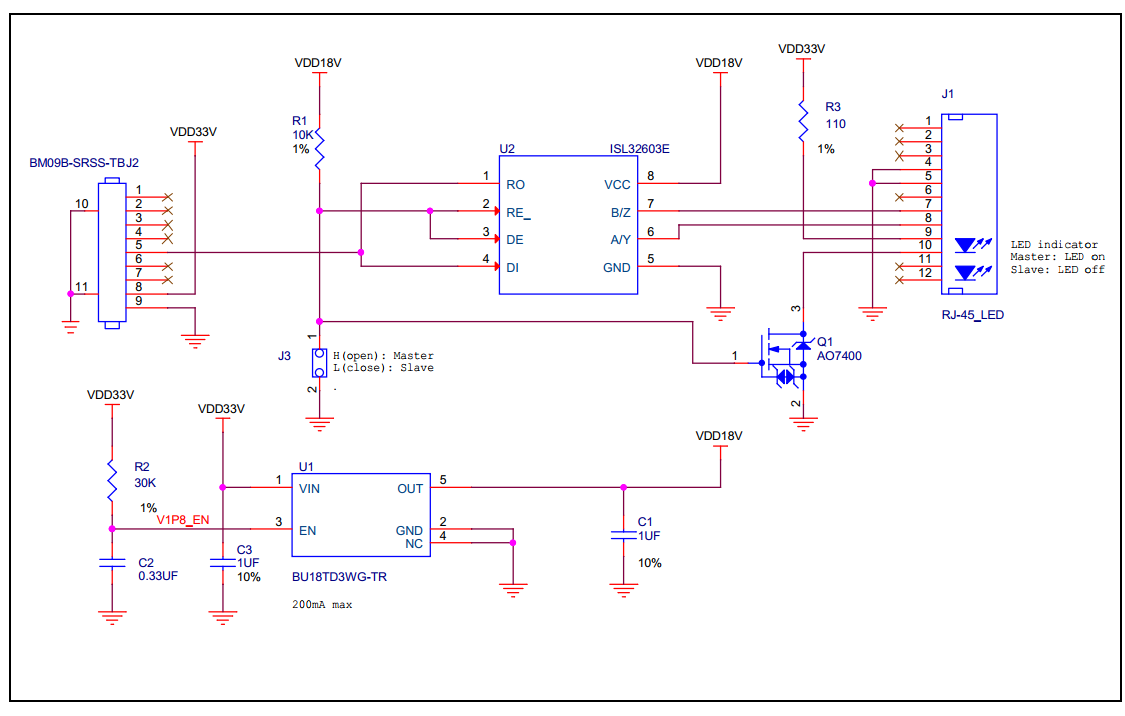
Please sign in to leave a comment.
Comments
6 comments