D435 Corrupted depth image
Hi,
We are developing a robotic picking cell to pick grocery. The robot cell has 5 D415 cameras all looking towards the ground (4 on the cell's ceiling and 1 on the robotic arm flange. The robotic cell has 4 LED lights on top. In In order to measure the height of the parts we are picking, we have added a D435 RS camera (Green marker) located on the side of the robot.
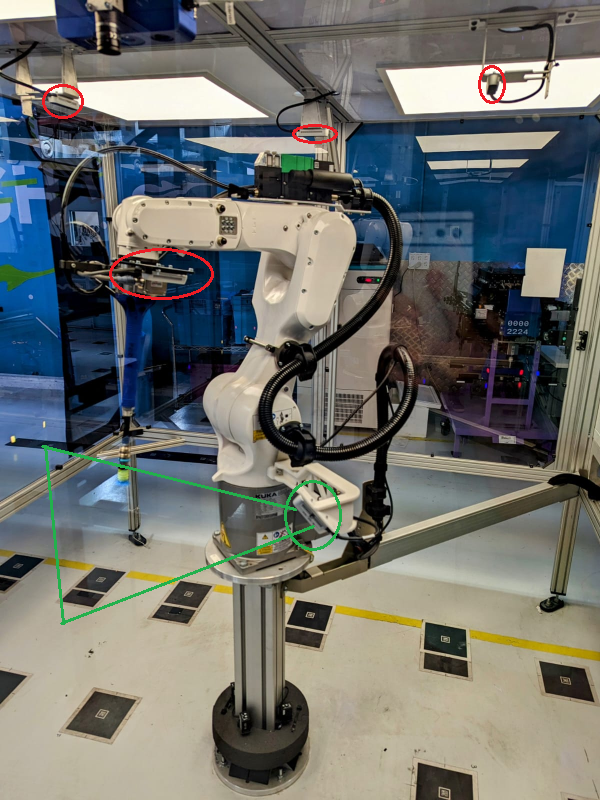
All cameras are streaming. currently
It seems that we are getting corrupted depth images from the D435 camera. We are wor
Here is what we tried so far:
1. HW reset - seems to work sometimes for a short period of time
2. Turn off all other RS cameras after initialization of the robotic cell, doesn't seem to work.
3. Turning off the RGB, doesn't seem to help.
I can add that when we check the images on the RS GUI the frame seems to be ok, we then turn the GUI off and start the program. it seems that the raw image we are getting is corrupted and after accessing the GUI again we can see the same corruption there as well. After an HW reset, it seems to help sometimes.
Any help will be appreciated, thank you
-
Hi Eliko2000 As you have a constant illumination level from the LED lights overhead, you could try disabling auto-exposure and using a manual exposure value to confirm whether the lights are causing problems for the auto-exposure.
-
I can see the same corruption there as well. https://hello-neighbor.io
Please sign in to leave a comment.
Comments
3 comments