How to use D435 SDK in 3D Reconstruction?
I want to make 3D Reconstruction for apple plantation with D435. Is there a way to do this by realsense SDK.
If you can recommend any projects, it would be helpful to me.
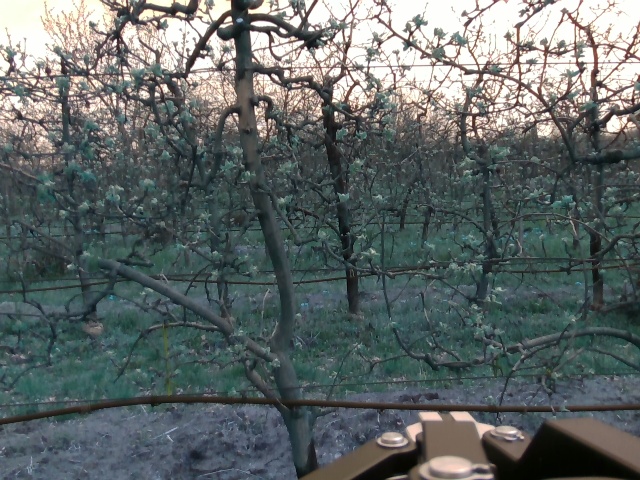
Here is an example to the data that I have:
-
Hi Jomanaashraf8 The term '3D reconstruction' usually refers to capturing a depth image of a scene, like the scene of outdoor trees in the RealSense depth image below, and saving it to a file. Is this the goal of your project, please?
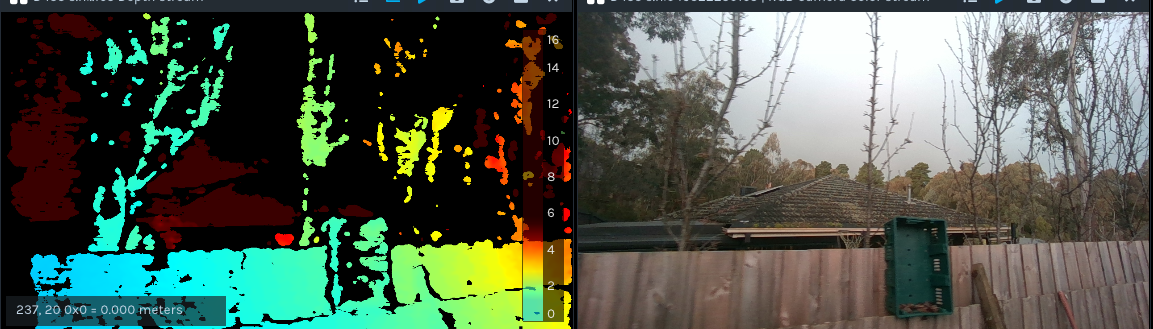
If you are seeking to create a 3D depth image of the trees, the discussion at the link below that the above image is taken from may be a useful reference.
A 3D depth image can be captured with the free RealSense SDK software, using a program script or a pre-made tool such as the powerful RealSense Viewer.
https://www.youtube.com/watch?v=sBxSExrjULg
If you need to capture a wide 3D image of an orchard, you could also consider using more than one RealSense camera and combining the multiple camera views together into a single image using the RealSense-compatible commercial software RecFusion Pro.
If your goal though is to not create a 3D depth image but instead capture an RGB color image of the orchard like the one that you provided, you can do this with RealSense too. You may have to adjust a setting called white balance to avoid the RGB image of the green foliage having a blue tint like in the links below, but otherwise it should not be a problem to achieve.
https://support.intelrealsense.com/hc/en-us/community/posts/4407408839315-D435i-color-issue
-
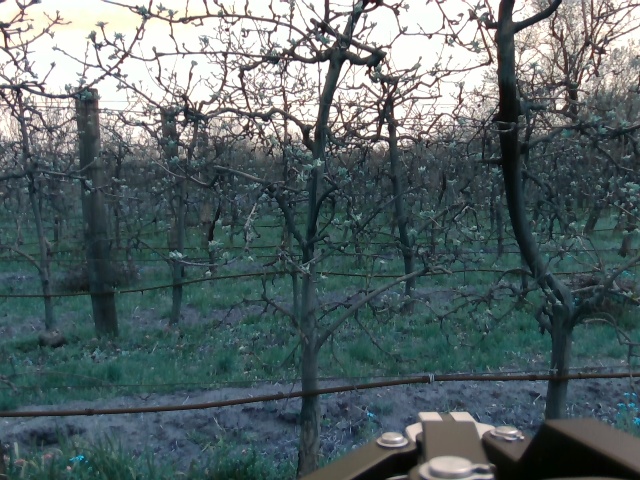
Yes I have also depth images and I need to make 3d reconstruction of the apple trees with both RGB and depth images but the problem is that I need to make the reconstruction for the whole trees in the row and I need the quality of the reconstrcution to be good so I can make some identifications on them later on
Here is example for the images that I had:

-
The camera will capture the areas of the scene that are inside its field of view size, so a single camera may not be able to fit an entire row of trees within its view without moving the camera. If the camera must be in a fixed position then arranging multiple cameras in a horizontal row may be necessary to capture depth and RGB images for all of the row.
If your project permits the camera is able to be moved around then it is possible to use a single camera to progressively build up a depth scan as the camera is moved around the scene and then stop the scan once you are satisfied with the level of detail on the image.
This would not be suitable for automatically capturing RGB images of the entire scene too though unless you created a program script that records the RGB to a video file such as .avi format for later reference at the same time that the depth image is being captured.
Single-camera applications that are D435 compatible and can capture a scene into a scan as the camera is moved around include the non-pro version of RecFusion and DotProduct Dot3D.
https://www.dotproduct3d.com/realsense.html
The RealSense SDK also has a free open-source C++ language example called rs-kinfu that can capture a scene as a 3D pointcloud scan by moving the camera around the scene and then export the scan as a .ply pointcloud file.
https://github.com/IntelRealSense/librealsense/tree/master/wrappers/opencv/kinfu
In regard to the quality of your depth image, if scanning will be performed in low-light or dark conditions and the camera is mounted on a moving vehicle (as the light brown metal section at the bottom of the RGB image suggests) then the camera may benefit from an external infrared projector being mounted alongside it. An external projector has a higher power output than the camera's built-in infrared projector and so will be able to cast infrared light to a longer range that can reach the trees from the position that you are capturing from. Intel has a guide to using external projectors with 400 Series cameras at the link below.
https://dev.intelrealsense.com/docs/projectors
A strong projector will also be able to cast a pattern of infrared dots onto the distant trees that the camera can use as a 'texture source' to aid analysis of the trees for depth information.
-
There is an example of Python code for disabling auto white-balance and setting a manual white-balance value at the link below.
https://github.com/IntelRealSense/librealsense/issues/10143
RealSense 400 Series cameras can make use of any ambient light source to enhance depth analysis, not just projectors. So an external light source should be fine.
-
Thanks a lot for your reply.
I also tried to use the rs-kinfu but I have problems with building the code as when I make a cmake .. inside my build folder I gor this error:
This warning is for project developers. Use -Wno-dev to suppress it.
-- Found OpenGL: /usr/lib/x86_64-linux-gnu/libOpenGL.so
CMake Error at CMakeLists.txt:17 (target_link_libraries):
Cannot specify link libraries for target "kinect_fusionglfw" which is not
built by this project.
-- Configuring incomplete, errors occurred!Is there anyway to solve this error or there are any steps to build the rs-kinfu in my repo without installing all the librealsense repo?
-
This particular error seems to refer to a dependency on GLFW, which is a graphics system equivalent to OpenGL that is part of the librealsense SDK (the SDK uses GLFW3).
GLFW3 can also be installed separately from the SDK.
https://shnoh171.github.io/gpu%20and%20gpu%20programming/2019/08/26/installing-glfw-on-ubuntu.html
rs-kinfu.cpp imports librealsense files, so the SDK would need to be installed.
https://github.com/IntelRealSense/librealsense/blob/master/wrappers/opencv/kinfu/rs-kinfu.cpp#L5-L6
-
I saw the code of the white-balance from the following link:
https://github.com/IntelRealSense/librealsense/issues/10143#issuecomment-1013340798
But I don't know how to specify a specific value for the white balance?
Also, Is the auto exposure is setting to true when using the camera by python code automatically or should I include to set the auto exposure to true manually in my code?
Another question, is there any resources that explain those options in the following link?
https://intelrealsense.github.io/librealsense/python_docs/_generated/pyrealsense2.option.html
-
You could simply change wb_balance in the code below to a fixed value.
Changing this:
rgb_camera.set_option(rs.option.white_balance, wb_value)
To this:
rgb_camera.set_option(rs.option.white_balance, 4600)
4600 is the default manual value of white balance.
If you set a manual white balance value in your script then auto white-balance should automatically disable, so you do not need to include an instruction to make auto white-balance false.
The C++ version of the documentation provides good descriptions of RealSense functions. Google for the term realsense cross platform api and put on the end of the search term the function that you want information about. For example:
realsense cross platform api apd_temperature
-
I tried to compile the rs-kinfu in my repository with installing all the required libraries and also the SDK of librealsense.
Here is my CMakeLists.txt
cmake_minimum_required(VERSION 3.1.0)
When I use cmake .. inside my package I got this warning:
project(kinect_fusion)
find_package(realsense2 REQUIRED)
find_package (OpenCV REQUIRED )
find_package(glfw3 3.3 REQUIRED)
find_package(OpenGL REQUIRED)
set(CMAKE_CXX_STANDARD 11)
set(CMAKE_CXX_STANDARD_REQUIRED TRUE)
include_directories(${OpenCV_INCLUDE_DIRS})
add_executable(${PROJECT_NAME} kinect_fusion/kinect_fusion.cpp)
set_property(TARGET ${PROJECT_NAME} PROPERTY CXX_STANDARD 11)
target_link_libraries(${PROJECT_NAME}${DEPENDENCIES})
# Link librealsense2 to the target
target_link_libraries(${PROJECT_NAME} ${realsense2_LIBRARY})CMake Warning (dev) at /usr/local/share/cmake-3.20/Modules/FindOpenGL.cmake:315 (message):
Policy CMP0072 is not set: FindOpenGL prefers GLVND by default when
available. Run "cmake --help-policy CMP0072" for policy details. Use the
cmake_policy command to set the policy and suppress this warning.
FindOpenGL found both a legacy GL library:
OPENGL_gl_LIBRARY: /usr/lib/x86_64-linux-gnu/libGL.so
and GLVND libraries for OpenGL and GLX:
OPENGL_opengl_LIBRARY: /usr/lib/x86_64-linux-gnu/libOpenGL.so
OPENGL_glx_LIBRARY: /usr/lib/x86_64-linux-gnu/libGLX.so
OpenGL_GL_PREFERENCE has not been set to "GLVND" or "LEGACY", so for
compatibility with CMake 3.10 and below the legacy GL library will be used.
Call Stack (most recent call first):
CMakeLists.txt:8 (find_package)
This warning is for project developers. Use -Wno-dev to suppress it.
-- Configuring done
-- Generating done
-- Build files have been written to: /home/jomana/masters_ws/src/Studying/Thesis/robot_version/cpp/buildAnd then when I use make command I got this:
[ 50%] Linking CXX executable kinect_fusion
/usr/bin/ld: CMakeFiles/kinect_fusion.dir/kinect_fusion/kinect_fusion.cpp.o: undefined reference to symbol 'pthread_create@@GLIBC_2.2.5'
/usr/bin/ld: /lib/x86_64-linux-gnu/libpthread.so.0: error adding symbols: DSO missing from command line
collect2: error: ld returned 1 exit status
make[2]: *** [CMakeFiles/kinect_fusion.dir/build.make:98: kinect_fusion] Error 1
make[1]: *** [CMakeFiles/Makefile2:83: CMakeFiles/kinect_fusion.dir/all] Error 2
make: *** [Makefile:91: all] Error 2
Can you help me in compiling this in my repository?
-
Have you built the librealsense SDK from source code with CMake and set the following build flags to true as the installation instructions describe, please?
BUILD_CV_EXAMPLES
BUILD_CV_KINFU_EXAMPLE
BUILD_GRAPHICAL_EXAMPLES
https://github.com/IntelRealSense/librealsense/tree/master/wrappers/opencv/kinfu#installation
-
I followed this guide for installing the librealsense SDK
https://github.com/IntelRealSense/librealsense/blob/v2.53.1/doc/distribution_linux.md
But I don't need to download the whole repository because it is too large so I took the code and the required codes in the include and put it in my package with the mentioned CMakeLists.txt before so, I got this error.
Is it mandatory to install the github package as I saw an example working with librealsense in their c++ code without installing the github repo in this mentioned link
https://github.com/IntelRealSense/librealsense/tree/master/examples/cmake
-
I believe that you will need librealsense, but if the installation is too large then you can use a strip command in CMake to significantly reduce the build size by stripping out debug symbols and other content.
-
If you are writing your own script and you place the instruction cfg.enable_device_from_file on the line before the pipe start instruction then the program should use the bag file as the camera data source instead of a live camera. Changing the white balance should therefore update the RGB frames that were loaded from the bag.
rs2::config cfg;
cfg.enable_device_from_file(<filename>);
pipe.start(cfg); // Load from file -
I have already done that; here is the code :
if args.playback_rosbag:
But I got this error:
config.enable_device_from_file(path_play_bag,repeat_playback=True)
# Start streaming
profile=pipeline.start(config)
depth_sensor=profile.get_device().first_depth_sensor()
color_sensor=profile.get_device().query_sensors()[1]
color_sensor.set_option(rs.option.white_balance,wb_value)color_sensor.set_option(rs.option.white_balance, wb_value)
RuntimeError: This option is read-only!Another Question:
If I put repeat_playback = false in enable_device_from_file it will play the bag file one time right?
Please sign in to leave a comment.
Comments
17 comments