How can I get ndvi(850nm) image from d455
I heard that I can can use nir image with d455
I want to know how can I see the image and save it. (850nm)
thanks
-
Hi Siukey It s possible for RealSense cameras to use light in visible or near-infrared (ranging from ~400-1000nm, with 850nm being a recommended frequency.
More information about the infrared capabilities of the cameras can be found in the link below.
https://github.com/IntelRealSense/librealsense/issues/8647#issuecomment-804712685
In regards to capturing and saving an infrared image, you can do so with the RealSense Viewer tool. If you require a custom-created capture solution though then you can certainly write your own using programming languages such as C++, C# and Python. If you have a preference of language, please let me know so that I can direct you to a script reference in that language for infrared image capture and saving.
-
The link below provides a Python script for displaying an IR image.
https://github.com/IntelRealSense/librealsense/issues/1297#issuecomment-466038777
In the same discussion, a commenter advices that the image can be saved to file instead of displayed by changing the imshow instruction to imwrite
https://github.com/IntelRealSense/librealsense/issues/1297#issuecomment-497399062
-
Do you mean whether it is possible to custom-configure the infrared stream, please? If so then yes, you can do that by editing the line below.
config.enable_stream(rs.stream.infrared, 1, 640, 480, rs.format.y8, 30)
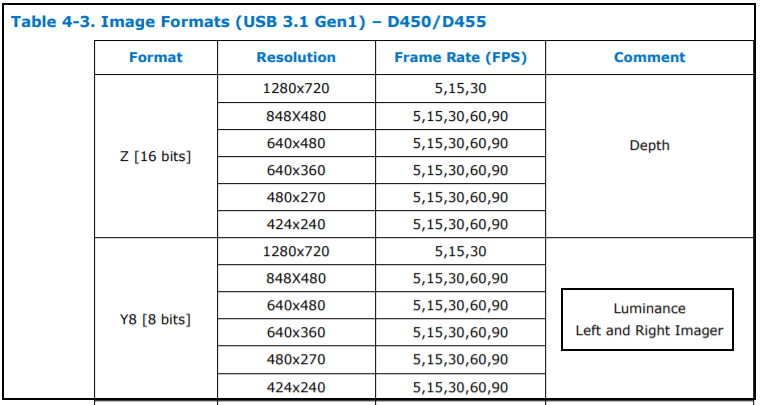
You can change the resolution of the stream to one that is supported by the particular camera model that you are using (D455 in this case) by changing the '640, 480' numbers in the bracket. For example, to use 848x480 you can change the numbers to 848,480 or to use 1280x720 you can change the numbers to 1280,720.
The final number in the bracket - '30' - relates to the frames per second (FPS) speed of the infrared channel. '30' is a commonly used value, though for infrared resolutions 848x480 and lower, 60 and 90 FPS are also supported.
-
You could modify the properties of the light that is entering the infrared sensor by purchasing a physical optical filter product and applying it over the camera lenses on the outside of the camera. More information about this can be found in Intel's white-paper document about optical filters.
https://dev.intelrealsense.com/docs/optical-filters-for-intel-realsense-depth-cameras-d400
I am not aware of a way to customize the infrared frequency range using software settings though.
Please sign in to leave a comment.
Comments
8 comments