D455-How can I see far away
Hello
I'm using D455, but I can't measure far.
How can I measure far?
I installed the D455 and gradually lowered the person to see how far I could measure.
As a result, I could only see up to 3.9m.
By the way, I did the same with the D435i and was able to see up to 3.9m.
I can only see the same distance as the D435i.
The measurements were made with the default settings of realsense-viewer.
How can I measure the distance?
-
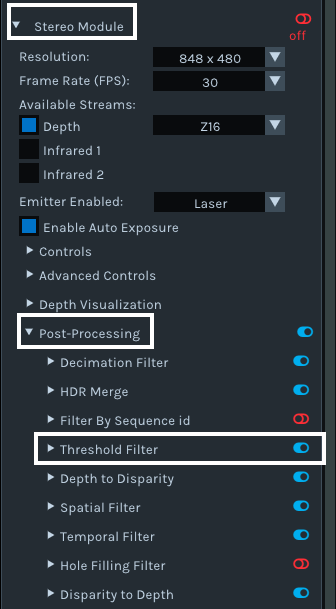
Hi N Kanbe I9 If you are using the RealSense Viewer tool and your depth range is limited to 4 meters then it may be because a post-processing filter setting called the Threshold Filter is enabled. This limits the depth data rendered to values up to a maximum of 4 meters by default.
The status of the Threshold Filter can be checked in the Viewer in the options side-panel. Expand open the Stereo Module options and then expand the Post-Processing sub-category. Look for the Threshold Filter option in the list of filters. If it has a blue icon beside it (which indicates that it is On), left-click on the blue icon to turn it to red (Off). The camera should then be able to render on the depth image the full distance range of depth data that it is able to observe.
Please sign in to leave a comment.
Comments
1 comment