How to calibrate L515
Hello
I am currently using L515.
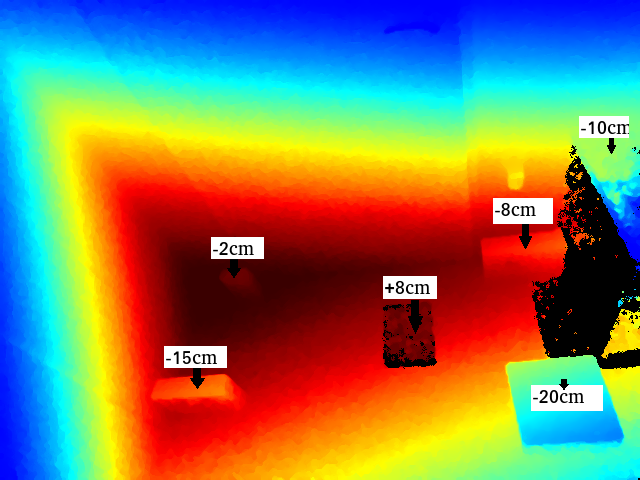
When using L515, the maximum distance error is about 20 cm.
The distance from the camera in the green part of the attached image is about 1 m, and the dark red is about 1.7 m.
There is an error of about 8 to 20 cm within about 1.4 m.
There seems to be almost no error when it is far away.
Therefore, I would like to calibrate. Is there a calibration tool that can be used with the L515?
How can I fix the error if the tool doesn't exist?
-
Hello N Kanbe l9,
Thank you for contacting us.
The is no calibration tool available for Realsense L515. We suggest you to use Short Range preset. This preset lowers the laser power and gain so that close objects do not oversaturate the
receiver. This allows operation at a close distance to objects. This setting may not be good if objects further away in the scene also need to perform well.You can refer to Intel® RealSense™ LiDAR Camera L515 User Guide for better performance.
Regards,
Zulkifli Halim
Intel Customer Support
-
Hi
Is there any update on the calibration tools for the L515? From the above comments I am assuming that we would not need any calibration if we keep the settings right for our application. Is my assumption correct?
If not, then what is the advisable procedure/steps for L515?
Thank You
Nikhil Mehra
Please sign in to leave a comment.
Comments
3 comments