D455 not detected
Hi,
I bought a new realsense D455 camera (82635DSD455) . I connected it to my computer using a USB3.0 but the SDK software(depth quality tool & Intel Realsense Viewer v2.42.0) cannot detect it.

I checked the drivers and it seems are correctly installed:
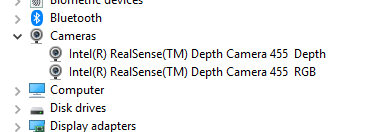
If I try to collect frames using Python or Matlab, but it doesn't work.
I try to reinstall the SDK, connect it to other computer USB sockets, reverse the USB-C connector in the camera,...
I try also to update the camera firmware, but I've got this error:

I have another realsense camera (D435) and it works without problems...but the D455 it doesn't.
Any idea where is the problem?
Thanks,
Christian
-
Hi Cristian Vilar A RealSense user in Germany had this cocreateinstance(clsid_sensormanager, null, clstcx error with the L515 camera model in December 2020, though that particular case (on a Surface Pro 3 computer) did not have a solution at the end of it as the user stopped responding.
https://github.com/IntelRealSense/librealsense/issues/7952
I note the phrase in your error message blockerat av en grupprinclip which roughly translates to English in Google Translate as blocked by a group principle. This suggests that group permissions might be involved in the blocking. On the L515 case linked to above, a RealSense team member saw similar information about a group permissions block when they translated the error information from German.
https://github.com/IntelRealSense/librealsense/issues/7952#issuecomment-757500368
-
Hi,
Camera is working using the apps Intel Realsense Viewer and Depth Quality Tool. The problems was some windows privacy configuration parameters.
Unfortunately, D455 camera is not working using Matlab.... I tried with the D435 and it works, but the D455 it doesn't.
regards,
Cristian
-
Are you using the RealSense MATLAB wrapper for Windows 10 with your D455 or accessing the camera directly from MATLAB, please?
https://github.com/IntelRealSense/librealsense/tree/master/wrappers/matlab
The discussion in the link below has an example of D455 being used with the wrapper and MATLAB 2020b.
https://github.com/IntelRealSense/librealsense/issues/8368
Currently, MATLAB 2017b is recommended by the documentation for use with the wrapper. Newer versions such as 2020a and 2020b have been used with the wrapper, but results may be unpredictable in regard to possible errors.
-
Hi,
I updated the SDK and the camera firmware. Now I can use the camera with matlab 2019.b but with one issue:
Command pipe.start(cfg) doesn't works:
cfg = realsense.config();
cfg.enable_stream(realsense.stream.depth,vidWidth,vidHeight,realsense.format.z16,fps);
cfg.enable_stream(realsense.stream.color,vidWidth,vidHeight,realsense.format.rgb8,fps);

% Make Pipeline object to manage streaming
pipe = realsense.pipeline();

% Start streaming on an arbitrary camera with cfg settings
profile = pipe.start(cfg); % <-- NOT WORKING IN D455  , ( BUT IT WORKS in D435)
profile = pipe.start();    % <-- IT WORKS IN BOTH D455 & D435

regards,
Cristian -
Are you setting your FPS to the minimum of '6' with the cfg instruction, please? If so, 6 FPS is supported on D435 but the D455 uses '5' for its minimum FPS and does not support '6'.
The supported resoution / FPS modes for D455 are listed on page 65 of the current edition of the data sheet document for the 400 Series cameras.
https://dev.intelrealsense.com/docs/intel-realsense-d400-series-product-family-datasheet
Please sign in to leave a comment.
Comments
6 comments