RealSense L515 is not recognized in device manager
A few months ago I bought a RealSense L515. It used to acquire the data in the intel Realsense Viewer. However, after the update of the firmware, my device manager doesn't recognize the camera:
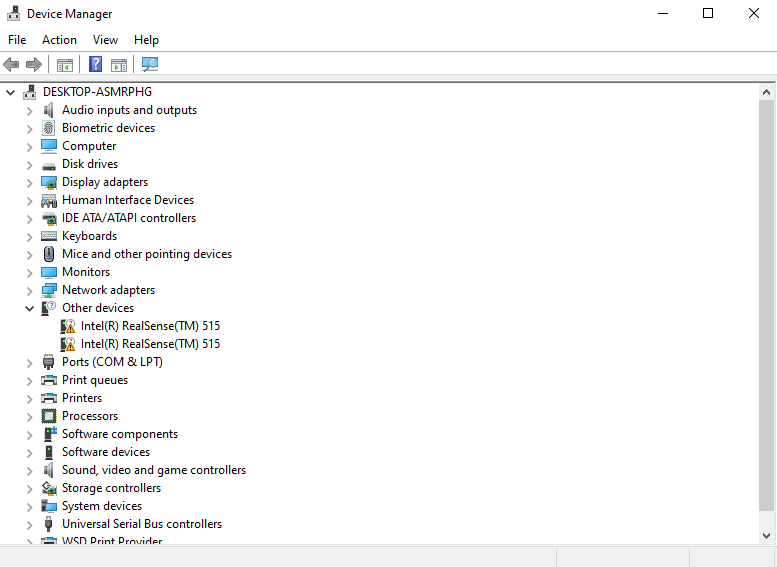
I tried the following:
- Unplug and plug the camera.
- Change the cable. I used the same cable to connect the RealSense D435 with success.
- I always use a USB 3.0 port.
- Connect the camera on a different PC with Windows, and also one with Ubuntu.
I tried the command rs-enumerate-devices.exe
No device detected. Is it plugged in?
I also tried with rs-fw-update.exe -r -f Signed_Image_UVC_1_5_4_1.bin
update to FW: Signed_Image_UVC_1_5_4_1.bin
When I connect the camera, the RealSense Viewer v2.42.0 indicates the following:
11:24:47 [Info] C:\jenkins_sys_rsbuild\workspace\LRS_windows_compile_pipeline\src\context.cpp:381 - Found 0 RealSense devices (mask 255)
Please can you help me?
Thanks in advance
-
Hi Leettin, please open a ticket here:
https://support.intelrealsense.com/hc/en-us/requests/new.
Sincerely,
Zulkifli,
Intel Customer Support
Please sign in to leave a comment.
Comments
3 comments