Camera connection and disconnection / C#
Hi All,
am monitoring the connection/disconnection ot 2 D455 cameras.
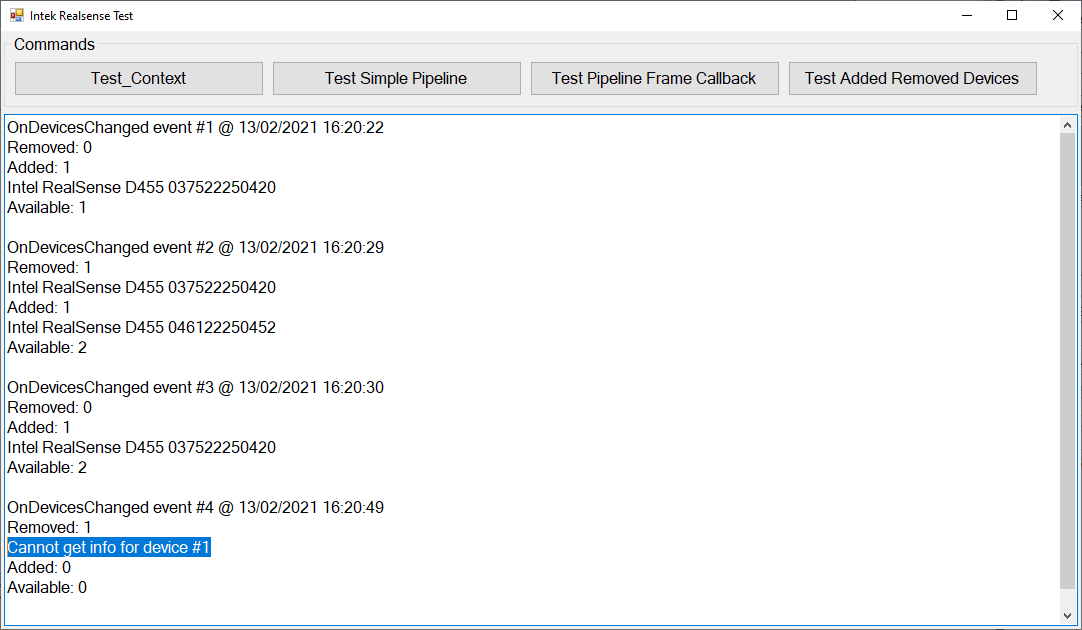
Below is the code and the result I get when I connect the two cameras and the disconect one of them.
When a camera is disconnected, the DeviceList removed_devices passed to the event handler function is not usable, as far as I can see: if I remove the try/catch block, I get the runtime error "System.Exception: 'Camera not connected!'"
Well, I did know alrady that the camera was disconnected...
Ultimately, I wonder about what is the possible use of "DeviceList removed" passed to the OnDevicesChangedDelegate, apart from knowning how many cameras were disconnected.
rgrds
Andrea
static Context context;
public static void Test_Added_Removed_Devices()
{
context = new Context();
context.OnDevicesChanged += new Context.OnDevicesChangedDelegate(Handler_OnDevicesChanged);
}
public static void Handler_OnDevicesChanged(DeviceList removed_devices, DeviceList added_devices)
{
string removed_devices_result = "Removed: ";
removed_devices_result = removed_devices_result + removed_devices.Count.ToString() + Environment.NewLine;
if (removed_devices.Count > 0)
for (int i = 0; i < removed_devices.Count; i++)
{
string device_info;
try
{
device_info = removed_devices[i].Info.GetInfo(CameraInfo.Name) + " " + removed_devices[i].Info.GetInfo(CameraInfo.SerialNumber);
}
catch
{
device_info = "Cannot get info for device #" + (i + 1).ToString();
}
removed_devices_result = removed_devices_result + device_info + Environment.NewLine;
}
string added_devices_result = "Added: ";
added_devices_result = added_devices_result + added_devices.Count.ToString() + Environment.NewLine;
if (added_devices.Count > 0)
for (int i = 0; i < added_devices.Count; i++)
{
string device_info;
try
{
device_info = added_devices[i].Info.GetInfo(CameraInfo.Name) + " " + added_devices[i].Info.GetInfo(CameraInfo.SerialNumber);
}
catch
{
device_info = "Cannot get info for device #" + (i + 1).ToString();
}
added_devices_result = added_devices_result + device_info + Environment.NewLine;
}
Context context = new Context();
string available_devices_result = "Available: " + context.Devices.Count();
context.Dispose();
AttachDetach_Counter++;
lock (Main_Form.Logging_Cueue)
{
Main_Form.Logging_Cueue.Add(
"OnDevicesChanged event #" + AttachDetach_Counter.ToString() + " @ " + DateTime.Now.ToString() + Environment.NewLine +
removed_devices_result +
added_devices_result +
available_devices_result + Environment.NewLine);
}
}
Please sign in to leave a comment.
Comments
0 comments