D455 not detected by RealSense Viewer / SDK
Hello,
I have worked through numerous threads in this forum, but I simply can't get my D455 working.
I am trying to develop a .Net application for the D455 and I am using the latest SDK version on Windows 10 Pro (up-to-date).
When I run the RealSense Viewer, it does not detect the camera.
I also have a D415, which is working fine.
I got the 455 camera working on one laptop (also Win10 Pro) and a collegue was successfully using it under Ubuntu, so I know it's working in general. I have also tried 4 more PCs (2x Intel NUC, 1 Laptop, 1 CSL Mini-PC); 3 with Win10 Pro and one with Win10 Home - didn't work there either. I am using the original USB cable that came with it.
The D455 shows up in the device manager as expected:
But neither the Viewer nor the Depth Quality tool (or my application) can connect/use it.
Here is some log output from the RealSense Viewer:
 01/02 09:39:33,676 INFO [3720] (rs.cpp:2701) Framebuffer size changed to 2560 x 1377
 01/02 09:39:33,676 INFO [3720] (rs.cpp:2701) Window size changed to 2560 x 1377
 01/02 09:39:33,676 INFO [3720] (rs.cpp:2701) Scale Factor is now 1
 01/02 09:39:34,007 INFO [3720] (mf-hid.cpp:487) Could not enumerate HID devices!
 01/02 09:39:34,013 WARNING [3720] (ds5-factory.cpp:1190) DS5 group_devices is empty.
 01/02 09:39:34,213 INFO [3720] (mf-hid.cpp:487) Could not enumerate HID devices!
 01/02 09:39:34,219 WARNING [3720] (ds5-factory.cpp:1190) DS5 group_devices is empty.
 01/02 09:39:34,417 INFO [3720] (mf-hid.cpp:487) Could not enumerate HID devices!
 01/02 09:39:34,423 WARNING [3720] (ds5-factory.cpp:1190) DS5 group_devices is empty.
 01/02 09:39:34,623 INFO [3720] (mf-hid.cpp:487) Could not enumerate HID devices!
 01/02 09:39:34,629 WARNING [3720] (ds5-factory.cpp:1190) DS5 group_devices is empty.
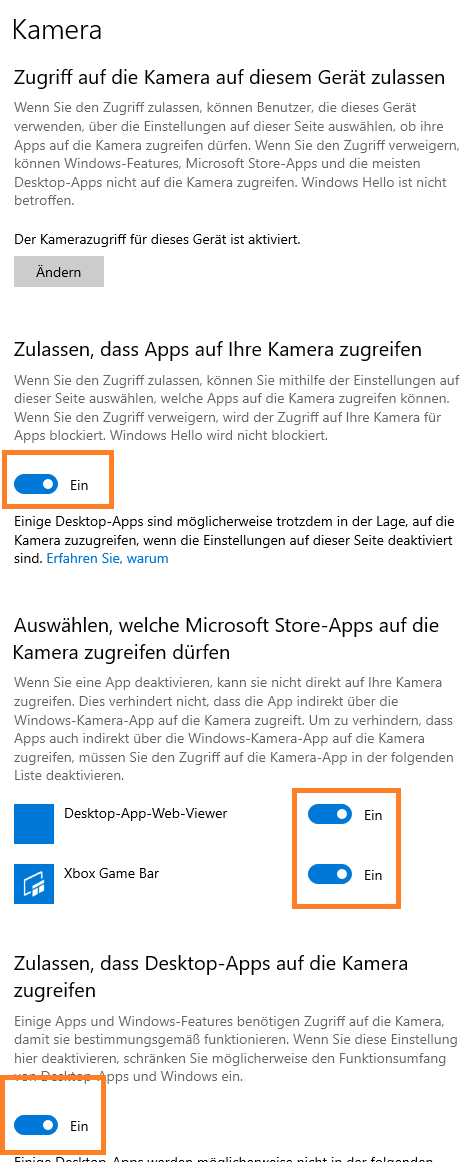
Windows camera access is allowed on my PC for all applications.
In my opinion, something's blocking the camera access, but I don't know what it could be.
Please help :)
-
Hi Markus Hochradl Please first check the camera privacy settings in Windows to ensure that permission to access the camera hardware and permission for applications to access the camera are both set to On. Instructions for doing so can be found at the link below.
https://github.com/IntelRealSense/librealsense/issues/3381#issuecomment-503424789
-
If your D455 works on one of the Windows PCs and on Ubuntu, it does not sound like a problem with the camera hardware or with the camera's firmware driver.
I recall that Windows 10 Pro has a feature called a group policy that allows the computer to be managed by corporate group policies that prevent certain type of actions / devices. If you are working in an office setting, is it possible that colleagues responsible for Information Technology have set up such a policy on your Windows work computers?
An example of a group policy affecting RealSense camera detection is at the link below.
https://github.com/IntelRealSense/librealsense/issues/5985#issuecomment-596055333
-
None of the PCs I have testet it on are part of a Windows domain and at least 2 of the PCs were setup by me (i.e. installed Windows and configured settings).
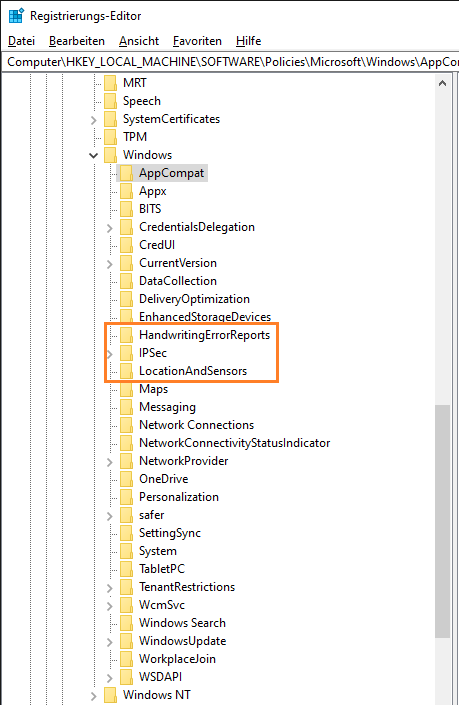
However, the hint with deleting certain registry entries worked! I had previously deleted a lot of keys as mentioned in other threads, but that didn't work.
Now, I was even able to narrow down the responsible keys by deleting entries one after another and checking if it worked afterwards.So for anyone else having this problem: delete these 3 registry keys and you might get your D455 working:
- Computer\HKEY_LOCAL_MACHINE\SOFTWARE\Policies\Microsoft\Windows\HandwritingErrorReports
- Computer\HKEY_LOCAL_MACHINE\SOFTWARE\Policies\Microsoft\Windows\IPSec
- Computer\HKEY_LOCAL_MACHINE\SOFTWARE\Policies\Microsoft\Windows\LocationAndSensors
My money is on the last one: LocationAndSensors.
That's what my registry looks like now with a working camera:
Thank you Marty!
Please sign in to leave a comment.
Comments
6 comments