D455 Camera Output
We are working on Virtual Try On using the sensor and the output of the camera is pixelated. We have been developing the solution using
1. Unity
2. Nuitrack SDK
Can you please advice us on what is the optimal settings the in the camera which will give us best output or suggest us the screen size which would give optimal solution.
We are using a 50” screen on a portrait mode, as our solution is virtual try on we would require that to be operated in portrait mode.
We want the camera output to be sharp.
Looking forward for your support here.
Regards,
Mahendra
-
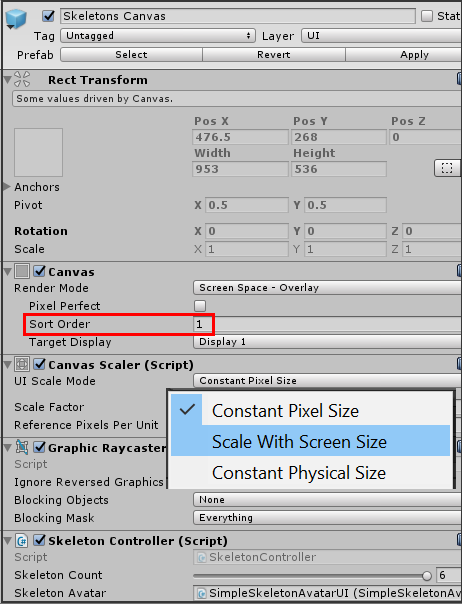
Hi Mahendra Vellingiri In your Nuitrack SDK project in Unity, is the image rendered to the screen by a Canvas component? If so then you could try changing the menu drop-down of the canvas component's Canvas Scaler to 'Scale With Screen Size' instead of 'Constant Pixel Size' so that the image is permitted to scale its size instead of being forced to maintain the original resolution when screen size is increased.
-
The link below suggests editing RGB / depth resolution in the Nuitrack SDK file nuitrack.config
https://community.nuitrack.com/t/rgb-camera-size-issue/2655/3
This file is located at: %NUITRACK_HOME%/nuitrack/data
-
I am not aware of a maximum recommended resolution for Nuitrack SDK.
Have you tried setting fullscreen mode to true in Unity instead of using windowed mode?
https://docs.unity3d.com/ScriptReference/Screen.SetResolution.html
Please sign in to leave a comment.
Comments
6 comments