Some strange phenomenon of infrared stream
I use Depth Quality Tool for Intel RealSense Cameras for tests. I find some purple dots in the infrared stream in the following left image, it does not always happen. I haven't found some issues about these purple dots in the community as well as in the datasheets. Can you tell what these purple dots are used for?
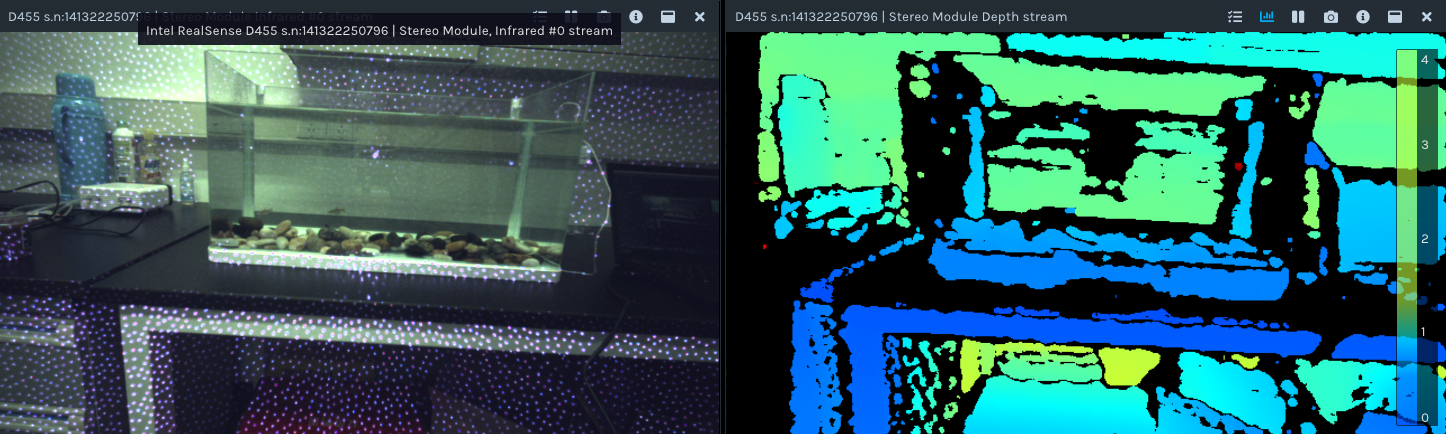
-
Hi Asd490695922 The dots are normal for an infrared image on RealSense 400 Series camera models that are equipped with a projector that is enabled. The camera can use the semi-random pattern of dots as a texture source to analyze surfaces for depth information. Disabling the projector can therefore result in a reduction in the amount of detail on the depth image.
The extent to which the dots are visible can depend on the time of day and the types of materials that the dots are cast onto. Visibility is also influenced by the Laser Power setting, becoming more visible if Laser Power is increased and less visible if it is reduced.
You can observe the difference made to the depth image when the pattern is enabled or disabled by going to the Emitter Enabled option in the Depth Quality Manager's options side-panel ('Emitter Enabled' is located directly under 'Stereo Module') and selecting 'Off' from the drop-down menu beside it. Selecting 'Laser' from the menu re-enables the pattern.
Please sign in to leave a comment.
Comments
1 comment