Unable to stream infrared/fisheye/gpio in C#/Windows
Hi,
I tried to use infrared stream with following configuration :
- realsense D435
- Windows 10
- SDK version is 2.50.0
- Camera firmware 05.13.00.50
For launching the infrared stream, I tried the following code :
var cfg = new Config();
cfg.EnableStream(Stream.Infrared, 1, 848, 480, Format.Y8, 6);
pipeline = new Pipeline();
pipelineProfile = pipeline.Start(cfg);
And it raise me the exception :
Exception thrown: 'System.Exception' in Intel.RealSense.dll
Exception thrown: 'System.InvalidOperationException' in Intel.RealSense.dll
System.Exception: Couldn't resolve requests ---> System.Runtime.InteropServices.ExternalException: rs2_pipeline_start_with_config(pipe:0000018333B9B2B0, config:0000018333B9AB30)
   --- End of inner exception stack trace ---
   at Intel.RealSense.ErrorMarshaler.MarshalNativeToManaged(IntPtr pNativeData)
   at System.StubHelpers.MngdRefCustomMarshaler.ConvertContentsToManaged(IntPtr pMarshalState, Object& pManagedHome, IntPtr pNativeHome)
   at Intel.RealSense.NativeMethods.rs2_pipeline_start_with_config(IntPtr pipe, IntPtr config, Object& error)
   at Intel.RealSense.Pipeline.Start(Config cfg)
I already tried to :
- set stream rate to 30
- use Gpio/Fisheye streams (Depth & color streams are working correctly), None of them worked
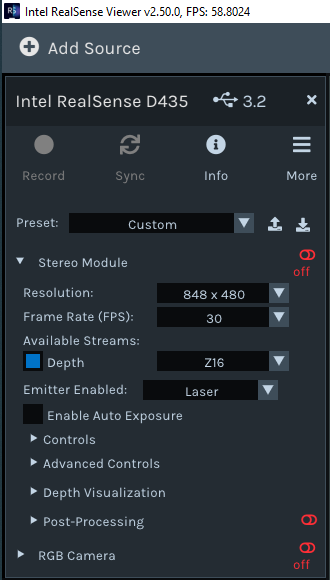
Also, the last Realsense viewer version on Windows do not seem to have infrared option for the D435 anymore.
Has someone used the infrared/GPIO/Fisheye stream with C# and the latest sdk version on Windows 10 and, if so, what am I doing wrong ?
Cordially,
Hugo
-
Hi Hcharrier If the Infrared topics are not listed in the Stereo Module options of the RealSense Viewer then it typically means that something has gone wrong in the two RealSense drivers (Depth and RGB) that can be found in the 'Cameras' section of the Windows Device Manager.
This is likely the cause of the Couldn't resolve requests error, which can occur if a currently unsupported resolution / FPS mode has been requested by a script. This problem can be corrected by performing a complete uninstall and reinstall of these two drivers using instructions at the link below.
https://support.intelrealsense.com/hc/en-us/community/posts/4419989666323/comments/4431239847443
Also, fisheye streams cannot be accessed on a D435 camera as they are only supported on the T265 Tracking Camera model.
-
Hi @MartyG,
Thank you for your awnser, indeed, a full reinstallation solved my problem for the infrared stream. However, the same exception is raised with the GPIO stream, I saw in https://github.com/IntelRealSense/librealsense/issues/10049 that it seems to not be available in C#. Have you got any news concerning that parts ?
-
I have never seen an example of RS2_STREAM_GPIO being used in scripts or supported by the RealSense Viewer program. The SDK file link below suggests that it is a feature that was disabled and is not used.
https://github.com/IntelRealSense/librealsense/blob/master/unit-tests/unit-tests-live.cpp#L3705
A RealSense team member advises in the link below that the GPIO pins are not programmable by RealSense end-users.
https://github.com/IntelRealSense/librealsense/issues/3001#issuecomment-453665014
Please sign in to leave a comment.
Comments
3 comments