HW Sync Verification
I am working on reducing frame drops and improving camera synchronization. I achieved this by enabling initial reset, having CPU affinity but now when investigating hw sync, I am unsure if it is correct. Is there any way to verify if the cameras are in hw sync mode? Measuring the sync between cameras doesn't work as the whitepaper states that to verify hw sync, there should be a drift encountered over time.
Also I am using 4 D455 cameras and I thought by using hw sync, splitting these cameras between 2 USB controllers using a PCIE USB hub would be better as it mitigates any USB bandwidth issues yet after some initial testing, I see an increase in drops when using 2 controllers. Wanted to know if this was ever encountered before and if it is an issue with my hw sync configuration or a scheduling issue between controllers causing contention.
-
Hi Hugh Feehan The ideal situation would be to have one USB controller per camera. This would be achievable when plugging the cameras into built-in ports on the computer, but many computers do not have more than a couple of USB ports and so a hub or PCIE becomes the only viable option for attaching 3+ cameras to the same computer. Some hubs may allocate 2 ports to 1 controller though instead of having an dedicated controller for each port, which is less optimal than the 1-per-port controllers of a computer's built-in ports.
Amazon Basics hubs have been very reliable for use with RealSense. It is the type of hub used for bandwidth testing in the hardware sync whitepaper and I have used one of these hubs with RealSense cameras without problems for 6 years.
Aside from checking timestamps to confirm that drift over time is occurring, the only other method of hardware sync verification that I am aware of is to use the high-speed LED panel product described here:
https://github.com/realsenseai/librealsense/issues/14131#issuecomment-3062069766
-
My understanding was that an internal usb hub would be faster than an external one. My point was that splitting the cameras up resulted in more frame drops. Also could an oscilloscope to monitor pulses from all cameras to see a proper hw sync connection or could an arduino be used to create pulses to all cameras?
-
I have heard anecdotally in the past from a small number of RealSense users with a PCIE based hub that they considered it an efficient solution compared to an external hub.
I haven't heard of using an oscilloscope for monitoring pulses from multiple cameras. It is feasible though to use an Arduino to act as a signal generator though, as illustrated in the setup below with an Arduino Micro and a 'level shifter' component to configure the pulse to a RealSense-compatible voltage of 1.8 V.
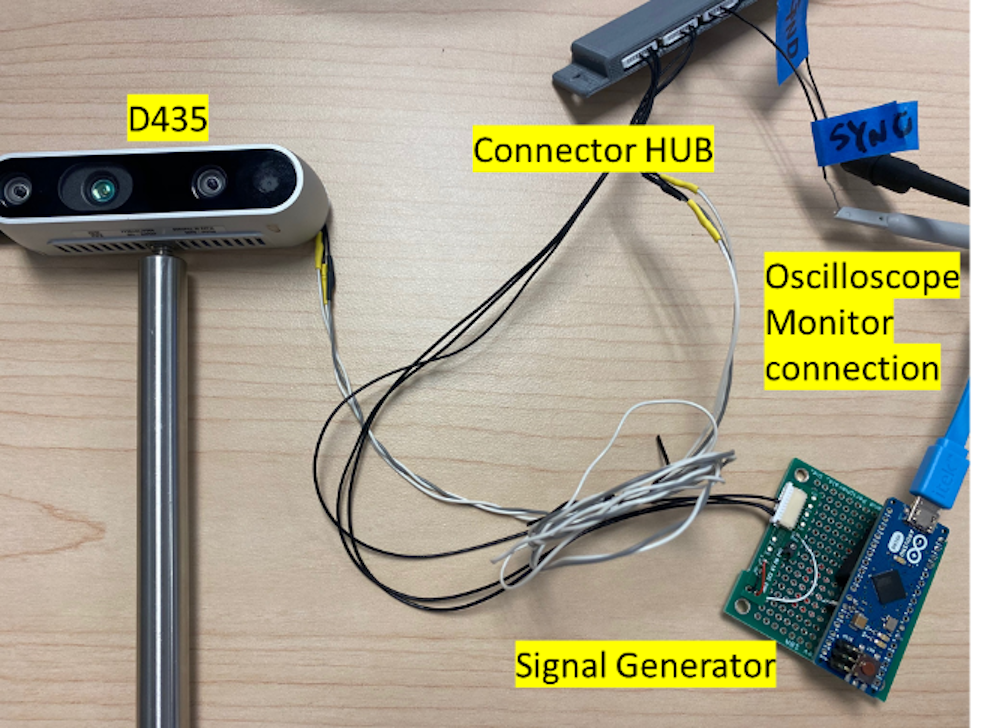
An example of a level shifter module that has been used by a couple of RealSense users for triggering is the Sparkfun one here:
https://www.sparkfun.com/sparkfun-logic-level-converter-bi-directional.html
-
Hi Hugh Feehan Do you require further assistance with this case, please? Thanks!
Please sign in to leave a comment.
Comments
4 comments