D435 acceptance criteria
Hello,
We use D435 in our robots and have a few returns from our customer for a ghost hit investigation. Going through all possible contributing factors such as surface reflections and different settings, we would like to verify the camera itself is good.
If we check a camera health with quality tool and it passes (<0.25), Does it mean the camera itself good?
We see some cameras in the same area with no problem while a few others with false hits. What likely caused the different results considering environment is the same? View angle is the same or the light sensitivity difference?
Please help.
Richard
-
Hi Richard Li Yes, < 0.25 health check score means that the calibration is very good.
Ghost data is not an indication of a problem with the camera hardware and would not merit a return of the camera. A cause of this ghost effect can be a phenomenon called a repetitive pattern. This is where the camera's depth sensing can become confused if there are repeating horizontal or vertical rows of similar looking objects in the scene, such as a row of vertical fence posts or trees, window blind slats or tiles on the floor or ceiling.
The angle that a scene with repeating elements is viewed from can make a difference to whether or not ghost data occurs as a result of the pattern, as tilting the camera can break up the repetitive pattern and negate its negative effects.
The link below has a guide to dealing with repetitive patterns.
https://dev.realsenseai.com/docs/mitigate-repetitive-pattern-effect-stereo-depth-cameras/
-
Hello,
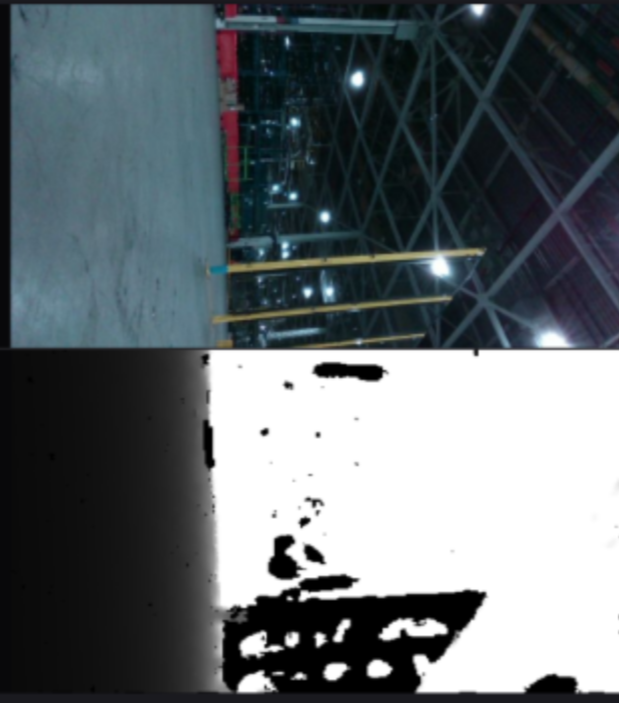
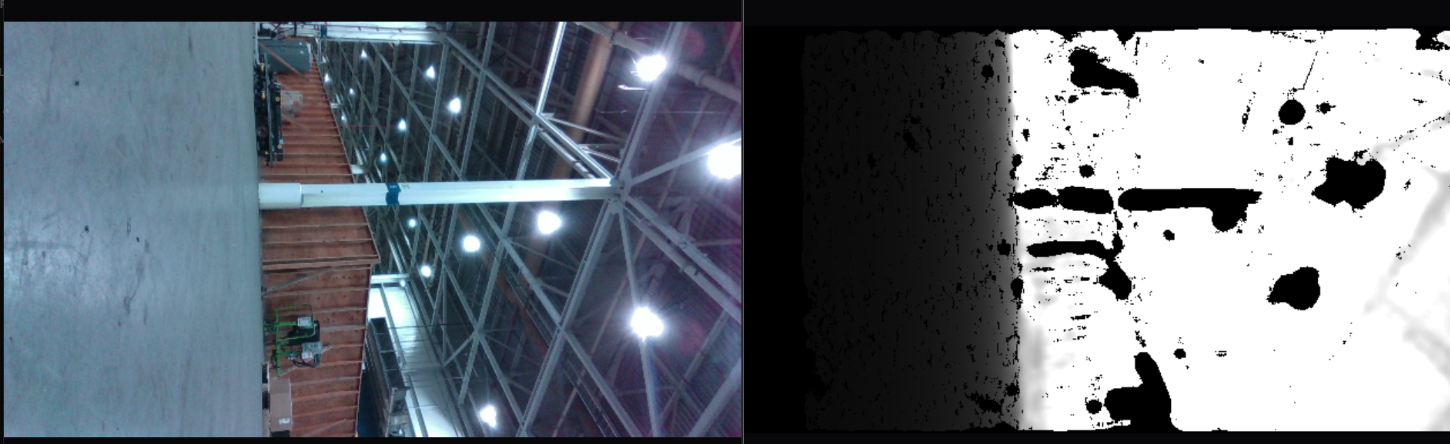
Thank you for the advice. Here are a few pictures which cameras see.
Do you think these are caused by reflection from the ceiling lights? If so, why other robots don't have such problem, perhaps the view angle, not the camera itself? I don't think calibration will help solve the problem. What do you think I should look into?
Please advise. Thanks.
-
The plain black areas on the depth image do correspond closely to the position of ceiling lights or areas where their light is being strongly cast onto reflective surfaces such as the horizontal girder beam. The lights are too bright for the camera to read any depth from, causing them to be rendered as plain black (areas of the scene without depth information), And strong reflections onto reflective surfaces cover up readable textures on the surfaces that light is cast onto, making them also difficult to render on the depth image.
The negative effects of glare from reflections can be greatly reduced, making those areas much more readable by the camera, by fitting a thin-film linear polarizer product over the glass on the front of the camera. Most polarizers will work so long as they are linear, so they can be purchased inexpensively on stores such as Amazon by searching for 'linear polarizing filter sheet'.
What tool was your images captured with, please? If it was the RealSense Viewer then that tool has a 4 meter maximum limit on depth sensing applied by default in its Threshold Filter post-processing filter. Disabling the Threshold filter in the Stereo Module > Post Processing section of the Viewer's options side-panel will enable the camera to depth sense to its full 10 meter range.
It is also worth mentioning that it is a general physics principle (not specific to RealSense) that dark grey or black absorbs light and so makes it more difficult for depth cameras to read depth information from such surfaces. The darker the color shade, the more light that is absorbed and so the less depth detail that the camera can obtain. So the largely dark grey shade of the ceiling could also negatively affect the ability of such surfaces to be depth-analyzed.
-
Results could vary depending on the camera viewpoint, as RealSense cameras lacking filtering that are directly facing a strong light source can have their sensors saturated with light, causing problems with the depth and IR images until the camera is turned away from the light source and the auto-exposure can correct the image.
A replacement camera that is placed in the same scene but not at the exact same position and angle as the previous camera may not experience the same image degradation if the condition of direct exposure to the same light source is not reproduced.
You could test whether this is what is affecting the cameras that are experiencing the problem by putting a hand over the front of the camera for several seconds to cover the sensors, which should allow the auto-exposure to correct the image automatically.
If you are replacing cameras then the D435F model would likely be a more suitable choice for this environment, as it has built-in light blocking filters that provide improved depth image quality when directly facing strong light and greater resistance to the repetitive pattern phenomenon that can cause ghost data.
Please sign in to leave a comment.
Comments
8 comments