problem with IntelRealsense 435i
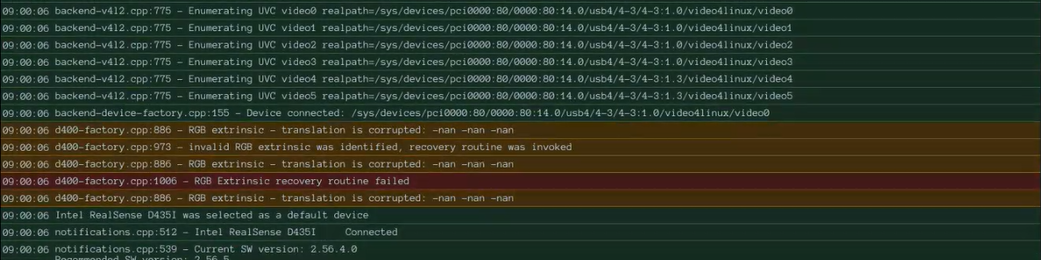
my new camera gives me this error: ERROR [138888739870592] (d400-factory.cpp:1006) RGB Extrinsic recovery routine failed
How i can resolve?
-
Hi sara ponzetti If you are able to enable the depth stream in the RealSense Viewer tool, please first try resetting the camera to its factory-new calibration values using instructions at the link below.
https://github.com/realsenseai/librealsense/issues/10182#issuecomment-1019854487
-
Please provide information about the questions below.
1. Which version of the RealSense SDK are you using the camera with?
2. Has RGB ever worked since the camera was purchased or did it work before but suddenly stop working now?
3. Are the other streams such as depth and infrared able to function?
4. Does it make a difference if you unplug the micro-sized end of the USB cable from the side of the camera, reverse the connector's orientation and plug it back into the camera (USB-C cables are two-way insertion at the micro-sized end).
-
If all streams on the camera are otherwise working normally and the error message is not generating continuously then I would recommend ignoring the message. For some error situations, they are only momentary and the SDK is able to automatically recover. An example is an error caused by the camera hardware not responding fast enough to a check from the SDK but it responds in time on subsequent checks.
-
Which firmware driver version is installed in your camera, please? If it is a new camera that has not yet had its firmware updated then its firmware may be out of date and not recommended for use with the SDK versions that you are using.
The recommended firmware for 2.56.4 and 2.56.5 is 5.17.0.10. You can check which firmware version is currently installed in the camera by clicking the 'Info' button at the top of the RealSense Viewer's options side-panel.
-
Although not a fix, you could likely stop the error from generating in the RealSense Viewer log console by disabling logging to the console.
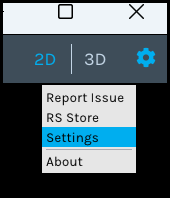
1. Open the Viewer's settings interface window by left-clicking on the gear-wheel icon in the top corner of the Viewer window and selecting Settings from the drop-down menu.
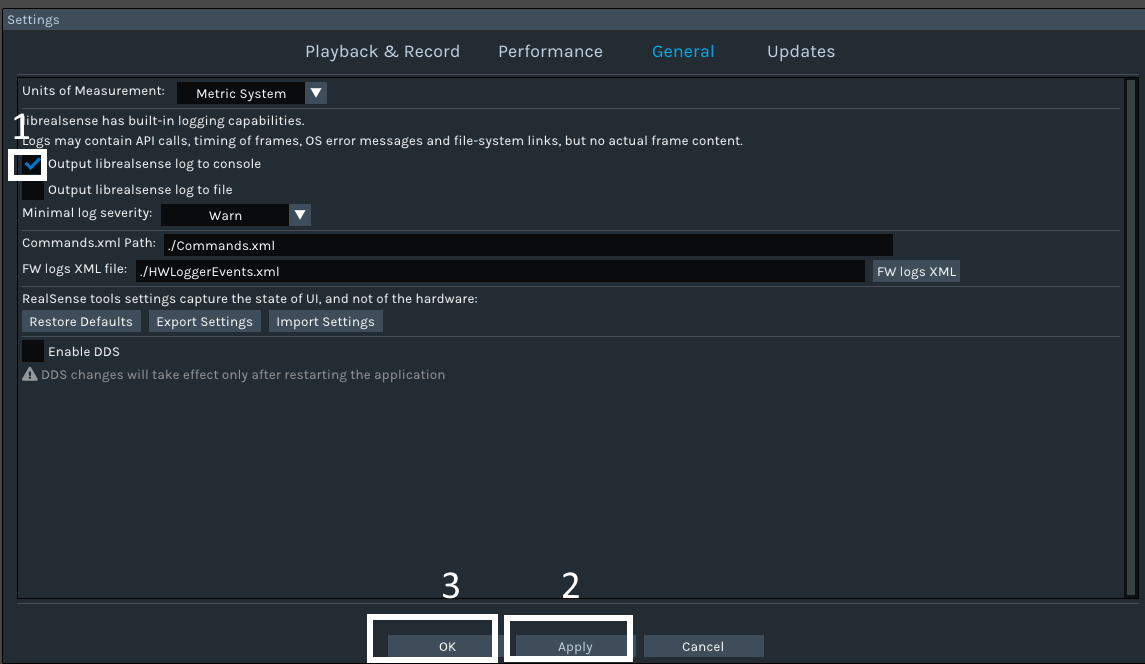
2. When the Settings window pops up, click on the General option at the top of the window.
3. Left-click on the tick beside the Output librealsense log to console to remove the tick and disable logging (1). Then click on the Apply button to apply the change (2) and finally click on the OK button to close the settings window.
-
NaN is 'Not a Number', an erroneous value. But as your RGB stream is working, unless you are performing an application where extrinsic values are important such as aligning depth and RGB images together then you should be able to ignore the NaN.
An extrinsic describes the physical relationship between two different sensors, such as the distance on the front of the camera between the depth sensor and the RGB sensor.
-
Can you tell me about this target that you are trying to reach, please? Calibrating the RGB image is not usually required to reach a target. Depth calibration is what is most important when observing a target, and you can calibrate depth in the RealSense Viewer without needing the RGB calibration values.
-
If updating the firmware or resetting the calibration to factory-new values has not resolved the issue then unfortunately the only remaining action that I can recommend is to perform an RMA return of the camera to the retailer that you purchased it from to obtain a replacement. I note that in your first message you said that the camera is new, so it should still be within its warranty period.
If you purchased it from the official RealSense Store then you can use the contact web-form at the link below to contact the Store about a return, selecting 'Return/Warranty' as the message topic.
https://www.realsenseai.com/realsense-e-commerce-store-inquiry/

Please sign in to leave a comment.
Comments
19 comments