the Intel.RealSense.Viewer.exe software cannot detect the camera.
Hello, Why can my computer detect the D455 camera, but the Intel.RealSense.Viewer.exe software cannot detect the camera.


-
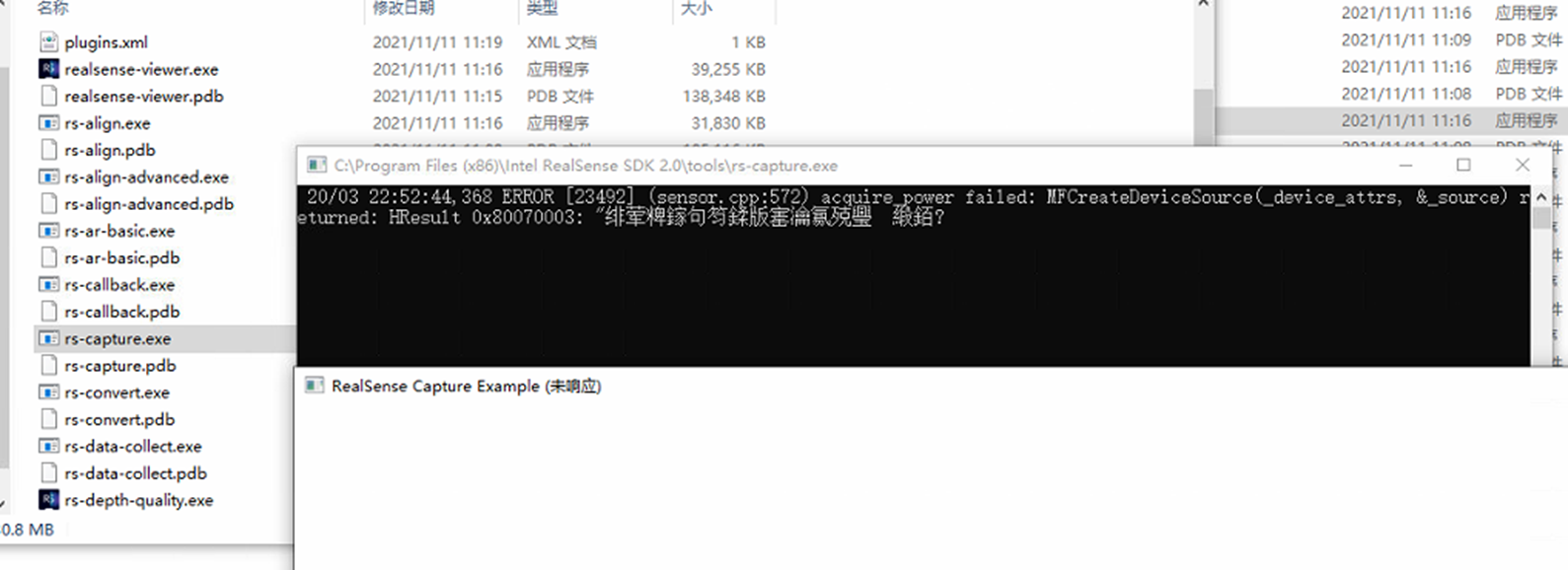
Please try running the RealSense SDK's example program rs-capture on Windows using the instructions at the link below to test whether the problem is specifically with the RealSense Viewer program or whether other RealSense programs cannot detect the camera.
https://github.com/IntelRealSense/librealsense/issues/8024#issuecomment-747630656
-
Thank you very much. The MFCreateDeviceSource error in Windows can indicate that there is a permissions related problem. Next, please check whether the camera privacy options in Windows are set to On for both access to the hardware and permission for applications to access the camera. Instructions for doing so are at the link below.
https://github.com/IntelRealSense/librealsense/issues/3381#issuecomment-503424789
-
I turned on camera and location permissions, but she doesn't seem to work. It's worth mentioning that before this, the camera was functioning normally.When I open the software, the following message appears.
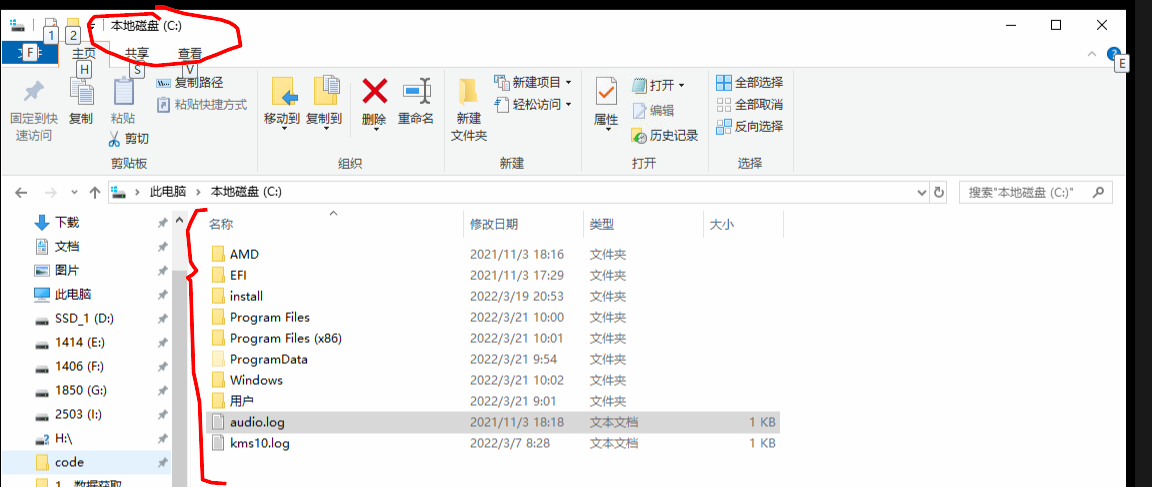
10:03:04 [Info] - librealsense version: 2.50.0
10:03:04 [Info] C:\jenkins_sys_rsbuild\workspace\LRS_windows_compile_pipeline\src\rs.cpp:2688 - Framebuffer size changed to 1387 x 683
10:03:04 [Info] C:\jenkins_sys_rsbuild\workspace\LRS_windows_compile_pipeline\src\rs.cpp:2688 - Window size changed to 1387 x 683
10:03:04 [Info] C:\jenkins_sys_rsbuild\workspace\LRS_windows_compile_pipeline\src\rs.cpp:2688 - Scale Factor is now 1
10:03:04 [Error] C:\jenkins_sys_rsbuild\workspace\LRS_windows_compile_pipeline\src\sensor.cpp:572 - acquire_power failed: MFCreateDeviceSource(_device_attrs, &_source) returned: HResult 0x80070003: "系统找不到指定的路径。"
10:03:04 [Warn] C:\jenkins_sys_rsbuild\workspace\LRS_windows_compile_pipeline\src\rs.cpp:310 - null pointer passed for argument "device"
10:03:04 [Warn] C:\jenkins_sys_rsbuild\workspace\LRS_windows_compile_pipeline\src\rs.cpp:2691 - Couldn't refresh devices - MFCreateDeviceSource(_device_attrs, &_source) returned: HResult 0x80070003: "系统找不到指定的路径。"
10:03:05 [Info] C:\jenkins_sys_rsbuild\workspace\LRS_windows_compile_pipeline\src\context.cpp:382 - Found 4 RealSense devices (mask 0xfe)
10:03:18 [Info] C:\jenkins_sys_rsbuild\workspace\LRS_windows_compile_pipeline\src\rs.cpp:2688 - Framebuffer size changed to 1 x 1
10:03:18 [Info] C:\jenkins_sys_rsbuild\workspace\LRS_windows_compile_pipeline\src\rs.cpp:2688 - Window size changed to 1 x 1
10:09:23 [Info] C:\jenkins_sys_rsbuild\workspace\LRS_windows_compile_pipeline\src\rs.cpp:2688 - Framebuffer size changed to 1387 x 683
10:09:23 [Info] C:\jenkins_sys_rsbuild\workspace\LRS_windows_compile_pipeline\src\rs.cpp:2688 - Window size changed to 1387 x 683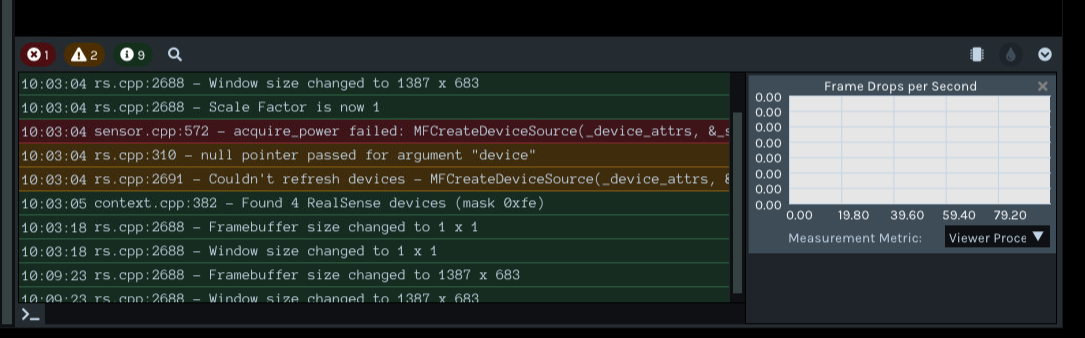
-
It is normal to not be able to find a Jenkins folder on your C: drive, so there is no need to be concerned about that.
Next, please try completely uninstalling all of the RealSense Depth and RGB drivers listed in your Device Manager. You can do this using a guide at the link below.
https://support.intelrealsense.com/hc/en-us/community/posts/4419989666323/comments/4431239847443
-
Thank you very much, but after following the above process, the result did not improve. I think my camera is broken. However, I did another test, I used python-opencv to call the camera, and it turned out to be callable. Now I have no choice. However, when I use the pyrealsense2, I got some bad information.
Traceback (most recent call last):
File "D:/realsense_code/code/save_rgb_depth/test1.py", line 63, in <module>
profile = pipeline.start(config)
RuntimeError: No device connected -
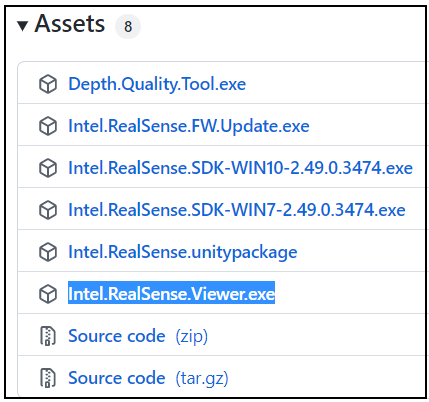
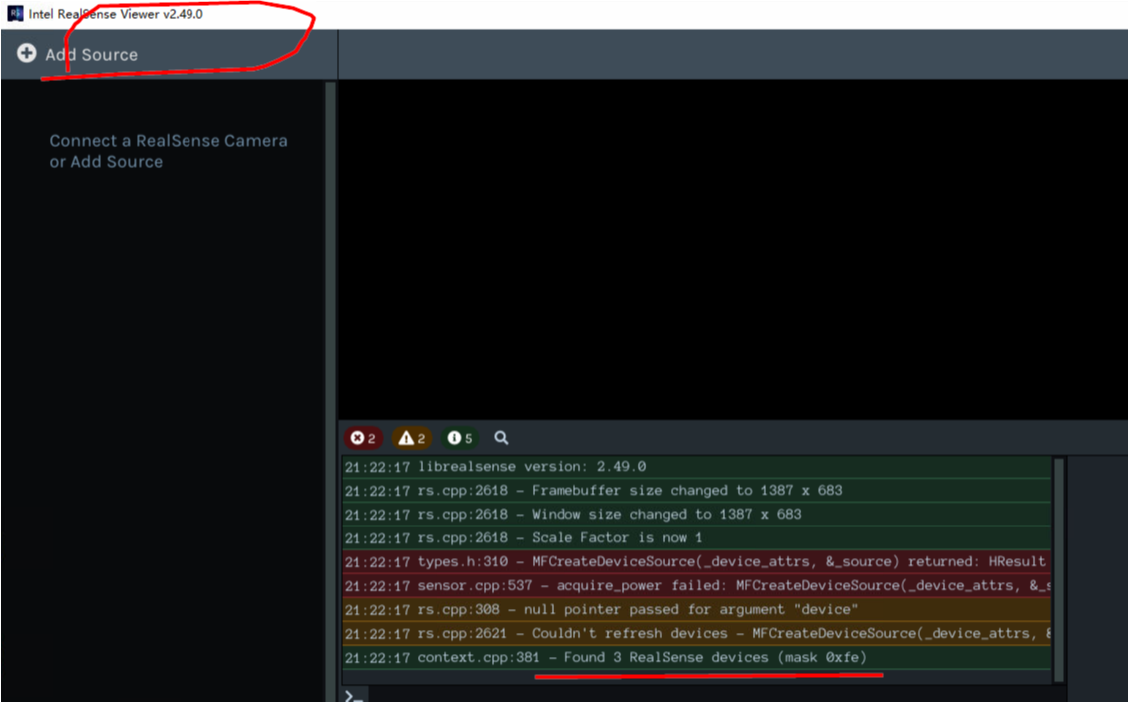
Next, please download the 2.49.0 version of the standalone RealSense Viewer (Intel.RealSense.Viewer.exe) from the Assets list at the link below and then launch it with a double-leftclick from the folder location that you downloaded the file to.
https://github.com/IntelRealSense/librealsense/releases/tag/v2.49.0
Is the camera able to be detected in the 2.49.0 Viewer?
-
The Found 3 RealSense devices message that you highlighted is unusual if you only have one D455 attached, as the number of detected devices should reflect how many are attached. For example, in a test I ran, attaching a D455 and a D405 resulted in 2 devices being found. Unplugging the D405 so that only the D455 was detected resulted in 1 device being found.
It would therefore be normal for 3 found devices to be reported if you had 3 D455 plugged in at the same time when launching the Viewer.
-
Is it able to detect a single camera in the Viewer if only one is plugged in? If it can detect one camera but not three in the Viewer, but it can list all three in the Device Manager, the problem may be related to insufficient power available on the USB system to meet the needs of 3 cameras on the computer that you are using.
-
I tried the single camera operation and it didn't work. I also checked the motherboard display is normal
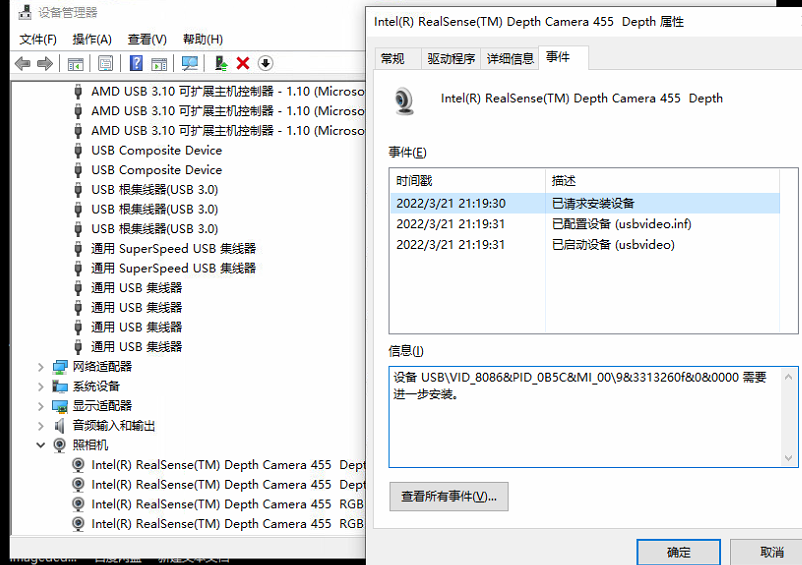
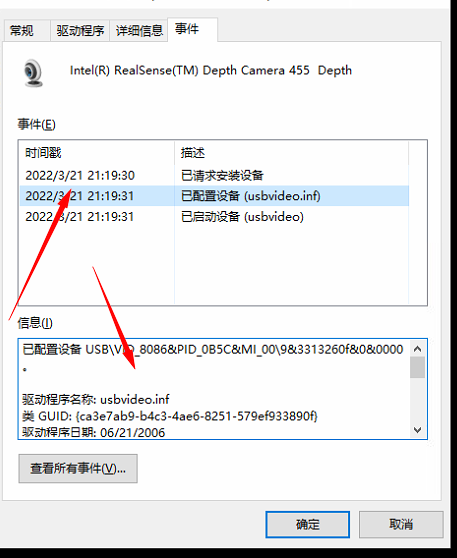
已配置设备 USB\VID_8086&PID_0B5C&MI_00\9&3313260f&0&0000。
驱动程序名称: usbvideo.inf
类 GUID: {ca3e7ab9-b4c3-4ae6-8251-579ef933890f}
驱动程序日期: 06/21/2006
驱动程序版本: 10.0.17763.1192
驱动程序提供商: Microsoft
驱动程序部分: USBVideo.NT
驱动程序等级: 0xFF2002
匹配设备 ID: USB\Class_0e
低等级驱动程序:
设备已更新: false
父设备: USB\VID_8086&PID_0B5C\112623060253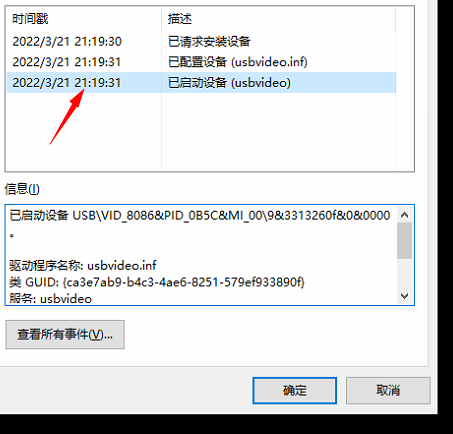
已启动设备 USB\VID_8086&PID_0B5C&MI_00\9&3313260f&0&0000。
驱动程序名称: usbvideo.inf
类 GUID: {ca3e7ab9-b4c3-4ae6-8251-579ef933890f}
服务: usbvideo
低层筛选程序: WdmCompanionFilter
高层筛选程序: -
Which method did you use to install the RealSense SDK on your Windows computer, please?
1. With the automated installer file Intel.RealSense.SDK-WIN10
https://github.com/IntelRealSense/librealsense/blob/master/doc/distribution_windows.md
Or 2. Building it from source code with CMake.
https://github.com/IntelRealSense/librealsense/blob/master/doc/installation_windows.md
-
At the beginning, I didn't download the SDK, just run the view.exe software and it can run normally. After I downloaded SDK2.0 today, I configured vs2017 to perfection. When running the Sample in the SDK again, the following error is given.
“align.exe”(Win32): 已加载“C:\Program Files (x86)\Intel RealSense SDK 2.0\samples\x64\Release\align.exe”。已加载符号。
“align.exe”(Win32): 已加载“C:\Windows\System32\ntdll.dll”。无法查找或打开 PDB 文件。
“align.exe”(Win32): 已加载“C:\Windows\System32\kernel32.dll”。无法查找或打开 PDB 文件。
“align.exe”(Win32): 已加载“C:\Windows\System32\KernelBase.dll”。无法查找或打开 PDB 文件。
“align.exe”(Win32): 已加载“C:\Windows\System32\imm32.dll”。无法查找或打开 PDB 文件。
“align.exe”(Win32): 已加载“C:\Windows\System32\user32.dll”。无法查找或打开 PDB 文件。
“align.exe”(Win32): 已加载“C:\Program Files (x86)\Intel RealSense SDK 2.0\samples\x64\Release\realsense2.dll”。无法查找或打开 PDB 文件。
“align.exe”(Win32): 已加载“C:\Windows\System32\opengl32.dll”。无法查找或打开 PDB 文件。
“align.exe”(Win32): 已加载“C:\Windows\System32\win32u.dll”。无法查找或打开 PDB 文件。
“align.exe”(Win32): 已加载“C:\Windows\System32\msvcrt.dll”。无法查找或打开 PDB 文件。
“align.exe”(Win32): 已加载“C:\Windows\System32\gdi32.dll”。无法查找或打开 PDB 文件。
“align.exe”(Win32): 已加载“C:\Windows\System32\advapi32.dll”。无法查找或打开 PDB 文件。
“align.exe”(Win32): 已加载“C:\Windows\System32\ole32.dll”。无法查找或打开 PDB 文件。
“align.exe”(Win32): 已加载“C:\Windows\System32\gdi32full.dll”。无法查找或打开 PDB 文件。
“align.exe”(Win32): 已加载“C:\Windows\System32\sechost.dll”。无法查找或打开 PDB 文件。
“align.exe”(Win32): 已加载“D:\install\pycharm2021.2\bin\msvcp140.dll”。无法查找或打开 PDB 文件。
“align.exe”(Win32): 已加载“C:\Windows\System32\combase.dll”。无法查找或打开 PDB 文件。
“align.exe”(Win32): 已加载“C:\Windows\System32\msvcp_win.dll”。无法查找或打开 PDB 文件。
“align.exe”(Win32): 已加载“C:\Windows\System32\rpcrt4.dll”。无法查找或打开 PDB 文件。
“align.exe”(Win32): 已加载“C:\Windows\System32\ucrtbase.dll”。无法查找或打开 PDB 文件。
“align.exe”(Win32): 已加载“C:\Windows\System32\ucrtbase.dll”。无法查找或打开 PDB 文件。
“align.exe”(Win32): 已加载“C:\Windows\System32\ucrtbase.dll”。无法查找或打开 PDB 文件。
“align.exe”(Win32): 已卸载“C:\Windows\System32\ucrtbase.dll”
“align.exe”(Win32): 已卸载“C:\Windows\System32\ucrtbase.dll”
“align.exe”(Win32): 已加载“C:\Windows\System32\bcryptprimitives.dll”。无法查找或打开 PDB 文件。
“align.exe”(Win32): 已加载“C:\Windows\System32\shell32.dll”。无法查找或打开 PDB 文件。
“align.exe”(Win32): 已加载“C:\Windows\System32\cfgmgr32.dll”。无法查找或打开 PDB 文件。
“align.exe”(Win32): 已加载“C:\Windows\System32\oleaut32.dll”。无法查找或打开 PDB 文件。
“align.exe”(Win32): 已加载“C:\Windows\System32\glu32.dll”。无法查找或打开 PDB 文件。
“align.exe”(Win32): 已加载“C:\Windows\System32\shlwapi.dll”。无法查找或打开 PDB 文件。
“align.exe”(Win32): 已加载“C:\Windows\System32\SHCore.dll”。无法查找或打开 PDB 文件。
“align.exe”(Win32): 已加载“D:\install\python\vcruntime140.dll”。无法查找或打开 PDB 文件。
“align.exe”(Win32): 已加载“C:\Windows\System32\setupapi.dll”。无法查找或打开 PDB 文件。
“align.exe”(Win32): 已加载“C:\Windows\System32\windows.storage.dll”。无法查找或打开 PDB 文件。
“align.exe”(Win32): 已加载“C:\Windows\System32\profapi.dll”。无法查找或打开 PDB 文件。
“align.exe”(Win32): 已加载“C:\Windows\System32\bcrypt.dll”。无法查找或打开 PDB 文件。
“align.exe”(Win32): 已加载“C:\Windows\System32\powrprof.dll”。无法查找或打开 PDB 文件。
“align.exe”(Win32): 已加载“C:\Windows\System32\kernel.appcore.dll”。无法查找或打开 PDB 文件。
“align.exe”(Win32): 已加载“C:\Windows\System32\winusb.dll”。无法查找或打开 PDB 文件。
“align.exe”(Win32): 已加载“C:\Windows\System32\mf.dll”。无法查找或打开 PDB 文件。
“align.exe”(Win32): 已加载“C:\Windows\System32\cryptsp.dll”。无法查找或打开 PDB 文件。
“align.exe”(Win32): 已加载“C:\Windows\System32\mfplat.dll”。无法查找或打开 PDB 文件。
“align.exe”(Win32): 已加载“C:\Windows\System32\mfreadwrite.dll”。无法查找或打开 PDB 文件。
“align.exe”(Win32): 已加载“C:\Windows\System32\mfcore.dll”。无法查找或打开 PDB 文件。
“align.exe”(Win32): 已加载“C:\Windows\System32\crypt32.dll”。无法查找或打开 PDB 文件。
“align.exe”(Win32): 已加载“C:\Windows\System32\msasn1.dll”。无法查找或打开 PDB 文件。
“align.exe”(Win32): 已加载“C:\Windows\System32\ksuser.dll”。无法查找或打开 PDB 文件。
“align.exe”(Win32): 已加载“C:\Windows\System32\cryptbase.dll”。无法查找或打开 PDB 文件。
“align.exe”(Win32): 已加载“C:\Windows\System32\RTWorkQ.dll”。无法查找或打开 PDB 文件。
“align.exe”(Win32): 已加载“C:\Windows\System32\uxtheme.dll”。无法查找或打开 PDB 文件。
“align.exe”(Win32): 已加载“C:\Windows\System32\winmm.dll”。无法查找或打开 PDB 文件。
“align.exe”(Win32): 已加载“C:\Windows\System32\winmmbase.dll”。无法查找或打开 PDB 文件。
“align.exe”(Win32): 已加载“C:\Windows\System32\winmmbase.dll”。无法查找或打开 PDB 文件。
“align.exe”(Win32): 已卸载“C:\Windows\System32\winmmbase.dll”
“align.exe”(Win32): 已加载“C:\Windows\System32\winmmbase.dll”。无法查找或打开 PDB 文件。
“align.exe”(Win32): 已卸载“C:\Windows\System32\winmmbase.dll”
“align.exe”(Win32): 已加载“C:\Windows\System32\dwmapi.dll”。无法查找或打开 PDB 文件。
“align.exe”(Win32): 已加载“C:\Windows\System32\msctf.dll”。无法查找或打开 PDB 文件。
“align.exe”(Win32): 已加载“C:\Program Files\TeamViewer\tv_x64.dll”。无法查找或打开 PDB 文件。
“align.exe”(Win32): 已加载“C:\Windows\System32\version.dll”。无法查找或打开 PDB 文件。
“align.exe”(Win32): 已加载“C:\Windows\System32\DriverStore\FileRepository\u0367912.inf_amd64_1567db284dfba458\B366469\atig6pxx.dll”。无法查找或打开 PDB 文件。
“align.exe”(Win32): 已加载“C:\Windows\System32\DriverStore\FileRepository\u0367912.inf_amd64_1567db284dfba458\B366469\atio6axx.dll”。无法查找或打开 PDB 文件。
“align.exe”(Win32): 已加载“C:\Windows\System32\dxva2.dll”。无法查找或打开 PDB 文件。
“align.exe”(Win32): 已加载“C:\Windows\System32\dxgi.dll”。无法查找或打开 PDB 文件。
“align.exe”(Win32): 已加载“C:\Windows\System32\ResourcePolicyClient.dll”。无法查找或打开 PDB 文件。
“align.exe”(Win32): 已卸载“C:\Windows\System32\ResourcePolicyClient.dll”
“align.exe”(Win32): 已卸载“C:\Windows\System32\dxgi.dll”
“align.exe”(Win32): 已加载“C:\Windows\System32\DriverStore\FileRepository\u0367912.inf_amd64_1567db284dfba458\B366469\atig6txx.dll”。无法查找或打开 PDB 文件。
“align.exe”(Win32): 已加载“C:\Windows\System32\atiadlxx.dll”。无法查找或打开 PDB 文件。
“align.exe”(Win32): 已加载“C:\Windows\System32\psapi.dll”。无法查找或打开 PDB 文件。
“align.exe”(Win32): 已加载“C:\Windows\System32\propsys.dll”。无法查找或打开 PDB 文件。
“align.exe”(Win32): 已加载“C:\Windows\System32\pdh.dll”。无法查找或打开 PDB 文件。
“align.exe”(Win32): 已加载“C:\Windows\System32\devobj.dll”。无法查找或打开 PDB 文件。
“align.exe”(Win32): 已加载“C:\Windows\System32\wintrust.dll”。无法查找或打开 PDB 文件。
“align.exe”(Win32): 已加载“C:\Windows\System32\TextInputFramework.dll”。无法查找或打开 PDB 文件。
“align.exe”(Win32): 已加载“C:\Windows\System32\CoreUIComponents.dll”。无法查找或打开 PDB 文件。
“align.exe”(Win32): 已加载“C:\Windows\System32\CoreMessaging.dll”。无法查找或打开 PDB 文件。
“align.exe”(Win32): 已加载“C:\Windows\System32\WinTypes.dll”。无法查找或打开 PDB 文件。
“align.exe”(Win32): 已加载“C:\Windows\System32\WinTypes.dll”。无法查找或打开 PDB 文件。
“align.exe”(Win32): 已卸载“C:\Windows\System32\WinTypes.dll”
“align.exe”(Win32): 已加载“C:\Windows\System32\ntmarta.dll”。无法查找或打开 PDB 文件。
“align.exe”(Win32): 已加载“C:\Windows\System32\clbcatq.dll”。无法查找或打开 PDB 文件。
“align.exe”(Win32): 已加载“C:\Windows\System32\SensorsApi.dll”。无法查找或打开 PDB 文件。
“align.exe”(Win32): 已加载“C:\Windows\System32\SensorsUtilsV2.dll”。无法查找或打开 PDB 文件。
“align.exe”(Win32): 已加载“C:\Windows\System32\SensorsNativeApi.V2.dll”。无法查找或打开 PDB 文件。
“align.exe”(Win32): 已加载“C:\Windows\System32\PortableDeviceTypes.dll”。无法查找或打开 PDB 文件。
“align.exe”(Win32): 已加载“C:\Windows\System32\deviceaccess.dll”。无法查找或打开 PDB 文件。
“align.exe”(Win32): 已加载“C:\Windows\System32\PortableDeviceApi.dll”。无法查找或打开 PDB 文件。
线程 0x7f8 已退出,返回值为 0 (0x0)。
“align.exe”(Win32): 已加载“C:\Windows\System32\CompPkgSup.dll”。无法查找或打开 PDB 文件。
“align.exe”(Win32): 已加载“C:\Windows\System32\Windows.Media.dll”。无法查找或打开 PDB 文件。
“align.exe”(Win32): 已加载“C:\Windows\System32\ws2_32.dll”。无法查找或打开 PDB 文件。
“align.exe”(Win32): 已加载“C:\Windows\System32\Windows.ApplicationModel.dll”。无法查找或打开 PDB 文件。
“align.exe”(Win32): 已加载“C:\Windows\System32\twinapi.appcore.dll”。无法查找或打开 PDB 文件。
“align.exe”(Win32): 已加载“C:\Windows\System32\rmclient.dll”。无法查找或打开 PDB 文件。
“align.exe”(Win32): 已加载“C:\Windows\System32\AppXDeploymentClient.dll”。无法查找或打开 PDB 文件。
“align.exe”(Win32): 已加载“C:\Windows\System32\StateRepository.Core.dll”。无法查找或打开 PDB 文件。
线程 0x6d8 已退出,返回值为 0 (0x0)。
“align.exe”(Win32): 已加载“C:\Windows\System32\hid.dll”。无法查找或打开 PDB 文件。
线程 0x28c0 已退出,返回值为 0 (0x0)。
线程 0x768 已退出,返回值为 0 (0x0)。
0x00007FFBDBC19329 处(位于 align.exe 中)引发的异常: Microsoft C++ 异常: std::runtime_error,位于内存位置 0x000000E5ABFBEE50 处。
线程 0x2d80 已退出,返回值为 0 (0x0)。
线程 0x2704 已退出,返回值为 0 (0x0)。
0x00007FFBDBC19329 处(位于 align.exe 中)引发的异常: Microsoft C++ 异常: std::runtime_error,位于内存位置 0x000000E5ABFBEE50 处。
线程 0x1e4c 已退出,返回值为 0 (0x0)。
线程 0x32ec 已退出,返回值为 0 (0x0)。
0x00007FFBDBC19329 处(位于 align.exe 中)引发的异常: Microsoft C++ 异常: std::runtime_error,位于内存位置 0x000000E5ABFBEE50 处。
0x00007FFBDBC19329 处(位于 align.exe 中)引发的异常: Microsoft C++ 异常: [rethrow],位于内存位置 0x0000000000000000 处。
0x00007FFBDBC19329 处(位于 align.exe 中)引发的异常: Microsoft C++ 异常: std::runtime_error,位于内存位置 0x000000E5ABFBEE50 处。
0x00007FFBDBC19329 处(位于 align.exe 中)引发的异常: Microsoft C++ 异常: [rethrow],位于内存位置 0x0000000000000000 处。
0x00007FFBDBC19329 处(位于 align.exe 中)引发的异常: Microsoft C++ 异常: rs2::error,位于内存位置 0x000000E5ABFBF600 处。
0x00007FFBDBC19329 处(位于 align.exe 中)引发的异常: Microsoft C++ 异常: std::runtime_error,位于内存位置 0x000000E5ABFBD700 处。
0x00007FFBDBC19329 处(位于 align.exe 中)引发的异常: Microsoft C++ 异常: [rethrow],位于内存位置 0x0000000000000000 处。
线程 0x2b7c 已退出,返回值为 0 (0x0)。
线程 0xea8 已退出,返回值为 0 (0x0)。
线程 0x2ba4 已退出,返回值为 0 (0x0)。
线程 0x2e10 已退出,返回值为 0 (0x0)。
线程 0x2a80 已退出,返回值为 0 (0x0)。
线程 0x3628 已退出,返回值为 0 (0x0)。
线程 0x3790 已退出,返回值为 0 (0x0)。
线程 0x59c 已退出,返回值为 0 (0x0)。
线程 0x36dc 已退出,返回值为 0 (0x0)。
线程 0x1d60 已退出,返回值为 0 (0x0)。
线程 0x2ce8 已退出,返回值为 0 (0x0)。
线程 0x5dc 已退出,返回值为 0 (0x0)。
“align.exe”(Win32): 已卸载“C:\Windows\System32\deviceaccess.dll”
“align.exe”(Win32): 已卸载“C:\Windows\System32\PortableDeviceTypes.dll”
“align.exe”(Win32): 已卸载“C:\Windows\System32\PortableDeviceApi.dll”
“align.exe”(Win32): 已卸载“C:\Windows\System32\ws2_32.dll”
“align.exe”(Win32): 已卸载“C:\Windows\System32\Windows.Media.dll”
“align.exe”(Win32): 已卸载“C:\Windows\System32\SensorsUtilsV2.dll”
“align.exe”(Win32): 已卸载“C:\Windows\System32\SensorsNativeApi.V2.dll”
“align.exe”(Win32): 已卸载“C:\Windows\System32\SensorsApi.dll”
“align.exe”(Win32): 已卸载“C:\Windows\System32\rmclient.dll”
“align.exe”(Win32): 已卸载“C:\Windows\System32\twinapi.appcore.dll”
“align.exe”(Win32): 已卸载“C:\Windows\System32\StateRepository.Core.dll”
“align.exe”(Win32): 已卸载“C:\Windows\System32\AppXDeploymentClient.dll”
“align.exe”(Win32): 已卸载“C:\Windows\System32\Windows.ApplicationModel.dll”
线程 0x644 已退出,返回值为 1 (0x1)。
线程 0x580 已退出,返回值为 1 (0x1)。
线程 0x1ed8 已退出,返回值为 1 (0x1)。
线程 0x5d8 已退出,返回值为 1 (0x1)。
线程 0xb98 已退出,返回值为 1 (0x1)。
线程 0x28a0 已退出,返回值为 1 (0x1)。
线程 0x1c54 已退出,返回值为 1 (0x1)。
线程 0x36d0 已退出,返回值为 1 (0x1)。
线程 0x1784 已退出,返回值为 1 (0x1)。
线程 0x34dc 已退出,返回值为 1 (0x1)。
线程 0xe0c 已退出,返回值为 1 (0x1)。
线程 0x16fc 已退出,返回值为 1 (0x1)。
线程 0x3444 已退出,返回值为 1 (0x1)。
线程 0xb94 已退出,返回值为 1 (0x1)。
线程 0x3750 已退出,返回值为 1 (0x1)。
线程 0x3600 已退出,返回值为 1 (0x1)。
线程 0x231c 已退出,返回值为 1 (0x1)。
线程 0x2b84 已退出,返回值为 1 (0x1)。
线程 0x2088 已退出,返回值为 1 (0x1)。
线程 0xbcc 已退出,返回值为 1 (0x1)。
线程 0x35dc 已退出,返回值为 1 (0x1)。
线程 0x2364 已退出,返回值为 1 (0x1)。
线程 0x3564 已退出,返回值为 1 (0x1)。
线程 0x36ac 已退出,返回值为 1 (0x1)。
线程 0x3708 已退出,返回值为 1 (0x1)。
线程 0x3744 已退出,返回值为 1 (0x1)。
线程 0x1f0c 已退出,返回值为 1 (0x1)。
线程 0x333c 已退出,返回值为 1 (0x1)。
线程 0x11e0 已退出,返回值为 1 (0x1)。
线程 0x2a3c 已退出,返回值为 1 (0x1)。
线程 0x2d8c 已退出,返回值为 1 (0x1)。
线程 0xec8 已退出,返回值为 1 (0x1)。
线程 0x3298 已退出,返回值为 1 (0x1)。
线程 0x268 已退出,返回值为 1 (0x1)。
线程 0x380 已退出,返回值为 1 (0x1)。
线程 0x37b8 已退出,返回值为 1 (0x1)。
线程 0x2148 已退出,返回值为 1 (0x1)。
线程 0x1c18 已退出,返回值为 1 (0x1)。
线程 0x2c50 已退出,返回值为 1 (0x1)。
线程 0x30a4 已退出,返回值为 1 (0x1)。
线程 0x31b8 已退出,返回值为 1 (0x1)。
线程 0x339c 已退出,返回值为 1 (0x1)。
线程 0x1284 已退出,返回值为 1 (0x1)。
线程 0x1bdc 已退出,返回值为 1 (0x1)。
线程 0x3458 已退出,返回值为 1 (0x1)。
线程 0xe8c 已退出,返回值为 1 (0x1)。
线程 0x34ac 已退出,返回值为 1 (0x1)。
线程 0x6e8 已退出,返回值为 1 (0x1)。
线程 0x3164 已退出,返回值为 1 (0x1)。
线程 0x3488 已退出,返回值为 1 (0x1)。
线程 0x3554 已退出,返回值为 1 (0x1)。
线程 0x784 已退出,返回值为 1 (0x1)。
线程 0x36d4 已退出,返回值为 1 (0x1)。
线程 0x2188 已退出,返回值为 1 (0x1)。
线程 0x36a0 已退出,返回值为 1 (0x1)。
线程 0x2b4c 已退出,返回值为 1 (0x1)。
线程 0x2a60 已退出,返回值为 1 (0x1)。
线程 0xd68 已退出,返回值为 1 (0x1)。
线程 0x568 已退出,返回值为 1 (0x1)。
线程 0xcec 已退出,返回值为 1 (0x1)。
程序“[10316] align.exe”已退出,返回值为 1 (0x1)。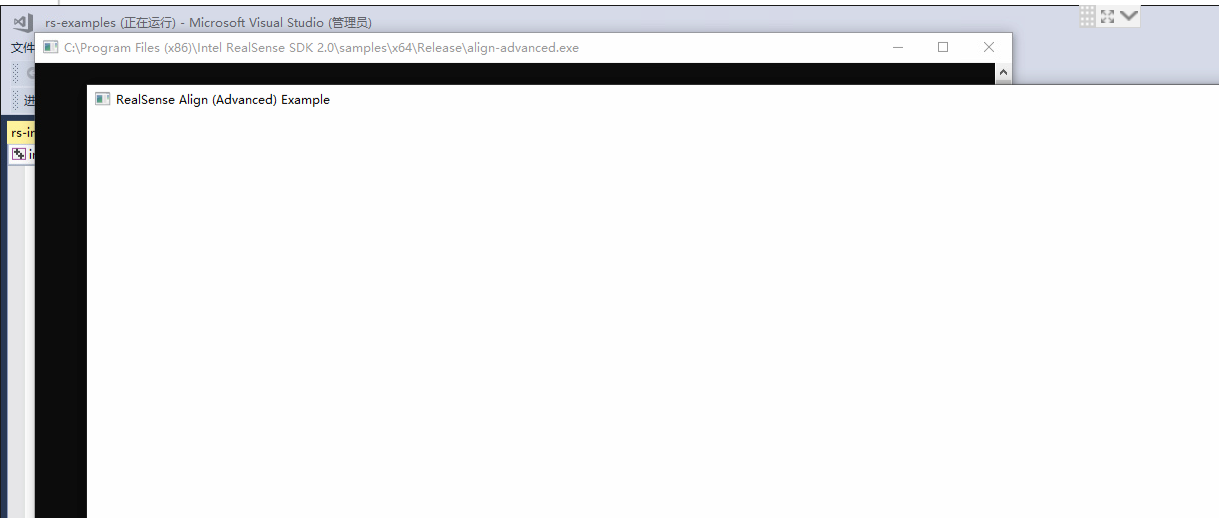
-
If you installed the full SDK with the automated installer file Intel.RealSense.SDK-WIN10 then you should not need Visual Studio to run the examples, as launchable pre-built .exe files of the examples should be in the folder Intel RealSense SDK 2.0 > Tools
If you wish to build the examples in Visual Studio on Windows, Intel provide guidance for doing so at the link below.
Please sign in to leave a comment.
Comments
18 comments