Running into " does not appear to contain CMakeLists.txt." during build of RealSense SDK
Hello,
I am following the following documentation to install RealSense SDK on my MacOS (Sequoia 15.7.2 (24G325).
https://dev.realsenseai.com/docs/macos-installation-for-intel-realsense-sdk
I am getting the following error on this step:
cmake .. -DBUILD_EXAMPLES=true -DBUILD_WITH_OPENMP=false -DHWM_OVER_XU=false -G Xcode
mustafacayci@Mustafas-MacBook-Pro build % cmake .. -DBUILD_EXAMPLES=true -DBUILD_WITH_OPENMP=false -DHWM_OVER_XU=false -G Xcode
CMake Warning:
CMake Error: The source directory "/Users/mustafacayci/Projects/IntelRealSense" does not appear to contain CMakeLists.txt.
I searched for that file. I don't see it.
Any help is much appreciated.
Mustafa
-
Hi MUSTAFA CAYCI That guide is very old. I recommend using the excellent Lightbuzz guide at the link below, which can be used with both the old Intel-based Macs and modern Apple Silicon M machines.
https://lightbuzz.com/realsense-macos/
Section 2 of the guide explains how to obtain the librealsense source code before initiating the CMake build command.
If you still experience problems then a quick way to install librealsense on Mac easily is with brew install librealsense
-
Hi MartyX Grover. I am following the steps in Lightbuzz. clone from GitHub is giving me 500. Is it on my end?
mustafacayci@Mustafas-MacBook-Pro IntelRealSense % git clone https://github.com/IntelRealSense/librealsense.git
Cloning into 'librealsense'...
remote: Internal Server Error
fatal: unable to access 'https://github.com/IntelRealSense/librealsense.git/': The requested URL returned error: 500
-
That GitHub clone address is the correct one.
If you continue to have problems, you can go to the GitHub repository page.
https://github.com/IntelRealSense/librealsense
Then click on the green Code button and click on Download ZIP to launch a download of a zipped file of the librealsense source code folder in your browser. Extract the contents of the zip (a folder called librealsense-master) once download has completed.
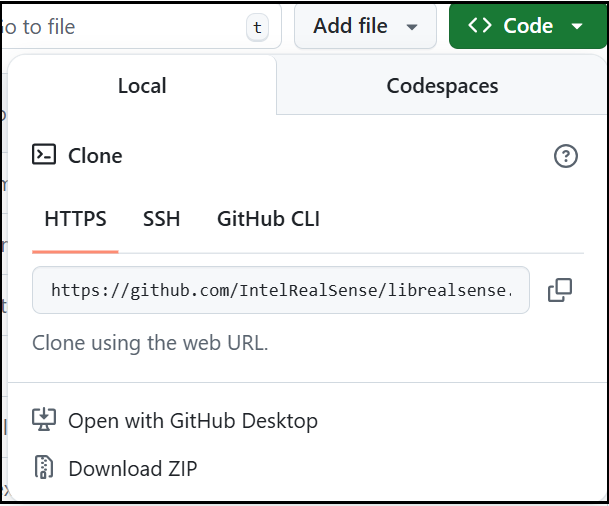
Navigate to the librealsense-master folder and then follow the Lightbuzz instructions from the mkdir build && cd build command onwards.
Please sign in to leave a comment.
Comments
3 comments