Assistance with Setting Up Intel RealSense D555 (PoE)
Hello Intel Support Team,
I’m reaching out from Amazon. I’m currently setting up a RealSense D555 camera using the Intel RealSense SDK, but I’m encountering some connection issues.
On Ubuntu, the RealSense Viewer does not recognize the device at all. On Windows, it’s detected as a USB device, but no data streams are available. I’ve tried connecting the camera both through a PoE switch and directly via Ethernet, but neither setup has worked so far.
Additionally, I’d like to connect to the camera and record data programmatically using Python, but I’m unable to determine the camera’s IP address. I attempted a few possible addresses, but without SDK detection, there doesn’t seem to be a way to identify the correct one.
Could you please guide me on how to properly connect and stream data from the D555 over the network? Any steps or configuration guidance would be greatly appreciated.
-
Hi Pavan Shetty There is an illustrated guide to setting up D555 on Windows for a PoE connection at the link below.
https://github.com/IntelRealSense/librealsense/issues/14293#issuecomment-3304919513
On Windows the jumbo packet value should be set to 9014 whilst on Linux it should be 9000.
Additionally, the RealSense SDK should be built from source code with CMake with the flag -DBUILD_WITH_DDS=ON included in the CMake build instruction in order for the camera to be used on a PoE ethernet connection.
https://github.com/IntelRealSense/librealsense/issues/14284#issuecomment-3349204762
If the camera is connected via a USB cable and you have made sure that the ethernet cable is not connected to the camera (as this prevents USB mode from working), if the streams are still not working then please check in the Windows camera privacy settings whether permission to access the camera hardware and permission for applications to access the camera are both set to On.
https://github.com/IntelRealSense/librealsense/issues/3381#issuecomment-503424789
D555 has the fixed IP address 192.168.11.55
-
Instructions for building the SDK from source code on Windows with CMake can be found here:
https://github.com/IntelRealSense/librealsense/blob/master/doc/installation_windows.md
-
Hello MartyX,
I’m following up regarding my RealSense D555 PoE camera setup. I’ve been able to get network connectivity established, but the SDK still doesn’t detect the camera. Below is a detailed summary of my setup, the steps I’ve taken, and the current issue.
System and Setup
-
Camera: Intel RealSense D555 (PoE)
-
OS: Ubuntu 22.04
-
Connection: Direct PoE → Ethernet (link detected, powered, and ping reachable)
-
Camera IP: 192.168.11.55 (fixed)
-
MTU: 9000
-
SDK Version: librealsense 2.56.5 (built from source)
What’s Working
-
PoE link verified via
ethtool→Link detected: yes -
Camera responds to
ping -
SDK builds and installs cleanly (
makeandsudo make installcomplete without errors) -
FastDDS and FastCDR installed from both
aptand later from eProsima’s official repository
What I’ve Tried
-
Built librealsense from source with:
cmake .. -DBUILD_WITH_DDS=ON -DFORCE_RSUSB_BACKEND=FALSE -DCMAKE_BUILD_TYPE=Release -
Also tried with:
-DCMAKE_PREFIX_PATH=/usr/lib/x86_64-linux-gnu/cmake/fastdds -
Verified FastDDS installation —
fastddsConfig.cmakeexists under/usr/lib/x86_64-linux-gnu/cmake/fastdds/ -
However, CMake output never shows:
-- DDS support: ON (FastDDS found)and
grep -i DDS ~/librealsense/build/CMakeCache.txtshows noDDS_FOUND:TRUE. -
On running:
rs-enumerate-devices --eth→ Output: “No device detected. Is it plugged in?”
-
The RealSense Viewer opens successfully, but under “Add Source” it only shows
“Add recorded sequence” — no “Network Device” option.
Summary of Issue
Despite successful SDK build and verified network connectivity, the SDK does not detect the D555 camera.
It seems that FastDDS integration isn’t being detected by CMake, even thoughfastddsConfig.cmakeis installed system-wide.
Request for Assistance
Could you please clarify:
-
Which CMake flags or variables are required for DDS detection in SDK v2.56.5?
-
Are there any additional dependencies or environment variables needed for the D555 PoE model?
-
Is there a verified CMake configuration example for Ubuntu 22.04 + FastDDS + D555?
Any updated documentation or example configuration would be greatly appreciated.
Thank you for your time and support.
Best regards,
Pavan Shetty
(Amazon – Robotics/AI) -
-
Thanks very much for the very detailed feedback.
-DBUILD_WITH_DDS=ON is the only CMake flag that is required in order to add DDS support in the SDK.
When the camera is detected by the Viewer, its details should be listed in the options side-panel and resemble the image below. You should not need to use the Add Source button as the camera's details should appear automatically in the side-panel when the Viewer is launched.
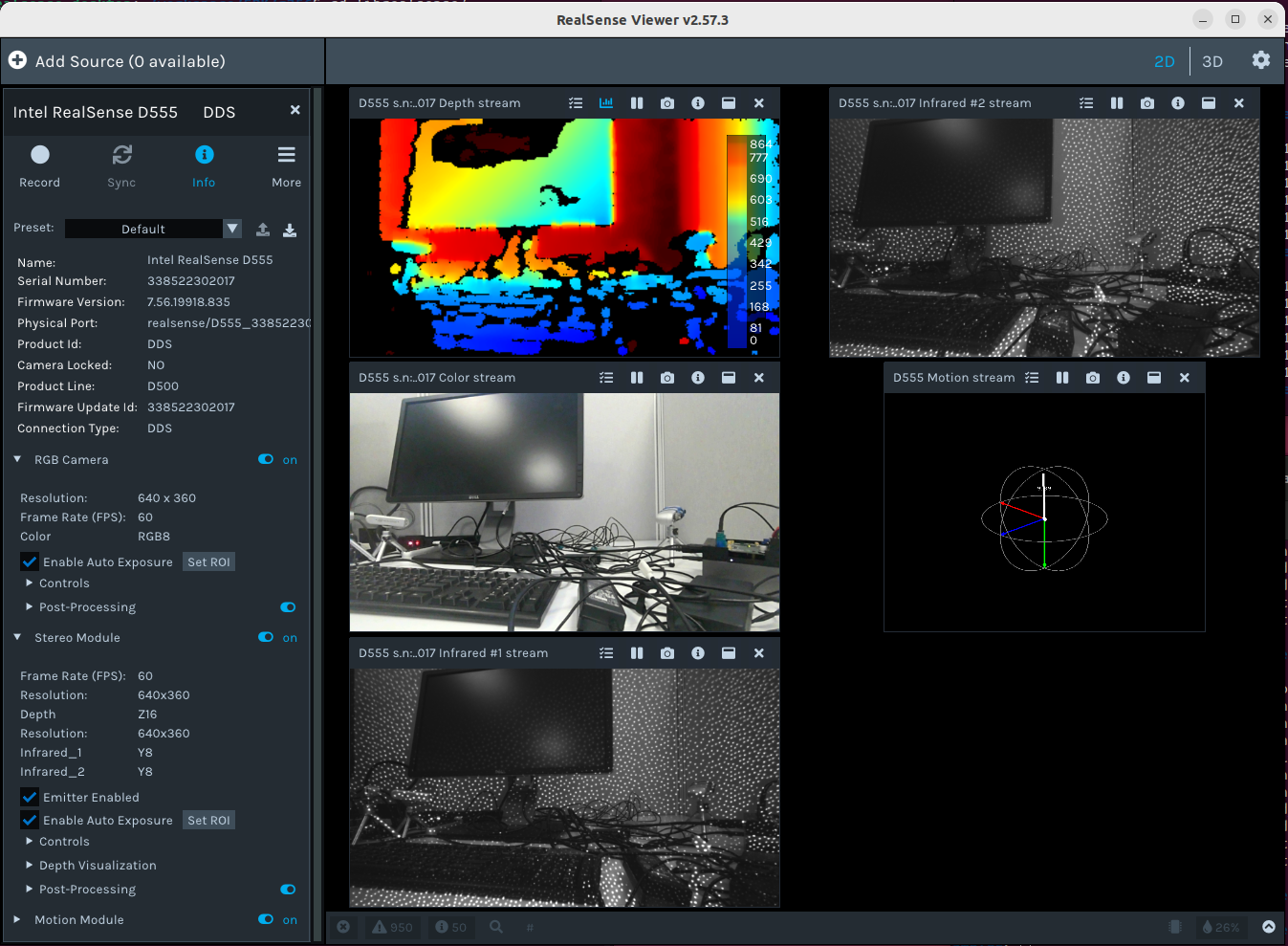
Before attempting to run a RealSense application, in addition to using a fixed IP of 192.168.11.55 and an MTU value of 1000, the host static IP should be set as 192.158.11.70 and the subnet mask set as 255.255.255.0
After that, you can run the rs-dds-config program and then rs-enumerate-devices
On the switch, the ethernet cable between the computer and the switch should go in the PoE In port. The D555 camera should be connected via its ethernet cable to the PoE Out port of the switch.
-
In regard to dependencies, the SDK installation process should be the same as for a USB source code installation except for the addition of the -DBUILD_WITH_DDS=ON CMake flag. One of my RealSense colleagues verified that their D555 camera was working by using the source code installation instructions at the link below before then configuring the ethernet settings once installation was complete.
The full list of instructions that my colleague shared, which were performed on Ubuntu 22.04, is here:
https://github.com/IntelRealSense/librealsense/issues/14284#issuecomment-3349204762
May I also confirm please that you are using ethernet cable that is CAT6 or higher, which is a requirement for the D555.
-
In the latest 2.57.4 version of the RealSense Viewer, an Enable DDS option has been added to the Viewer's settings configuration interface.
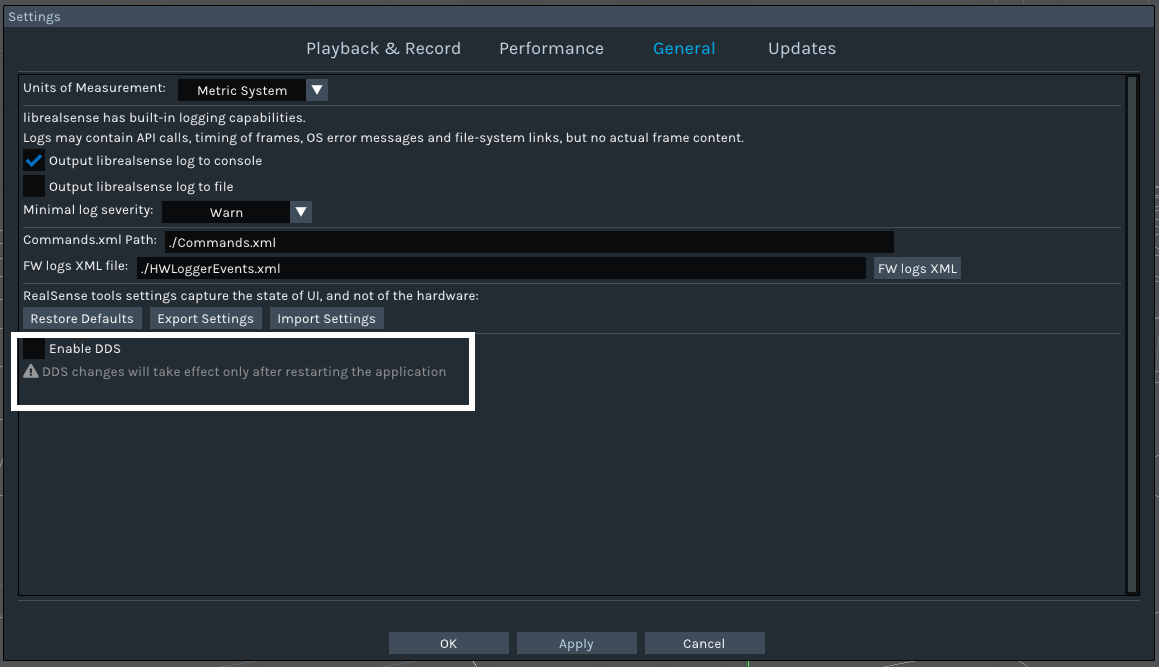
This interface can by accessed by clicking on the gear-wheel icon in the top corner of the Viewer to drop a menu down and then selecting Settings from the menu to pop up the Settings window. Then go to the General tab atop the Settings pop-up.
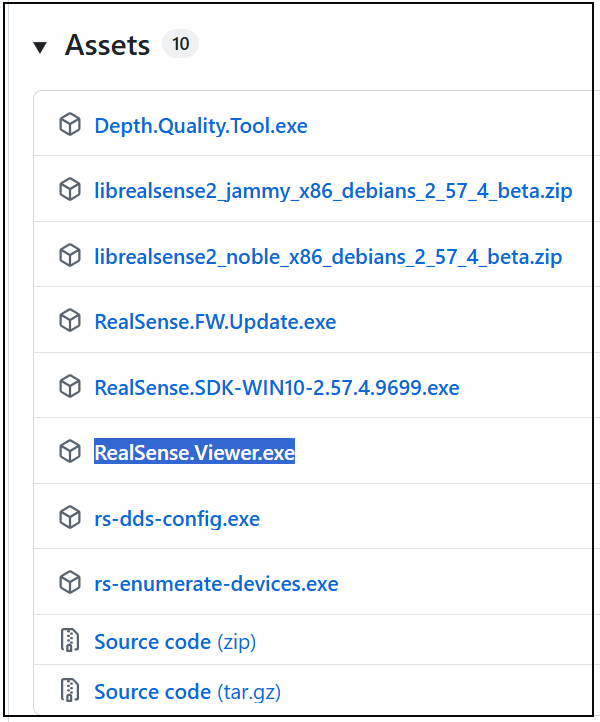
You could test this easily on Windows by downloading the standalone version of the 2.57.4 Viewer from the Assets list at the link below and then enabling DDS in the settings interface to see if your D555 appears.
https://github.com/IntelRealSense/librealsense/releases/tag/v2.57.4
-
Hello MartyX,
I’m following up regarding ongoing connection issues with my Intel RealSense D555 camera over PoE on Ubuntu 22.04. Despite successful network connectivity and DDS enablement, the camera is still not detected by the SDK or RealSense Viewer.
Below are all the steps and verification I’ve performed in sequence.
🧩 System & Build Environment
-
OS: Ubuntu 22.04 LTS
-
librealsense version: 2.57.4 (built from source)
-
CMake flags used:
cmake .. -DBUILD_WITH_DDS=ON -DFORCE_RSUSB_BACKEND=ON -
DDS confirmed enabled:
grep -i DDS ~/librealsense/build/CMakeCache.txt→BUILD_WITH_DDS:BOOL=ON -
RealSense Viewer: 2.57.4 (DDS option enabled in Settings → General)
-
FastDDS runtime: Not included natively on Ubuntu 22.04 (no packages found in eProsima APT repo), attempted manual installation and source build.
⚙️ Network Configuration
-
Camera: D555 with factory-fixed IP
192.168.11.55 -
Host: Static IP
192.168.11.70, Subnet255.255.255.0, MTU1000 -
Firewall: Inactive (
sudo ufw status → inactive) -
Connectivity:
-
ping 192.168.11.55→ success, ~1 ms latency -
ethtool eno1→Link detected: yes
-
-
Tested both:
-
Direct PoE injector (no switch)
-
PoE switch with host on PoE In, camera on PoE Out
-
🧠 DDS & SDK Behavior
-
rs-dds-configoutput:-I- DDS is now enabled by default in realsense-config.json ERROR [dds-device-impl.cpp:706] throwing: stream 'Infrared_1' options received out of order ERROR [dds-device-impl.cpp:706] throwing: stream 'Infrared_2' options received out of order ERROR [dds-device-impl.cpp:706] throwing: stream 'Motion' options received out of order -F- No device found supporting Eth -
rs-enumerate-devices --eth→ No device detected -
netstat -anu | grep 7400→ no active UDP listener (DDS discovery not visible on host) -
“Enable DDS” is checked inside RealSense Viewer → Settings → General.
🔍 Troubleshooting Attempted
-
Verified PoE power and network link (link light ON, ping works).
-
Disabled firewall and confirmed ICMP/multicast not filtered.
-
Tried direct PoE connection (bypassing switch) — same issue.
-
Rebuilt SDK multiple times with and without
-DBUILD_NETWORK_DEVICE=ON. -
Attempted to install FastDDS runtime (APT repo for Ubuntu 22.04 returns 404).
-
Checked for
fastdiscoveryand FastDDS binaries — not found. -
Rebooted camera multiple times and tested with MTU 1000 and 9000.
-
Verified
realsense-config.jsonshowsdds: true.
⚠️ Current State
-
DDS enabled, SDK built with DDS ON, network link stable, camera reachable via ping.
-
Still, no device enumeration or discovery occurs (
rs-enumerate-devices --eth→ empty). -
Viewer shows “Enable DDS” checked, but no D555 camera listed.
-
Error logs consistently mention “stream options received out of order,” suggesting a DDS handshake or firmware-level issue.
❓Questions / Assistance Requested
-
Could you confirm the minimum required firmware version for the D555 to work with SDK 2.57.4 and DDS?
-
Is there a specific FastDDS runtime package or version tested and compatible with this SDK on Ubuntu 22.04?
-
Is there a known issue with the D555’s embedded DDS agent or with SDK 2.57.4 on Ubuntu 22.04?
-
Would Intel provide a firmware image or tooling to reflash the DDS module if it has crashed or become incompatible? Also how do I know if the device is actually working and not faulty? there is no LED light or any indications of any sort
🧾 Additional Notes
-
I attempted connecting via USB-C as well, but only PoE mode seems functional.
-
I am using a certified CAT6 cable and verified power delivery from the injector.
-
The same configuration (hardware + PoE) works for other network devices on my setup, ruling out physical connectivity issues.
-
It appears the SDK’s FastDDS layer cannot discover or negotiate stream initialization with the D555 firmware.
Thank you for the detailed help so far.
I’d appreciate guidance on either obtaining the correct FastDDS runtime or confirming if a firmware reflash/update is required to restore DDS functionality.Best regards,
Pavan Shetty
Amazon – Robotics / AI -
-
My colleagues provided the following advice about your case.
*******
For that issue, it’s likely the incorrect MTU. D555's default MTU is 9000. Please leave it as the default (9000) and verify the MTU is 9000 on the host network interface as well as the switch.
For example, on Linux:
sudo ip link set down eno1

sudo ip link set mtu 9000 eno1

sudo ip link set up eno1
Restart the link and verify. It might take a couple of seconds for the camera to reconnect.
-
After further testing, I’ve confirmed that my host network adapter (Intel e1000e driver) does not support Jumbo Frames. The output from
ethtoolshowsRX Jumbo: n/a, and a jumbo-frame ping test (ping -M do -s 8972 192.168.11.55) fails with:ping: local error: message too long, mtu=1500This indicates the NIC is limited to a maximum MTU of 1500 bytes. Since the D555 requires MTU 9000 for DDS communication, the host is unable to receive the camera’s discovery packets—explaining why
rs-enumerate-devices --ethand the RealSense Viewer cannot detect the device, even though the PoE link and ICMP connectivity work normally.Could you please confirm whether the D555 supports a configurable MTU or reduced-frame-size mode for hosts without jumbo-frame capability, or should I proceed by using a NIC that explicitly supports MTU 9000?
Best regards,
Pavan Shetty -
At the time of writing this the camera firmware driver only supports MTU 9000. A future firmware version will introduce a function that allows use of lower MTU values including 1500 for switches that do not support jumbo frames, at the expense of lower data transmission speed.
For now, the only option if you need ethernet functionality immediately would be to use a NIC that supports MTU 9000.
-
Hi @IntelRealSense-Support / @MartyX,
Thanks again for your continued help on this issue. I wanted to share an update after performing additional tests on multiple systems and network configurations.
🧩 Current Status
The D555 camera is reachable via ICMP but none of its internal RealSense services (DDS, API, RTSP, or web interface) appear to initialize.
-
PoE power confirmed active (LEDs on injector/switch).
-
Link detected:
yesviaethtool. -
Ping: works consistently with ~2 ms latency.
ping -c 4 192.168.11.55
64 bytes from 192.168.11.55: icmp_seq=1 ttl=64 time=2.1 ms
However, DDS-based discovery and all higher-level services fail to respond.
❌ Service-Level Tests
Service Port Result RealSense API 8888 Closed Web interface 8080 Closed RTSP stream 554 Closed SDK / Viewer “No device connected” rs-enumerate-devices --ethNo devices found rs-dds-config“No device found supporting Eth” I also confirmed that the RJ-45 LEDs remain off even when ping is successful, which I understand is normal for this model.
⚙️ Diagnostics Performed
-
Tested on two different systems:
-
Intel-based mini-PC
-
HP Z2 Mini G9 Workstation (GPU system)
-
-
PoE injector and switch verified functional.
-
Camera responds to ping from both systems.
-
MTU set to 9000 per guidance, but both NICs (
e1000edriver) actually cap at 1500 bytes — verified with jumbo ping test:
ping -M do -s 8972 192.168.11.55 ping: local error: message too long, mtu=1500-
DDS discovery fails even though ping works perfectly.
🧠 Assessment
This behavior seems consistent with a firmware or embedded OS/service boot failure inside the D555.
The Ethernet PHY and ICMP layer clearly initialize, but the camera’s higher-level RealSense daemons (DDS, API, RTSP) never start.
📩 Request
Could you please confirm whether this indicates an internal OS or firmware fault, and if so, advise on the process for RMA or recovery?
I can provide full command outputs, logs, or Wireshark captures if helpful.
Thank you again for all your support so far — your earlier guidance helped me isolate this precisely to the service layer.
Best regards,
Pavan Shetty -
-
You are very welcome. I'm pleased to be able to help.
If your switch is capped at 1500 (the default MTU speed for a switch) and does not support jumbo frame values such as 9000, at the time of writing there is not currently a way around that except to replace the switch with one that supports jumbo frames.
In a future RealSense camera firmware update, a new parameter will be introduced to allow use of MTU values as low as 1500, at the expense of slower data transfer speed.
Please sign in to leave a comment.
Comments
13 comments