D455 Camera Stream FPS drops with Firmware 5.17.0.10
We observed significant FPS drops when using D455 with firmware 5.17.0.10, especially under motion scenarios.
The camera is connected via a dual USB hub chain (Camera → USB Hub → USB Hub → Host). After downgrading to firmware 5.15.1.55, the issue disappears.
This suggests a potential regression issue introduced in 5.17.0.10.
Could you please confirm if this is a known issue or if there are recommended mitigations?
-
Hi Jingliang Tian Which version of the RealSense SDK or RealSense Viewer are you using, please? Firmware 5.17.0.10 is designed for use with SDK / Viewer version 2.56.5 or newer.
-
Hi MartyX Grover,
I have tested camera stream FPS in different scenarios. Seems camera stream FPS be drops with camera firmware 5.17.0.10 and given dual USB hub chain no matter SDK versions. Do you have any knowledge to share about this dual USB hub chain scenario? Or I guess firmware 5.17.0.10 is not recommend base this hardware setup.
Attach as details:
Firmware: 5.17.0.10 SDK: 2.56.5.9235 Chain: dual USB hub chain (Camera → USB Hub → USB Hub → Host) Camera stream lag
Firmware: 5.17.0.10 SDK: 2.56.5.9235 Chain: Host directly USB (Camera -> Host) Camera stream non-lag
Firmware: 5.17.0.10 SDK: 2.55.1.6486 Chain: dual USB hub chain (Camera → USB Hub → USB Hub → Host) Camera stream lag
Firmware: 5.17.0.10 SDK: 2.55.1.6486 Chain: Host directly USB (Camera -> Host) Camera stream non-lag
Firmware: 5.15.1.55 SDK: 2.56.5.9235 Chain: dual USB hub chain (Camera → USB Hub → USB Hub → Host) Camera stream non-lag
Firmware: 5.15.1.55 SDK: 2.56.5.9235 Chain: Host directly USB (Camera -> Host) Camera stream non-lag
Firmware: 5.15.1.55 SDK: 2.55.1.6486 Chain: dual USB hub chain (Camera → USB Hub → USB Hub → Host) Camera stream non-lag
Firmware: 5.15.1.55 SDK: 2.55.1.6486 Chain: Host directly USB (Camera -> Host) Camera stream non-lag
-
The USB standard permits as many as five USB hubs to be linked together in a 'daisy chain'. My research of the subject indicates though that devices spread across more than one hub may receive insufficient power or experience slowdown unless mains electricity powered hubs are used that are connected to the mains plug socket instead of drawing their power from the computer. High power demand devices should all be attached to the first hub if possible.
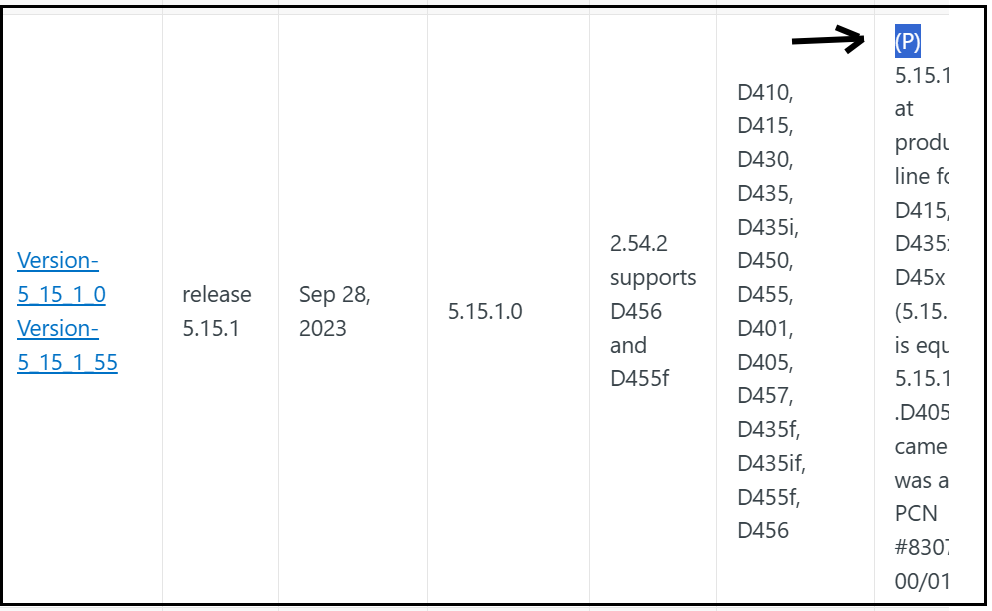
5.15.1.55 is classed as a Production firmware, meaning that it is recommended for use in critical-importance applications or commercial products that integrate RealSense because of Production firmwares' proven stability. At the time of writing this, 5.15.1.55 is the most recent Production firmware.
-
If you look at the firmware versions table, there is a field called Comment on the right-side that you may have to press the right-arrow key on your keyboard to scroll sideways to see properly. Production firmwares have (P) at the top of their comments.
https://dev.realsenseai.com/docs/firmware-releases-d400
Please sign in to leave a comment.
Comments
6 comments