Small objects scanning
I want to use the Realsense products to scan small objects (e.g. nose and ear), However as I understood the D400 series cannot capture small objects with enough resolution; on the other hand ID F400 can but the data is encrypted and we cannot have access to the raw data for our purposes. Is there any model recommendation that can satisfy my needs?
Thanks for your supports.
Payman.
-
Hi Payman Azari Creating 3D point cloud scans of small body parts such as nose, ears and mouth is achievable with a RealSense D435 or D435i camera model, though it requires some small adjustment of settings, such as using a Disparity Shift value of '50' so that the minimum depth sensing distance of the camera is reduced. This allows the camera to get closer to a surface than the default minimum distance of 0.1 meters / 10 cm on the D435 / D435i models.
Below is an image of a point cloud scan of my ear that I took with a D435i camera set at a Disparity Shift value of '50' and the Hole-Filling post-processing filter enabled to greatly assist in closing up black holes.
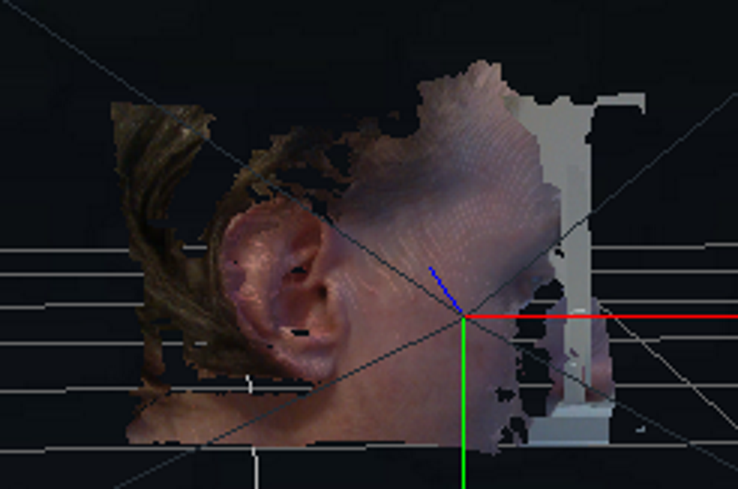
If the built-in RGB sensor of the D435i camera cannot meet your color resolution requirements then it is possible to sync an external HD RGB camera with depth data of a RealSense camera.
-
Hi MartyG , Thanks for your very helpful tip. Can you also tell me, in this situation how much would be the depth resolution of the image in millimeters? (with Disparity shift = 50)
Gratefully,
Payman.
-
In the above test, 848x480 depth and 1280x720 color was used. On the D435 and D435i models, you can use 1280x720 for depth but 848x480 is the optimal depth accuracy resolution.
Using a Disparity Shift enables the camera to get closer to an object / surface before the depth image starts breaking up below the minimum distance. It has the trade-off that the maximum observable depth sensing distance is also reduced as the Disparity Shift value is increased. This isn't so much of a problem when performing close-range sensing though, and '50' is a good all-round value that enables the camera to get closer whilst also preserving further away detail on the image (such as the front of the head in the image above).
Please sign in to leave a comment.
Comments
3 comments