D415 Intel RealSense D4xx Recovery S/N:Unknown
Hello,
Intel RealSense Viewer: v2.43.0
Camera cannot display images in RealSense Viewer.
Any idea?
Best regards,
LIU
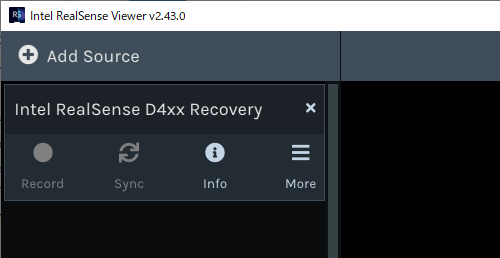
-
Hi Yiming Liu If you click on the More option, is there an option in its menu to Update Firmware
If there is, please follow the steps below.
1. Visit the firmware file archive at the link below and download a file called Signed_Image_UVC_5_12_12_100.bin
This is the recommended firmware for RealSense SDK version 2.43.0.
https://dev.intelrealsense.com/docs/firmware-releases#section-d400-series-firmware-downloads
2. Go to the More option in the Viewer and select Update Firmware from its menu. A file selection window will pop up. Navigate to the location on your computer that you downloaded the firmware file to and select it. The firmware should then begin updating to version 5.12.12.100.
If the firmware update process completes successfully, does the name of the D415 camera now display correctly?
Please sign in to leave a comment.
Comments
1 comment