Issues with D455f 3d camera display
Hi,
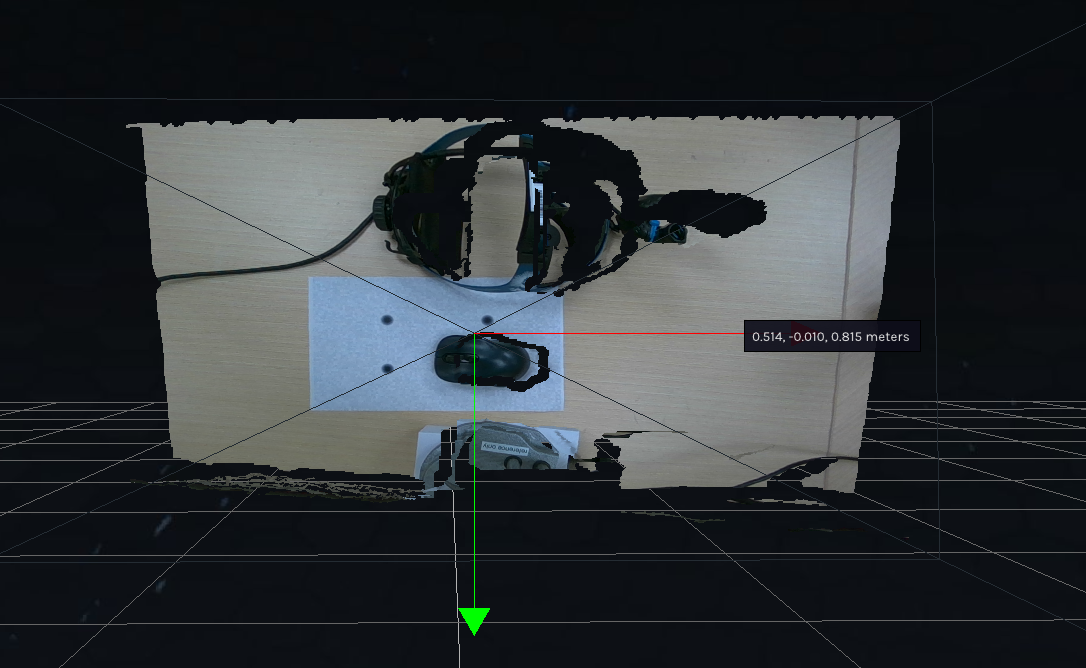
I am having some issues with my D455f camera in regards to the 3d function. It is placing black holes/missing potions in the display around some of the items. I have tried calibrating the camera, changing the lighting of the area I am using the camera in, updated all of the firmware, and have adjusted the camera at different heights to see if distance was the problem. I am just not sure what else to do to fix the problem. If anyone has any ideas please let me know. I was hoping to use this camera for an object detection picking and packing orders system. This is what I see, no matter the distance from the camera.
-
Hi Maggie Moloney Are you able to run the example program rs-pointcloud please? If you are, what quality of 3D pointcloud does it generate compared to the 3D mode of the RealSense Viewer tool, please?
However, a strong factor in your problem may be the color of the objects that are being depth-sensed (dark gray / black). It is a general physics principle (not specific to RealSense) that dark gray or black absorbs light and so makes it more difficult for depth cameras to read depth information from such surfaces. The darker the color shade, the more light that is absorbed and so the less depth detail that the camera can obtain.
Do you have objects of a brighter color that you can test the camera with if you have not done so already, please?
Please sign in to leave a comment.
Comments
1 comment