Camera Origin
Hello everyone,
I am using the Intel depth realsense camera D435if and I am trying to figure out where the origin of the RGB module is, specifically the z coordinate. According to the datasheet z coordinate of the starting point is -4.7mm from the front glass. I need to measure from the back of the camera, so my calculation would be (Value from back to front glass) - 4.7mm. Now I am missing the value from the back to the front glass. Online are only CAD models from D435i and D435f but not from D435if. Also when I use one of these CAD models somehow I can measure 2 values (24.95 or 25 mm). And on the official website those are the measurements:
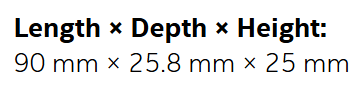 I need to be precise as possible. Are there any official values regarding the starting point in reference with the back of the camera?
I appreciate any further information and thank you in advance!
-
Hi St160743 The origin of RGB is the center-line of the RGB sensor. The RGB sensor does not measure distance, so the front glass measurement is only relevant to depth measurements. The origin of depth is the center-line of the left-side Infrared sensor.
The data sheet document states on page 92 that if you are using the back of the depth module then you should subtract a positive value instead of adding a minus value. D435if uses the D430 depth module, so you should subtract 7.5 mm from the depth value to find the ground-truth value for the back of the module.
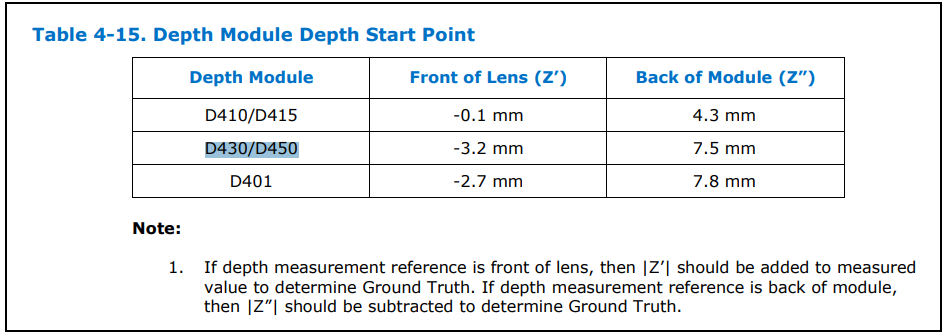
In most cases, RealSense users simply use the default depth value (measured from the front glass) instead of the ground-truth value. Again though, the ground truth value is not relevant to the RGB sensor.
The official RealSense store and the RealSense camera comparison chart both use the 25 mm value for D435if. 0.05 of a millimeter (the difference between 24.95 and 25) is so small though that there is not a ruler-measurable difference between 24.95 and 25 mm.
https://www.intelrealsense.com/compare-depth-cameras/
-
Hello MartyX Grover, thank you very much for your response. Now I am a bit confused. Maybe it is better if I decribe my use case. I use a objection detection with the realsense camera. Within the code I align depth and RGB module. The result is that it takes the RGB module as the origin (as I assume, because it takes the intrinsics of the RGB).
Am I correct to use the x and y coordinate of the RGB as the origin? And for the z coordinate I basically use Z' (if I measure from the front glass)?
In my use case my reference is the back of the camera, so I would need Z''?
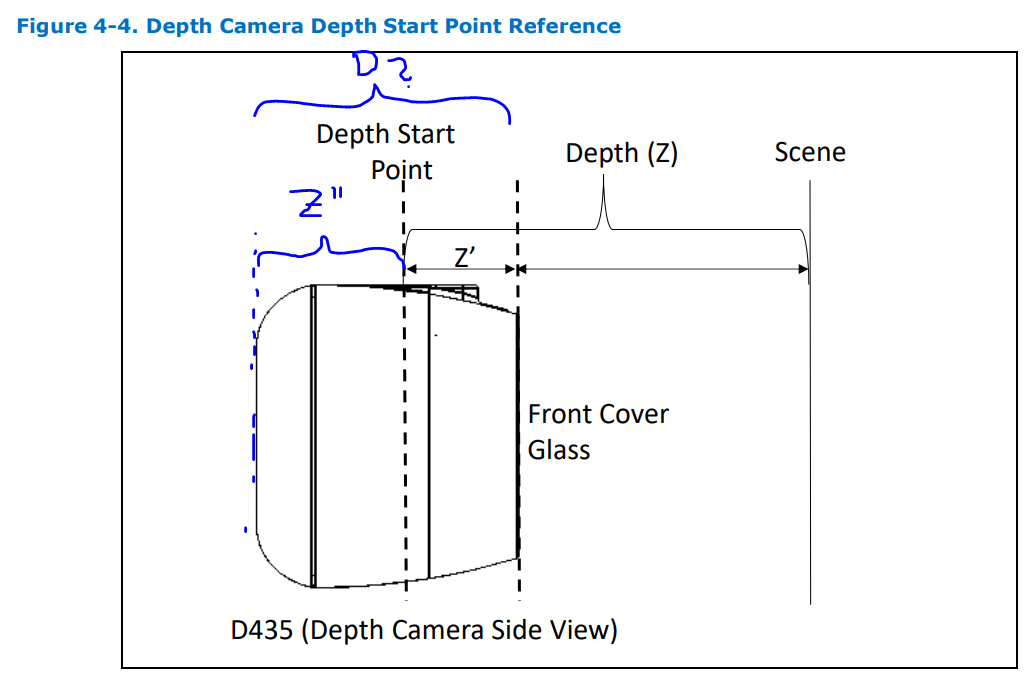
And quick question: Is D (picture above) according to the officials Depth or Height? Because I thought it would be Depth (25.8mm). Or is this the Height 25mm?
Correct me if I am wrong. I would appreciate if you could clarify for me!
-
If you are using depth-to-color alignment then yes, the origin of depth changes from the center-line of the left IR sensor to the center-line of the RGB sensor and the RGB color intrinsics should be used instead of the depth intrinsics.
Even though the XY origin coordinates of depth change to the RGB sensor center-line, the Z" depth ground truth measurement to the back of the module should still be relevant in an aligned image.
The first two measurements of the camera will be width x height, so the third (25 mm) of 90 mm × 25.8 mm × 25 mm will be the depth from the front to back of the camera casing as marked by 'D2' on your image above.
-
Thanks MartyX Grover for clarification. The only thing I don't understand now is, why do I need the position of the back of the module. To my understanding Z" (as marked in my image above) would be now Z" = 25 mm - 4.7 mm. Or am I wrong?
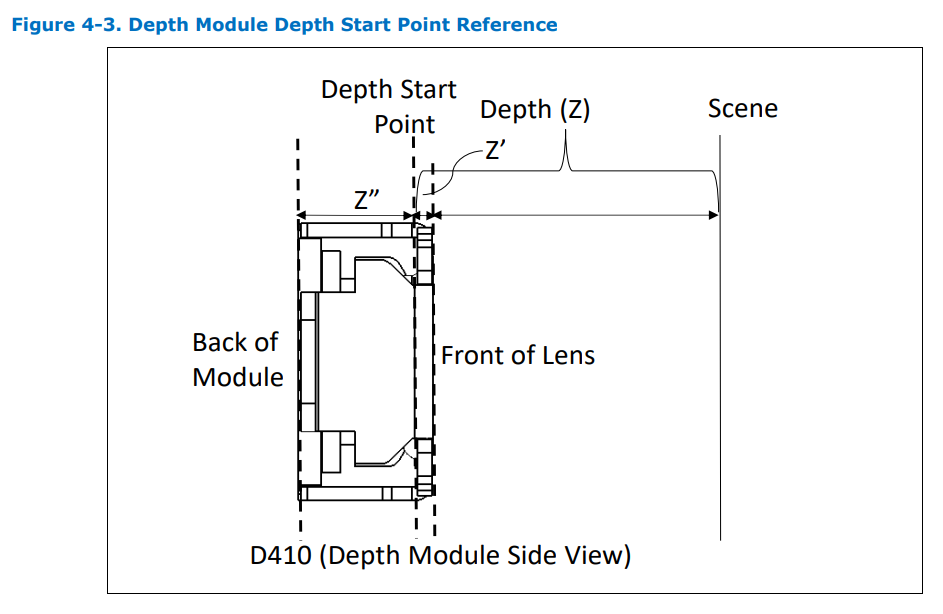
With back of the module you are referring to this image right?:
 But I haven't quite understood why I would need the back of the module instead of only the Depth Start Point.
 -
Yes, the above illustration shows the back of the module.
You do not need to refer to the back of the depth module, or even the sensor lens. The vast majority of users simply use the unaltered depth measurement taken from the front glass.
If you were using the back-of-module depth ground truth value then it would be <front glass depth> - 7.5 mm = back-module ground truth value.
As RealSense cameras measure in the unit of meters rather than millimeters. 7.55 mm would be 0.0075 meters. So subtracting it from the default front-glass value (e.g 2 meters - 0.0075 meters = 1.9925 meters) will not significantly add to depth measurement accuracy.
Please sign in to leave a comment.
Comments
5 comments