Depth Image from 435i does not seem right
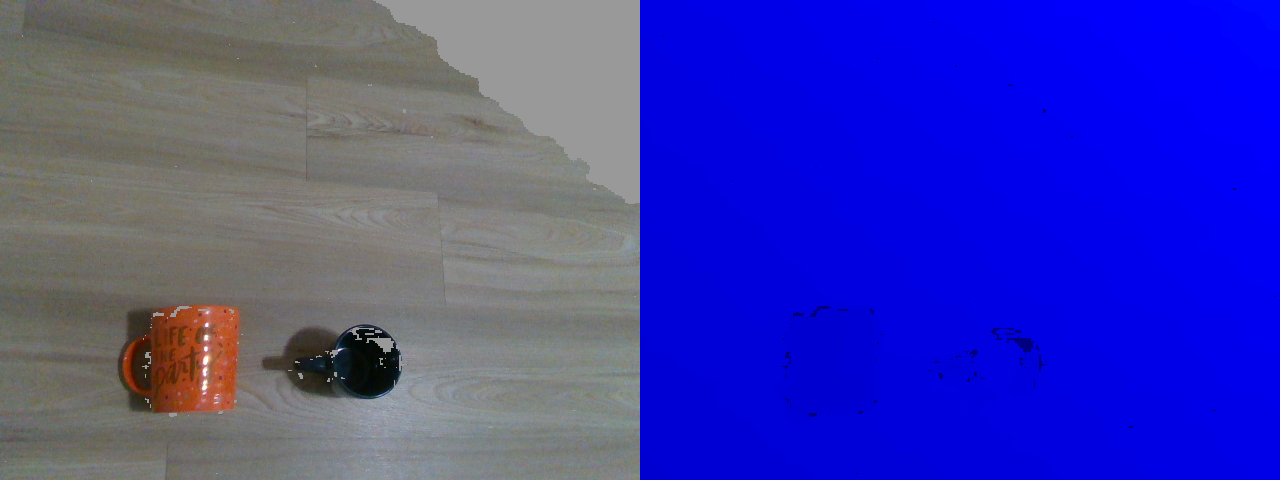
Hello Everyone,I am new to real sense usage . I was trying to detect color and depth images in opencv ( python). So, my image consists of two cups . However, in the depth image why is everything Blue ? Why cant I see the depth of two cups in depth image?
Right side ( RGB) , Left Side (Depth image)
-
Hi Prarthana Sigedar The all-blue color indicates that the wall and the cups are at approximately the same distance from the camera. By default, depth is represented by color values that shift between blue in the foreground (near to the camera) through to red in the background (in the far distance).
The cups are present on the image but difficult to see. I would first recommend changing the black cup for a different colored one, as depth cameras have difficulty seeing black or dark grey objects. This is because it is a general physics principle (not specific to RealSense) that dark grey or black absorbs light and so makes it more difficult for depth cameras to read depth information from such surfaces. The darker the color shade, the more light that is absorbed and so the less depth detail that the camera can obtain.
You might get a better image of the cups if you change the scale of the depth measurements from the default value of '0.001' to the smaller 0.0001. An example of Python code for doing so is below.
profile = pipeline.start()
depth_sensor = profile.get_device().first_depth_sensor()
if depth_sensor.supports(rs.option.depth_units):
depth_sensor.set_option(rs.option.depth_units, 0.0001)
Please sign in to leave a comment.
Comments
1 comment