Shutter speed of D455
How can I read and control the shutter speed of the D455 cameras?
-
Hi Akmaldeen20 The physical shutter speed on RealSense cameras is fixed. The D455 has a fast global shutter on both the RGB and the depth sensors.
You can instead achieve similar results to changing the shutter speed by defining a custom exposure time. I hope that the discussions in the links below will be useful to you.
https://github.com/IntelRealSense/librealsense/issues/2875
https://github.com/IntelRealSense/librealsense/issues/2461
If you need script code for setting a manual exposure time, please let me know which programming language you are using (C++, C#, Python, etc).
-
Thanks MartyX Grover.
I'm using C++ in windows visual studio. Please share the codes for manual exposure time settings.
Thanks
-
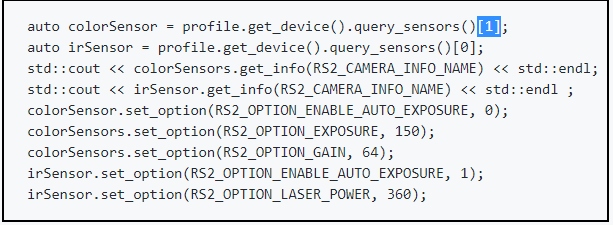
When setting manual exposure, it is important to bear in mind that there are separate exposure settings for depth and color. So to access color exposure, you should use an index number of '1' to query the color sensor (instead of '0' for querying the depth sensor).
https://github.com/IntelRealSense/librealsense/issues/3698#issuecomment-487950395
-
Thanks MartyG.
Can you explain this line : colorSensors.set_options(RS2_OPTION_EXPOSURE, 150);
is 150 in the code is exposing time (150ms)?
similarly the last line: irSensor.set_option(RS2_OPTION_LASER_POWER,360)
What is 360?
-
Yes, 150 represents the color exposure time. You can replace 150 with the value that you want to set the color exposure time to.
In the RealSense Viewer program, the default color exposure is set to '156', whilst the default depth exposure is set to '8500'.
Basically, the line colorSensors.set_options(RS2_OPTION_EXPOSURE, 150) is setting the color sensor's exposure time to '150'. It knows to set the color sensor because colorSensors was defined to point to the index number of the color sensor earlier in the script.
Laser Power sets the camera laser's power level, as the name suggests. By default it is set to '150', which is somewhere along the midpoint of the camera's minimum-maximum allowed range for this setting. '360' is the maximum laser power level. So this line is telling the script to set Laser Power to its maximum value instead of using the default.
Increasing the Laser Power like this will have the following effects:
- The dot pattern on the infrared image should become more visible, as its visibility is tied to Laser Power. Its visibility increases as Laser Power increases, and its visibility reduces as Laser Power is reduced.
- The detail on the depth image may become less sparse (less holes / gaps). Conversely, reducing the Laser Power makes the depth image more sparse.
-
Hi
I also have question regarding to this....
I am using VB.NET to run D455 and D435i (I know it is unusal one but this is what I am used to) and I wonder how I can control shutter speed and other basic camera parameters. Any help would be greatly appreciated. If anyone can provide some example codes, that would be great as well. Thank in advance... -
Hi Redyoung As mentioned earlier in this discussion, RealSense cameras do not have controls for physical shutter speed, which is fixed. Instead, you can replicate the effect of shutter speed changes by defining manual exposure time values.
There are not many RealSense-compatible VB.Net programming references available. The main ones that I found are listed below.
https://github.com/IntelRealSense/librealsense/issues/1983
https://github.com/IntelRealSense/librealsense/issues/2019
https://github.com/IntelRealSense/librealsense/issues/2081
https://github.com/IntelRealSense/librealsense/issues/2185
https://github.com/IntelRealSense/librealsense/issues/5652
https://opensourcelibs.com/lib/opencvb
If you are able to make use of C# then Intel provide a page of example scripts for RealSense SDK functions in their C# Cookbook:
https://github.com/IntelRealSense/librealsense/blob/master/wrappers/csharp/Documentation/cookbook.md
-
Thank MartyG... Yes, you are correct that you mentioned exposure time not shutter speed. I just use them interchangeablely. I will try out your suggestion.
Anyway,, Just out of curiosity.. Can we dynamically change the exposure time depending on pixel values?
I guess this is auto exposure feature but what I am wondering is if we can adjust auto exposure criteria...
Thank you for your help! -
When auto-exposure is enabled, it will control exposure and so you would need to disable auto-exposure so that custom exposure values can be set by your code. Setting exposure manually though carries the risk that certain ranges of values will change the FPS though, either reducing it or increasing it. The maths of this phenomenon is described in the link below.
https://github.com/IntelRealSense/librealsense/issues/1957#issuecomment-400715579
Alternatively, if you prefer to use auto-exposure then you can define an Auto-Exposure Region of Interest (ROI) area on the image. Pixels within that defined area will have their intensity maintained at a controllable setpoint value. This is described in Point 3 of the section of Intel's camera tuning guide linked to below.
Please sign in to leave a comment.
Comments
11 comments