RealSense L515 driver issue
Hello, while in South Korea, I recently bought two Intel RealSense L515 LiDar model via direct purchase for foreign goods. I was planning to utilize these devices for my personal interest. However, one of the device fails to operate due to possibly driver issue. The driver cannot detect the device connected to the computer. The device was plugged to 3.0 USB port.
In addition, I checked the status of the device through Ubuntu environment (using dmesg command in terminal), and I found out that the computer successfully detected the device through 3.0 USB port.
I wanted to use this device in Windows 10 environment, so is there a way to fix this problem?
-
Official comment
Hello Yoonhyunse,
Apparently, your malfunctioning camera is faulty and should be exchanged for a new one.
- If you purchased the camera from the Intel RealSense Store, please sign in to your account on http://www.intelrealsense.com and go to My Account -> My Orders -> Return or Replace Items or open a ticket here.
- If you did not purchase your Intel RealSense Camera from the Intel Store, contact your distributor for a return.
Sincerely,
Jesus G.
Intel Customer Support
Comment actions -
Hello Yoonhyunse,
One of your L515 cameras works well both in Windows and Ubuntu and the other camera is not recognized in Windows 10?
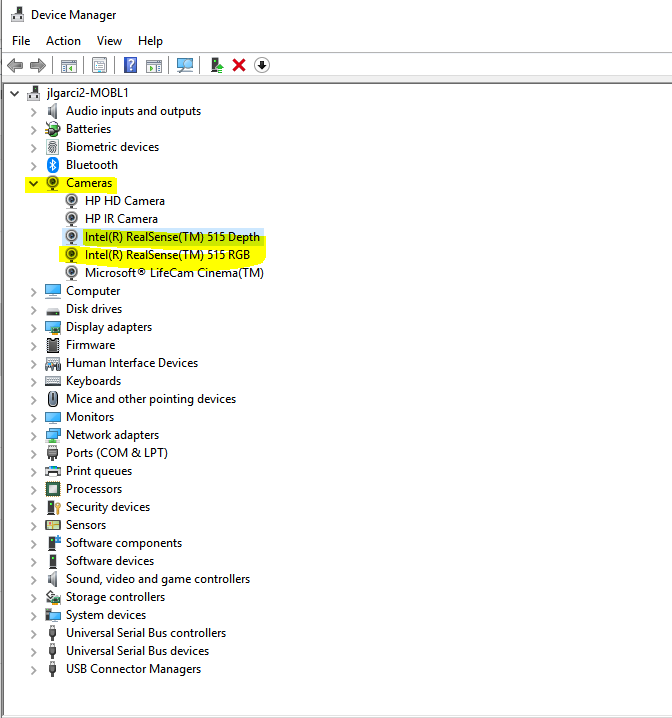
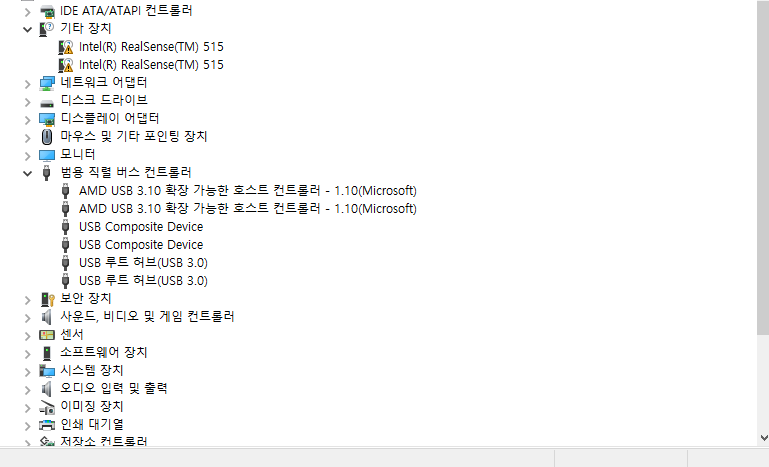
Please send us a screenshot of your Device Manager when connect the malfunctioning device. A correctly detected L515 should look like the below picture of the Device Manager.
Sincerely,
Jesus G.
Intel Customer Support
Please sign in to leave a comment.
Comments
3 comments