D455 not recognized as connected to USB 3 port.
I have connected my recently bought D455 to a USB 3.1 port of my laptop (ASUS ZenBook Pro Duo), but it is recognized as connected to a USB 2.1. The Realsense viewer is not receiving any streams. It is connected via the orginal cable.
I first connected it to an older laptop, on which it worked, and updated the firmware via the Realsense viewer,
-
Hi Jens Nirme Does the camera register correctly as USB 3.2 if you perform a reset of the camera in the RealSense Viewer, please? You can do this by going to the More option near the top of the Viewer side-panel and selecting the Hardware Reset option from its drop-down menu.
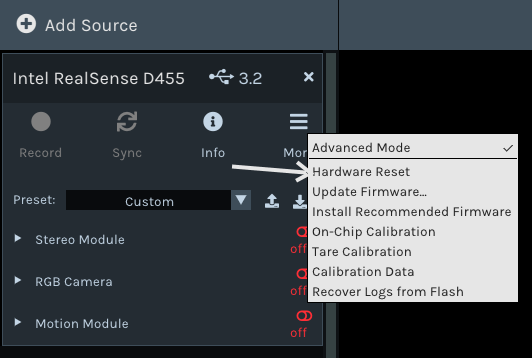
-
Great to hear Jens Nirme - thanks very much for the update!
Please sign in to leave a comment.
Comments
3 comments