Installed SDK and Viewer, but "Examples for Intel RealSense" is not working in Visual Studio.
Hi, I'm new to the Intel RealSense camera and I'm trying to configure it with C++ in Visual Studio. I'm running Windows 10 and installed the SDK of the camera. I also installed the "Examples for Intel RealSense" to run some example-programs in Visual Studio. I can't run anything, and have a lot of errors. Help would be appreciated.
I had the error "Windows SDK version 8.1 cannot be found", so I installed the 8.1 version and retargeted the projects (e.g. "hello-realsense"). Now I have 500 errors when I try to run "hello-realsense".
-
Hi Arthurwuytens If you are using Windows 10 then you can use an easy automated installer to install the Windows 10 version of the SDK. It is located in an Assets file list at the bottom of the listing for each SDK version on the Releases page.
https://github.com/IntelRealSense/librealsense/releases/tag/v2.42.0
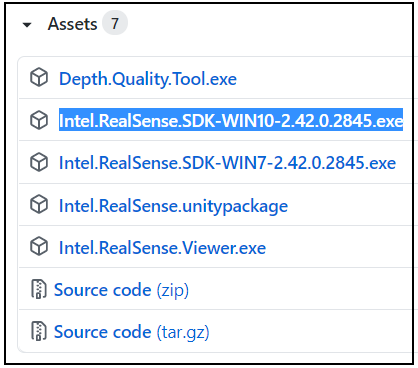
After downloading the file and running it to install the SDK, you can use Visual Studio props files provided in the SDK to create the linkages for Visual Studio projects that you have created. There is a guide for doing so here:
https://github.com/EduardoWang/visual-studio-real-sense-record-and-playback-project
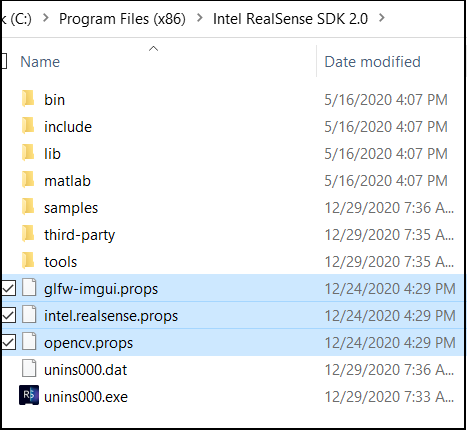
In regard to the existing SDK example programs, you can find pre-built executable versions of them by right-clicking on the RealSense Viewer launch icon that the SDK installer places on the desktop and selecting the Open file location menu option to open the SDK's Tools folder that contain tools and examples that can be launched with a double-leftclick.
If an example program seems to launch but closes after a second, this likely means that it is one that needs to be launched from the Windows command prompt text interface rather than a double-leftclick from the Tools folder.
If you would like to load the example programs into Visual Studio, the guidance in the link below will hopefully be of help:
Please sign in to leave a comment.
Comments
1 comment