Disparity to Depth Conversion for Complex Scenes
My device is Intel RealSense D455 (FW 5.12.6) and all "post-processing" are disabled by Intel RealSense Viewer v2.36.0. Both depth map and disparity map are saved by Intel RealSense Viewer v2.36.0 directly.
The depth map (A) is saved by setting "Disparity Mode" to 0 in Stereo Module > Advanced Controls > Depth Table.
The disparity map is saved by setting "Disparity Mode" to 1 in Stereo Module > Advanced Controls > Depth Table and then converted to depth map (B) by the equation: depth = (baseline x focal length x 32) / disparity. The converted depth map (B) is inconsistent to the depth map (A) and the quality of depth map (B) is worse than that of depth map (A) as shown below:
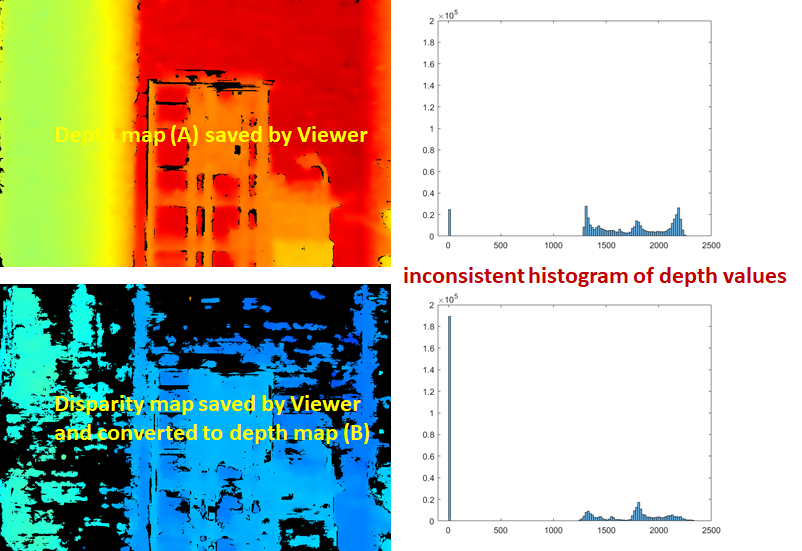
If I changed the scene to a single large plane, the converted depth map (B) is consistent to the depth map (A) as shown below:

Why does the same conversion result in different depth map? How to get a better conversion from disparity map to depth map (B) when the scene contains several objects at different distances?
-
Hi Temeiwang I would recommend trying to set disparity-to-depth and depth-to-disparity with bools as suggested in your other case. That will help to determine whether problems with scenes containing several objects are related to your use of a conversion formula or to something else.
https://support.intelrealsense.com/hc/en-us/community/posts/360051896473/comments/360013274934
-
I found the reason! We need to wait until the change of disparity mode becomes effective no matter in Viewer or my code.
Though the following code shows the disparityMode is changed (the last "cout" command), the disparity map is incorrect. I executed the code twice to get correct disparity map.
STDepthTableControl depth_table = advanced_mode.get_depth_table();
cout << "Disparity Mode: " << depth_table.disparityMode << endl;
depth_table.disparityMode = 1.f; // enable disparity mode
advanced_mode.set_depth_table(depth_table); // write changes
depth_table = advanced_mode.get_depth_table();
cout << "Disparity Mode: " << depth_table.disparityMode << endl;
Now, the histogram of converted depth map (B) is similar to the depth map (A) in complex scenes.
I'm not sure whether the command "advanced_mode.set_depth_table(depth_table);" should be called twice or insert sleep() to wait the change becomes effective. If we can insert sleep() instead, how long should be wait?
-
I would recommend using sleep. It is difficult to say precisely how long for though. I would suggest starting with a high value such as 5 seconds and then reducing it down a little at a time and re-testing until you find the point where it becomes unstable. Then set the time a little above that.
Please sign in to leave a comment.
Comments
5 comments