intel d435 unsynchronized images
Let's start by saying that I don't know at all about how this camera or its software works.
when I first installed it it worked flawlessly. Months ago I noticed a notification telling me to update the firmware, the installation failed for no apparent reason, from that moment the problems began.
I state that I have already tried to do the hardware reset but nothing has changed, I tried to reinstall the latest firmware by selecting the file manually and the installation was successful but the problem persists.
the following error keeps appearing:
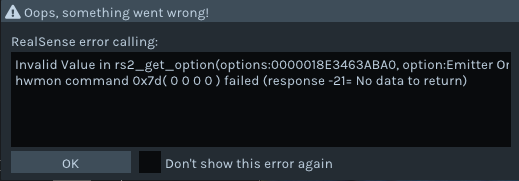
Invalid Value in rs2_get_option(options:000001FB70044180, option:Emitter On Off):
hwmon command 0x7d( 0 0 0 0 ) failed (response -21= No data to return)
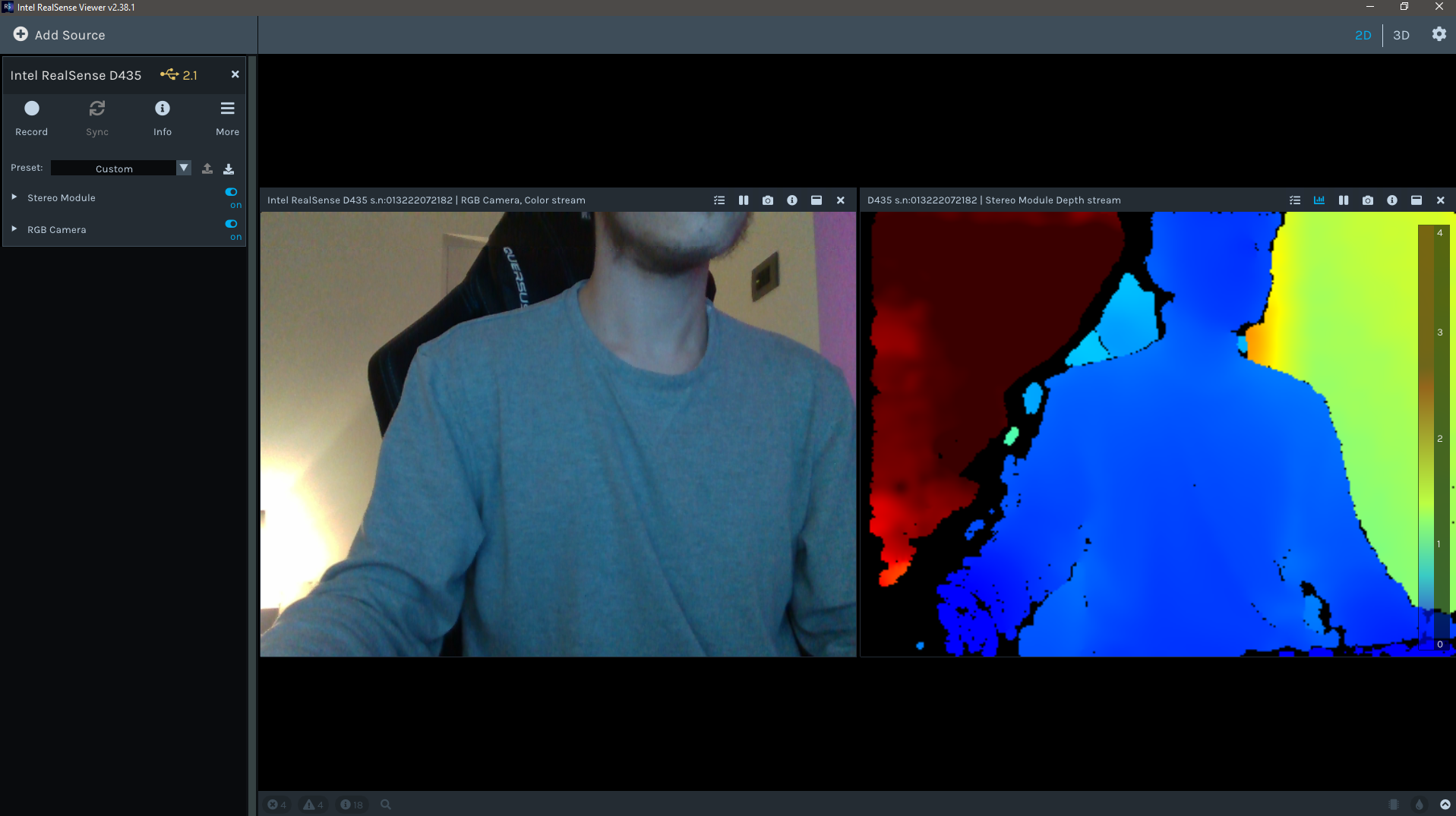
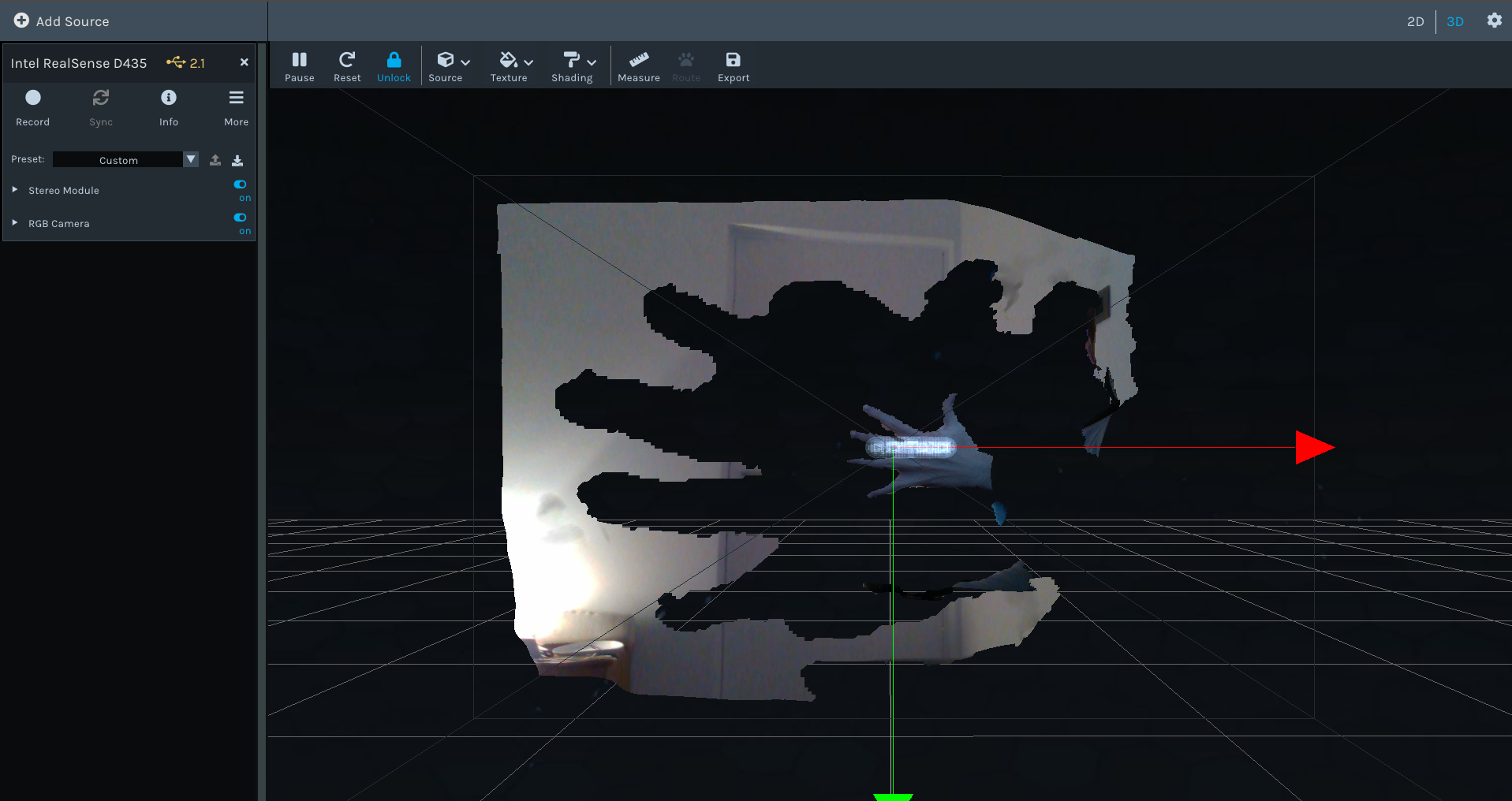
but above all the stereo module and the rgb camera do not have the same size, it is as if one of the two were much zoomed in than the other.
you can clearly see the difference in the 2d view, while if I go to the 3d one, the overlay of the images is wrong due to the difference in size.
I do not understand anything about depth cameras and I do not speak English well, I hope in someone nice who can help me, maybe it is a stupid thing but I have no idea.
I attach 3d and 2d visual screenshots.
thank you so much.
-
Hi Repele31 If you find it more comfortable to use a language other than English then please do and i shall do my best to help you in that language.
Could you perform a full recalibration of your camera please using the Dynamic Calibrator tool. This should help to correct any mis-alignments in your camera's depth and RGB sensors that may be causing your problem.
You can download the Dynamic Calibrator for Windows at the link below.
https://downloadcenter.intel.com/download/29618/Intel-RealSense-D400-Series-Dynamic-Calibration-Tool
If you are using Linux, installation instructions for Linux can be found at the link below. I have linked to the online version of the instructions to make it easier for an internet browser to translate its language if required.
-
Thank you very much for the reply, i'm italian but English is fine in any case I understand it I only have some difficulties in speaking it but luckily there is google translate :)
now I try the procedure you recommended and then I'll let you know if the problems have been solved.
thanks again for the help.
kindest reguards.
-
Ok I tried the procedure and opening the software I remembered I had done it in the past, in fact I already had the tartget tool app installed on my smartphone.
I remember I did this before I had this problem and it worked perfectly but now opening the calibration software and starting it doesn't work.
I get this error: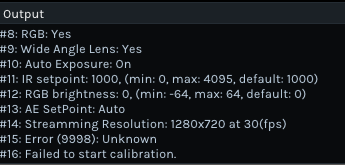
-
Thank you very much. If you are using Windows, do you remember if you have installed a program called the UWP Driver? If you have, and the driver is version number 6.11.160.21, then it should be removed from your computer. It is not needed to use RealSense with Windows and that version of the driver can cause errors. One of the errors reported is stopping the Dynamic Calibrator tool from working.
If you still have problems with the Dynamic Calibrator then you could try using the CustomRW tool that was installed as part of the Dynamic Calibrator to reset the camera to its factory new configuration with a Gold Reset. Both on Windows and Linux, this involves going into the text command terminal and launching CustomRW with the command below:
Intel.RealSense.CustomRW -g
-
As far as I remember I don't seem to have ever installed a software called Driver UWP and even looking for it in the computer I can't find it so I suppose it isn't there.
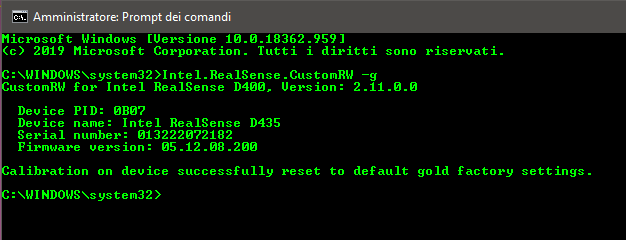
I tried to run the command in the prompt started as administrator and it seems to be successful but the dynamic calibrator still does not work.
I still try to look for that program called upw driver and in case I find it I uninstall it immediately.
-
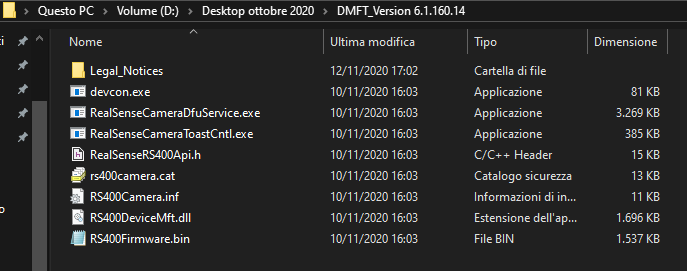
If UWP driver 6.11.160.21 had been downloaded then there would likely be a folder called DMFT_Version 6.1.160.21 on your computer that contains a file called RS400Camera so that should make it much easier to do an automatic file search of your C: drive.
https://support.intelrealsense.com/hc/en-us/community/posts/360051183634-Error-when-installing-the-realense-UWP-SDK
-
Thanks to your help, after several searches I found the file you were talking about.
However, the file is not located on the local disk C: but in a folder I created on hard disk D:I don't know if it is installed or not but I am sure there are no other locations on the computer that contain copies of this file or its folder.
What should I do now is to simply delete the folder? or is there a procedure to uninstall it?
thanks again for your availability and patience.
-
I would recommend seeing whether it is listed in the Programs And Features interface. You can find this by typing programs into the search box at the bottom of your Windows screen. The list is alphabetical, so if it is there then it will likely be under the Intel entries. If the UWP driver is in the list, left-click on it to highlight it and select Uninstall.
-
The driver in question does not seem to be installed as it does not appear in "programs and features" it does not appear in the control panel in the section where all installed programs are listed and there is not even a service in "local services" with the same name.
These are the Intel programs currently installed: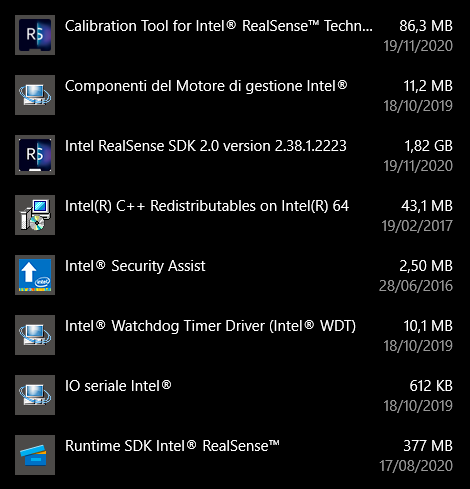
-
Okay, thanks for checking. Even if it were installed, your image showed that it is an earlier version of the UWP driver rather than the 6.11.160.21 one that can cause errors, so it may not be the cause of your problems.
I have just run extensive tests with three different camera models (D435i, D455, D415) to try to replicate your original problem with the giant black shadow around the hand (this shadow is called occlusion) that was much larger than the RGB size of the hand. I was able to replicate it on D435i, whilst the D415 and D455's shadow fit much more tightly around the hand.
What the D415 and D455 have in common is that they both have RGB and depth sensors that have the same field of view (FOV) size. On the D435 and D435i, the RGB sensor's FOV is smaller than the depth FOV. So it may be a consequence of the camera model being used to examine the hand, rather than a problem with the camera, since we were both able to produce this giant hand shadow effect.
-
thanks again for your availability.
The serious problem is that the occlusion always does it, whatever is in front of the camera, be it a hand, a person or an object, this huge shadow is always there and does not want to disappear.
It didn't before, this problem appeared completely randomly, it wasn't overused and it wasn't modified, it took no damage, nothing happened at all.
And there seems to be no way to bring it back to its previous condition...Should I consider it broken? or is there still a chance to remove the occlusion? because outside the Intel Realsense Viewer software, the camera doesn't seem to give any problems and works.
-
Since we both experienced the same 'giant hand shadow' phenomenon, it is unlikely that your camera is broken. What both of our cameras have in common is that they have not undergone a dynamic calibration recently (in your case, because you were getting a 'Failed to start calibration' error). I will make a note to perform a dynamic calibration of my D435i and report back with the results.
-
Thanks for your patience whilst I performed further tests.
A dynamic recalibration of the camera did not improve the apparent mis-scaling of the occlusion shadow around the hand.
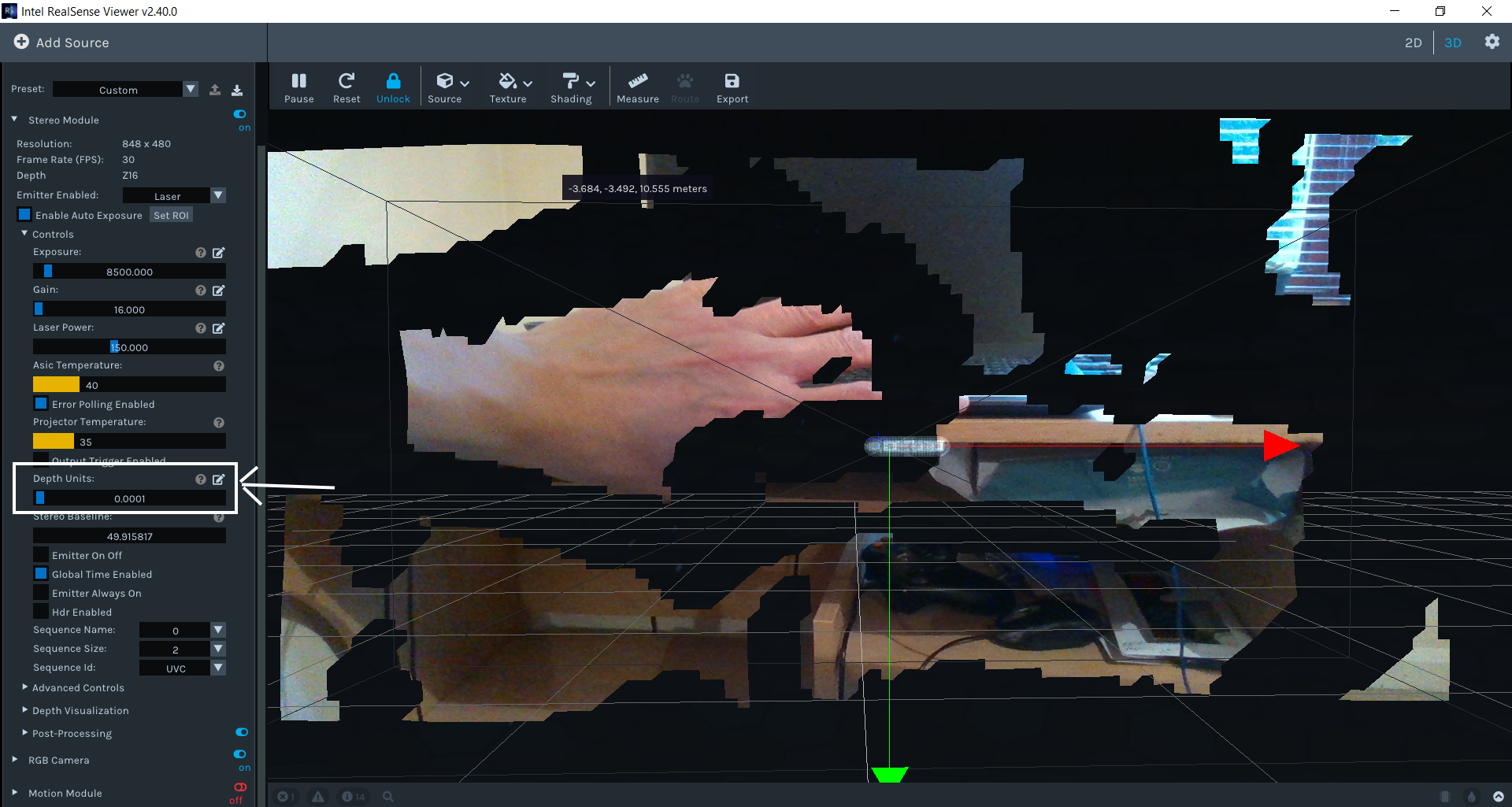
After extensive testing, the only way I found to create a tighter fit was to reduce the Depth Units from their default of '0.001' to '0.0001'.
I also found that the RGB is completely unrelated to the issue, as the same mis-scaling of depth data compared to the size of the occlusion shadow occurs in depth-only mode. It also occurs when using Infrared 1 as the color source instead of RGB, and Infrared 1 is perfectly aligned to depth as the two come from the same sensor.
-
I honestly don't remember, it was a request for the "intel realsense viewer" software
it appeared that the last driver was not installed and I clicked on install.
even now when I attach the cam to the pc, windows tells me that the driver needs to be updated and if I update it, intel realsense viewer tells me that the most appropriate driver is not installed but if I install it, windows returns to tell me that the latest driver is not is installed etc.
Please sign in to leave a comment.
Comments
17 comments