I am struggling in calibrating realsense rgb camera intrinsic parameters
Hi,
Can anyone help me get the intrinsic value for the RGB camera? Since intrinsic stored in real sense SDK is depth camera intrinsic, I have tried to calib the RGB sensor by chessboard, by calib.io software, but the result is not repeatable. Please advise if I have done something incorrectly. Pls see details in each image
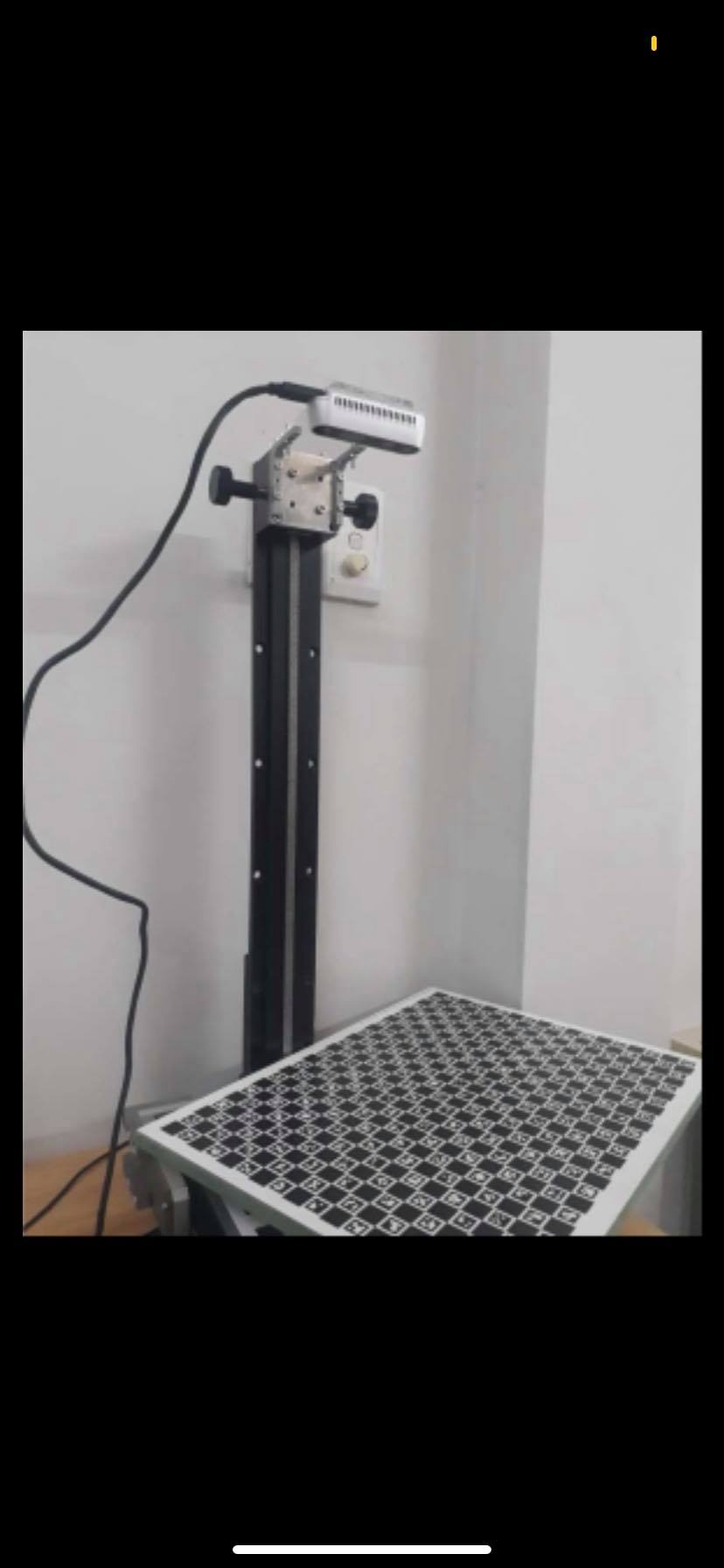
I used an 18x25 Charuco board (15mm square), randomly captured 150 pictures of it with our camera. The result should be like this (see next image)
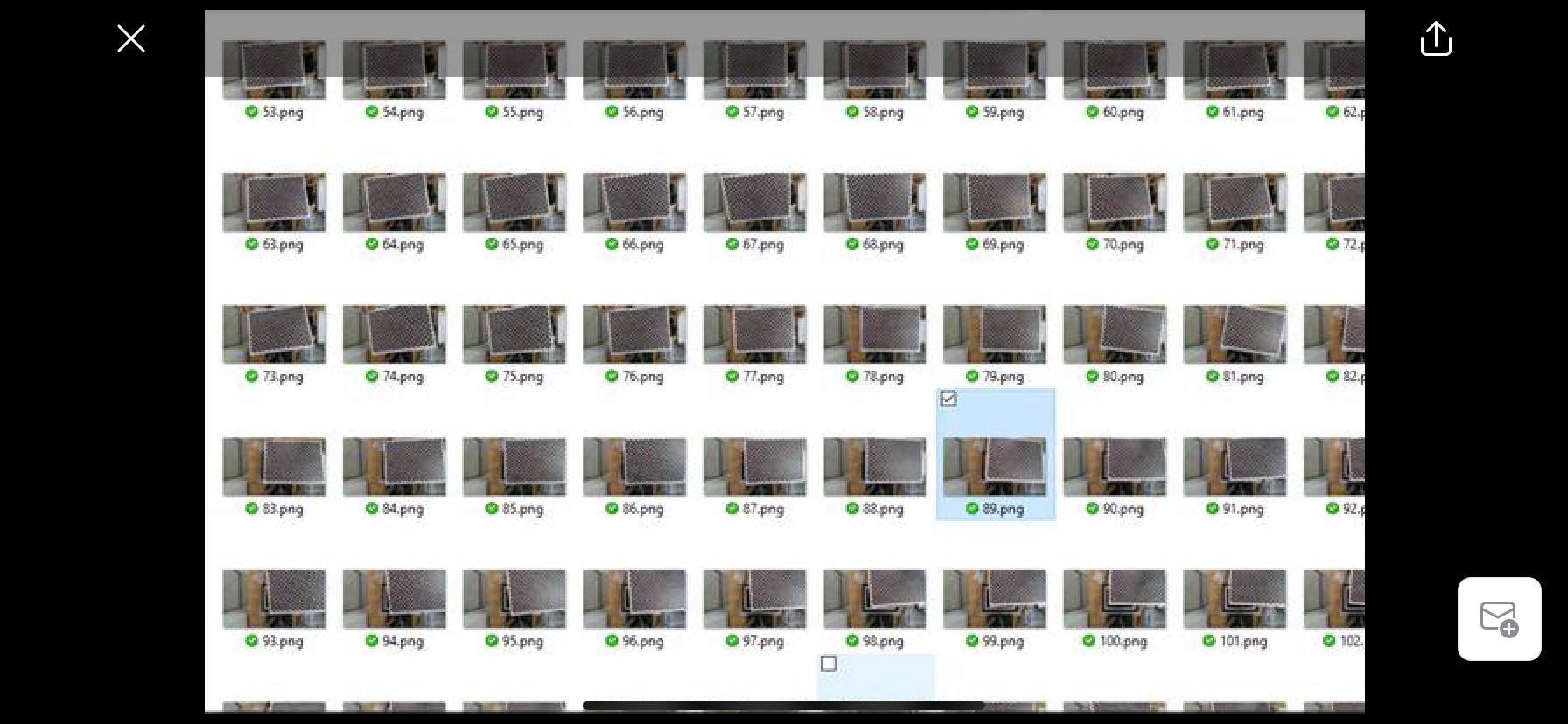
This is the output image, 1 set has 150 images of random position and orientation of Charuco in-camera FOV.
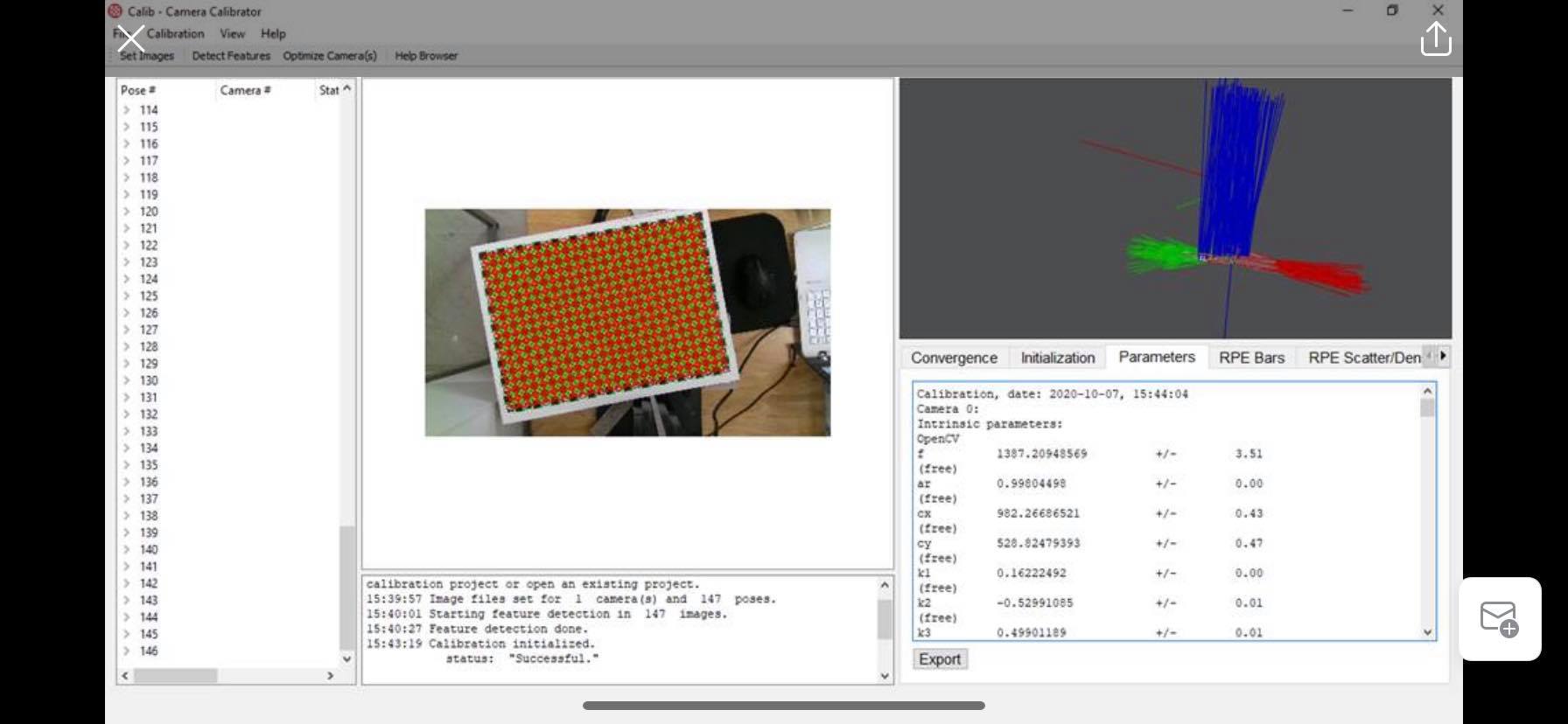
I fed the calib.io software with those images, and use Detect Features to find the corners of Charuco. After all, I used Optimize Camera with OpenCV camera model to determine fx, fx, cx, cy, and distortion coefficients k1, k2, k3, p1, p2. The result should be like the image below.
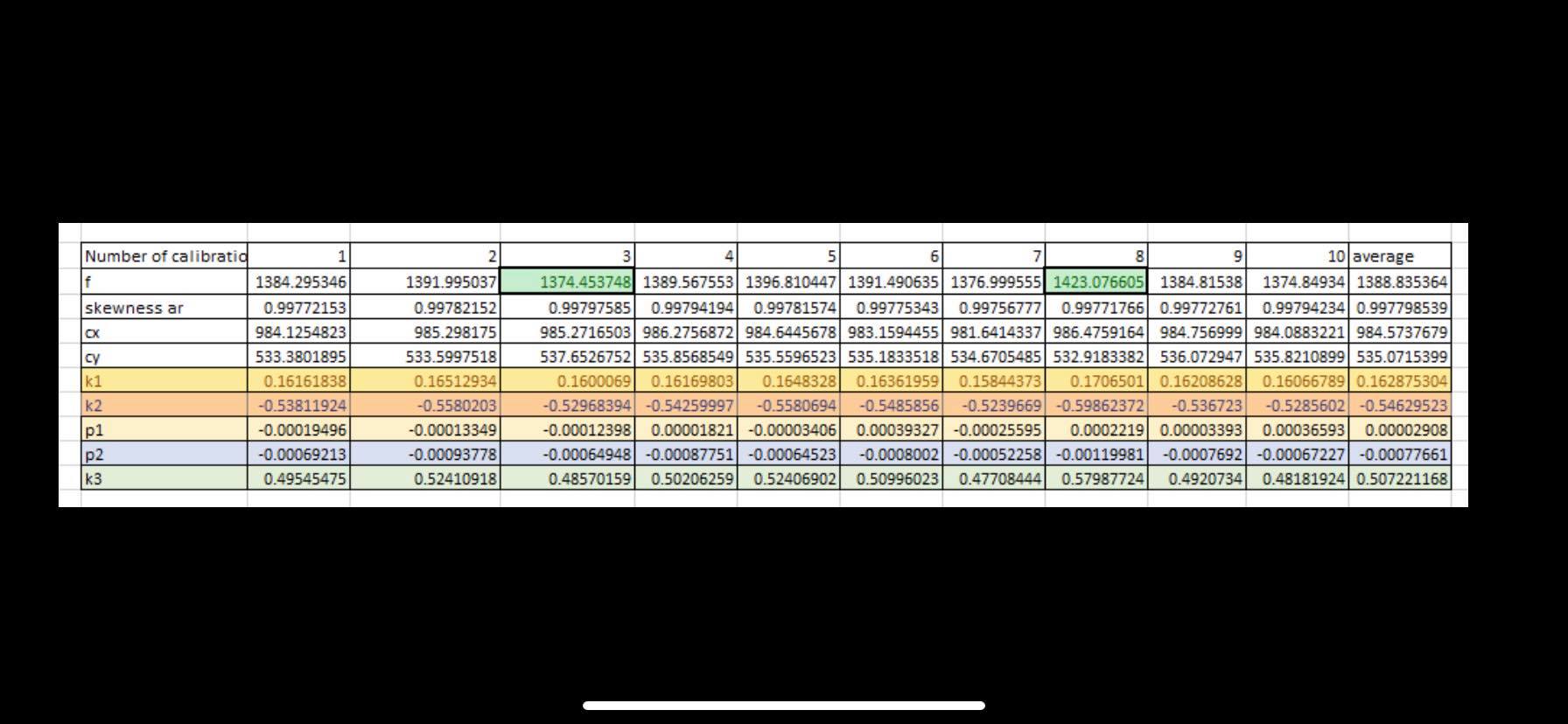
The problem is, I have 10 sets of those 150 images, and for every 1 set the value calculated is different. For instance, f have differences between the highest and lowest values is about 3%, but k1, k2, p1, p2, k3 have differences between each calibration above 10 percent. Kindly see the table below.
Can you please advise me on how to use the software correctly to avoid unstable calibration like above?
Your help is appreciated.
-
Hi Dannguyen You can list the intrinsics and extrinsics details for all of the sensors using the rs-enumerate-devices tool by using the launch command rs-enumerate-devices -c ('c' stands for 'calibration').
https://github.com/IntelRealSense/librealsense/tree/master/tools/enumerate-devices
You can query the intrinsics and extrinsics of the sensors with more precision by using the rs-sensor-control tool.
https://github.com/IntelRealSense/librealsense/tree/master/examples/sensor-control
In regard to calibrating the intrinsics ... the normal version of the official Dynamic Calibrator tool only calibrates extrinsics. There is however an OEM version of the software that can calibrate both extrinsics and intrinsics. It is supplied as part of the $1500 USD OEM Calibration Target system.
https://store.intelrealsense.com/buy-intel-realsense-d400-cameras-calibration-target.html
-
Hi MartyG, thanks a lot for your quick help.
About RGB intrinsic value, do you know how to validate the intrinsic value collected after "Targeted calibration"? Since I used chessboard calibration for a conventional camera to get intrinsic of RGB sensor, but the result is not repeatability - especially for focal length and distortion coefficients.
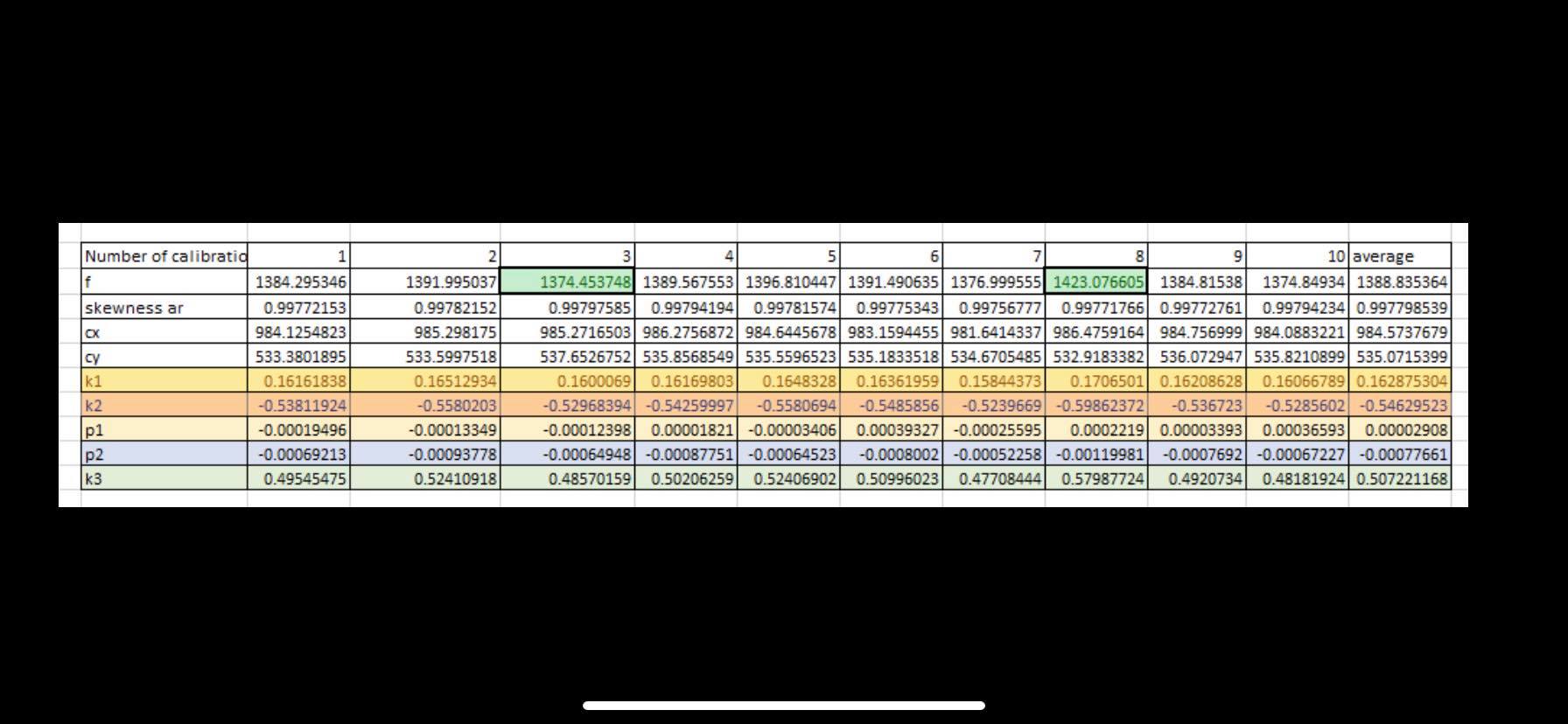
Appreciate your help.
Regards,
Dan
-
I made an edit to my opening comment after first mentioning RGB calibration with Targeted Calibration, as I saw that you were trying to calibrate intrinsics and the normal version of the Dynamic Calibrator only calibrates extrinsics (the OEM version of the tool is required for intrinsics calibration). My apologies for that.
-
Hi MartyG, thanks for your help about camera calibration tools, as I understand, will calibrate the accuracy and repeatability for depth image. I have also do the Dynamic calibrator, and visually see the image is less noise. But do you know any numerical method to validate the calibration output is good? I mean Intel only give the illustration for what is "good" and "not good" depth map, see below, but I curious about how much accuracy is added, or how to tell which intrinsic value is better?
-
As well as the Dynamic Calibrator tool, you can also use an On-Chip Calibration tool that is built into the RealSense Viewer program to test the camera and provide a 'heath check' value for the calibration. There is a Tare tool in the Viewer too for improving depth measuring accuracy. Both tools can be found in a menu under the More option at the top of the Viewer's options side-panel, and Intel have published a white-paper guide to use of On-Chip Calibration and Tare.
https://dev.intelrealsense.com/docs/self-calibration-for-depth-cameras
I would recommend using the Dynamic Calibrator when you need to perform a thorough and robust calibration of the camera's imager components, and use On-Chip Calibration for more regular checks.
There is also the option of testing depth image quality and receiving feedback about it (such as the amount of error) using the Depth Quality Tool.
The normal version of the Dynamic Calibrator tool only calibrate extrinsics because it is extrinsics that have the most effect on depth quality. Users of the OEM version of the tool have the option of calibrating intrinsics too, though that system is aimed at engineering departments and manufacturing facilities, and 99% of RealSense users will not require it.
-
Hi Dannguyen
Thanks for having a look at the Calib.io Camera Calibrator software for intrinsic calibration.
There are a couple of important points to consider when performing camera calibration. I recommend having a look at our best practices article: https://calib.io/blogs/knowledge-base/calibration-best-practices
In your particular case, the calibration board is barely tilted. Tilt (foreshortening) is necessary to constraint the focal length estimation. This is the main reason you are getting a large uncertainty on the focal length parameter.
For distortion coefficients, please note that the higher order model you are using requires a good amount of observations (images). Also, these parameters are not entirely independant. Different combinations of them can actually describe very similar distortion fields.
Best regards
Jakob, Calib.io
Please sign in to leave a comment.
Comments
6 comments