Video full setup windows 10
Is some one able to make a full video guide on how to set everything up and how to run an example code. I have spent at least 4 hours trying to figure this out. I just need a bit of help. Thanks
From Oscar
-
Hi Oscar On Windows 10, a lot of the setup is already pre-made, enabling you to get started quickly.
The first step is to install the RealSense SDK software, This can be done by visiting the Releases web-page.
https://github.com/IntelRealSense/librealsense/releases/
Scroll to the bottom of the details for a particular version to find an Assets file list. Left-click on the arrow next to it to expand the list open if it is hidden.
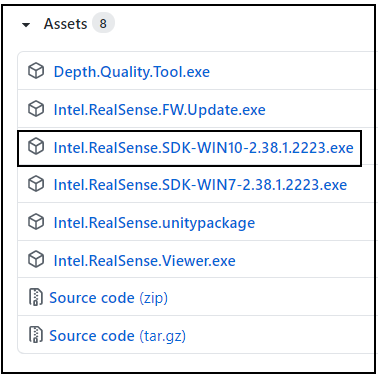
In this list is a Windows 10 installer file. Its file name will typicaly be 'Intel.RealSense.SDK-Win10' with a version name after it.
Left-click on it to download the installer file for the SDK in your browser and then run the file once download is completed to install the RealSense SDK software for Windows 10.
The installation program places a couple of pre-built tools on your Windows desktop, the RealSense Viewer and the Depth Quality Tool. The RealSense Viewer in particular is excellent for learning the basics of using your RealSense camera.
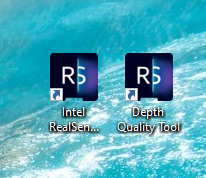
A set of pre-made launchable examples are provided in the Tools folder of the SDK. You can find the folder easily by right-clicking on the launch icon for the RealSense Viewer on your Windows desktop and selecting the Open file location option from the menu.

Launchable programs can be identified by the word Application beside them.
Some of these programs can be launched with a double-leftclick from that folder, whilst others must be launched from the Windows Command Prompt interface. You can find the Command Prompt by typing the word command into the text-box at the bottom of your Windows screen, next to the button where you shut down the PC. This may be visible by default or may appear when clicking on an icon that looks like a magnifying glass.

If you would also like a YouTube video guide for installing the RealSense SDK on Windows, the link below may be helpful.
-
To the Intel RealSense Helpdesk:
I am in the same situation, but on Windows 10, connected to USB 3.0, the Realsense L515 appears as unknown device.
I could not find any .inf file and the only firmware update... well the explanation on how to install it or use it is missing some information for a newbye like me. I tried to run the commandline in the command shell, in the command of the viewer, and the rs-fw- is not a supported command.
I have also spent the last 3 hours on this, and I am far from impressed knowing that I spent 400 dollars on the device... and I can't find a way to get it working...
... this being said I have another L515 that worked like a charm from the first time, on the same computer... and my students are using it now... but the new one I just bought just won't work and there is kind of a lack of information on how to solve issues.
Thanks
CG
-
I am having the same issue - Bought 2 units (L515s) Both were working, but now one is only identified as an unknown device and the drivers won't load. Tried it on several machines - even a new windows 10 install with all updates and no luck. Cannot use any of the dev software as none of them see the device. Any help would be great on how to resolve this.
Thanks, JL
Please sign in to leave a comment.
Comments
3 comments