I'm trying to running rs-capture in win10. But I don't know how to running.
I'm trying to running rs-capture in win10. But I don't know how to running. I downloaded lbrealsense-master at github. And I'm trying to run, but it doesn't have solution file. so I cannot running that folder. Is librealsense-master is running at linux only?
-
You do not need to build librealsense from the master branch on Windows. You can install it quickly and easily by downloading and running an installer file on the RealSense SDK Releases page.
If you scroll down to the bottom of the page at the link below, you will find an Assets file list. Download and install the 791 mb file Intel.RealSense.SDK-WIN10-2.36.0.2034.exe
https://github.com/IntelRealSense/librealsense/releases/tag/v2.36.0
When the installation is complete, launch icons for the RealSense Viewer and Depth Quality Tool programs will be placed on your Windows desktop.
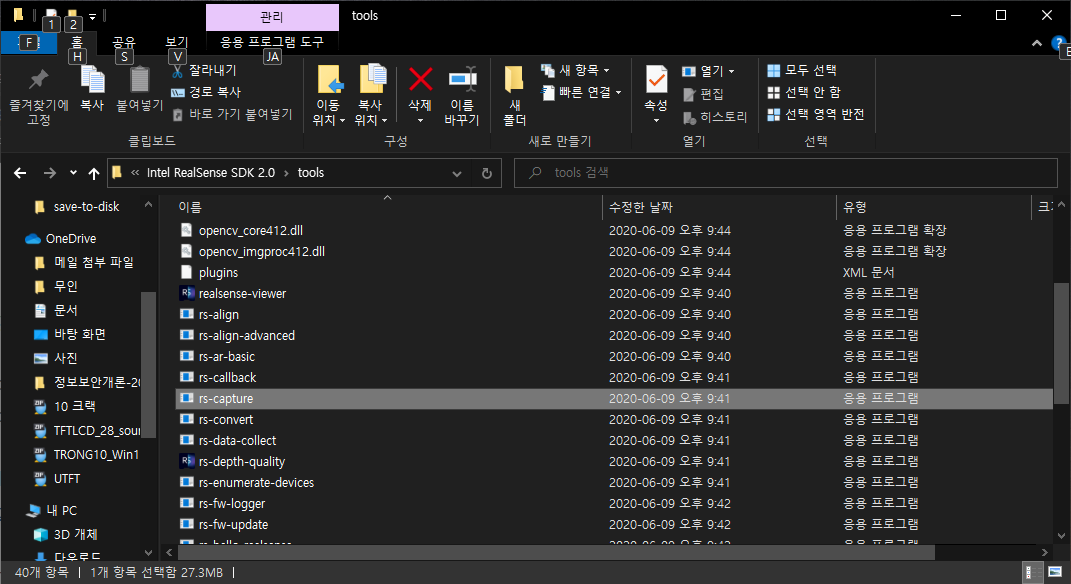
The files for these programs are located in an SDK folder called Tools, where there are also pre-built launchable versions of example programs such as rs-capture. To find the Tools folder quickly, right-click on the RealSense Viewer launch icon on the desktop and select Open File Location from its menu.
If you then want to learn how to access the examples in Visual Studio, the link below should be helpful.
If you want to build your own project and link the librealsense library files into it, please refer to the link below.
-
rs-capture is a program that should launch when double-leftclicked on. Are you able to run the realsense-viewer program please? If that also does not launch, it would suggest that your computer's graphics drivers may need updating, as rs-capture and realsense-viewer rely on OpenGL graphics support to work correctly.
Please sign in to leave a comment.
Comments
3 comments