昨年度と今年度の違いが知りたいです
2019年度と2020年度にRealSenseを入荷し使用させていただいております。
ツールについては
2019年度は、Intel RealSense D400 Series UWP Driver v5.1.160.24.zip
2020年度は、DMFT_Version 6.1.160.14.zip(+D400_Series_Development_FW_5_12_3_0.zip)
下記に書かれている Stereo Module「 Emitter Enabled」の差分は
何が原因で発生しているのでしょうか?
【RealSense設定差分例 差分継続確認中】
2019年度 2020年度 想定される影響
Stereo Module
-> Emitter Enabled off on 確認中
※カメラ設定は下記方法で確認しております。
RealSence:Intel RealSense Viewerの「Info」から確認
-
Title translation from Japanese: "I want to know the difference between last year and this year"
Question: How the RealSense Viewer's IR Emitter Enabled on / off control changed between 2019 and 2020
As far as I know, turning the emitter on and off using programming scripting still works the same. In the RealSense Viewer, the On and Off state has been replaced by Off, Laser and Laser Auto.
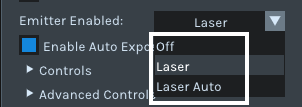
There is a RealSense SDK command called RS2_FRAME_METADATA_FRAME_EMITTER_MODE that has the number settings listed below:
0 - all emitters disabled
1 - laser enabled
2 - auto laser enabled
In the Emitter menu of the RealSense Viewer, these settings are expressed as Off ( which is 0), Laser (which is 1) and Laser Auto ( which is 2).
My research indicates that the meaning of Laser Auto is that the emitter only activates when lighting level is detected to have fallen below a certain level. In most cases, using Off or Laser (on) setting in the Viewer should be okay.
************************
TRANSLATION
私の知る限り、プログラミングスクリプトを使用してエミッタをオンまたはオフにすることは、同じように機能します。 RealSense Viewerでは、オンとオフの状態がオフ、レーザー、レーザー自動に置き換えられました。
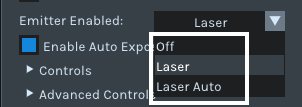
RS2_FRAME_METADATA_FRAME_EMITTER_MODEと呼ばれるRealSense SDKコマンドがあり、以下にリストされている番号設定があります。
0-すべてのエミッターを無効にします
1-レーザーが有効
2-自動レーザーが有効
RealSense Viewerのエミッタメニューでは、これらの設定はオフ(0)、レーザー(1)、レーザー自動(2)で表されます。
私の研究によると、レーザーオートの意味は、発光レベルが特定のレベルを下回ったことが検出された場合にのみエミッターがアクティブになることです。 ほとんどの場合、ビューアでオフまたはレーザー(オン)設定を使用しても問題ありません。
Please sign in to leave a comment.
Comments
1 comment