No RGB on D435i
Camera : D435i
Firmware : 05.12.05.00
OS : win 10
SDK version : 2.0
USB type where the camera is plugged in : 3.2
Hello, I'm so pissed off by intel. I'm trying to make my D435i working since this morning but there is absolutely no phone number to contact.
The issue : No RGB stream
On RealSense Viewer, when I switch on the rgb, it becomes a total mess. One of ten times, I have rgb but generally not. What can I do ? I read that windows often detect USB3 as USB2.
-
Hi A Elghozi Support for RealSense cameras is provided through forums such as this one, or at the RealSense GitHub forum.
https://github.com/IntelRealSense/librealsense/issues
If you are able to obtain an RGB image at least one out of ten times then it suggests a software problem rather than a problem with the camera hardware.
If the firmware driver inside the camera does not detect the RGB component inside the D435i then it identifies the camera model as D430 (a model that does not have an RGB sensor) and so RGB would not be accessible on the camera.
In the RealSense Viewer, is the camera name at the top of the Viewer side-panel stated as D430 when the RGB is not accessible, please?
If the Viewer is detecting the camera as USB2 then it should say 2.1 beside the camera name at the top of the options side-panel instead of 3.1 or 3.2.
-
Yes there are so many lol
Error messages :
Request: RGB8 Color,
Resolved to: YUYV Color,Found 1 unreachable streams, 320 extrinsics deleted
Backend in rs2_get_option(options:000001D388FE6D40, option:Backlight Compensation):
hr returned: HResult 0x800703e3: "L’opération d’entrée/sortie a été abandonnée en raison de l’arrêt d’un thread ou à la demande d’une application."Found 1 unreachable streams, 320 extrinsics deleted
By the way, there is no rgb stream displayed on the calibration tool software (dynamic calibrator) when I launch the calibration process.
-
I have also :
Out of frame resources!
Exception was thrown during user processing callback!
owner->_reader->ReadSample(dwStreamIndex, 0, nullptr, nullptr, nullptr, nullptr) returned: HResult 0xc00d3ea2: "Le périphérique d’enregistrement vidéo n’est plus présent."
USB SCP overflow
RT IC2 Config error
-
Thanks, the error message was very helpful.
Considering the extent of the errors, I would next recommend trying to downgrade the firmware to the previous version and then re-upgrade to the current one.
STEP ONE
Visit the firmware file download page and download the firmware file Signed_Image_UVC_5_12_3_0.bin
https://dev.intelrealsense.com/docs/firmware-releases
STEP TWO
In the RealSense Viewer, go to the More option at the top of the Viewer's options side-panel and select the Update Firmware menu option. Select the firmware file that you downloaded.
STEP THREE
Once the firmware 5.12.3 has successfully installed, check whether RGB now works with the 5.12.3 firmware version.
STEP FOUR
If you still want to use the latest firmware version, go back to More and select the option Install Recommend Firmware to re-upgrade to 5.12.5
-
Thank you for the tutorial but it didn't solve the issue. I think I have more information about it. When I enable stereo module and others disabled, it's fine. Then I enable rgb and sometimes I have it. Then if I enable motion module, rgb disappears.
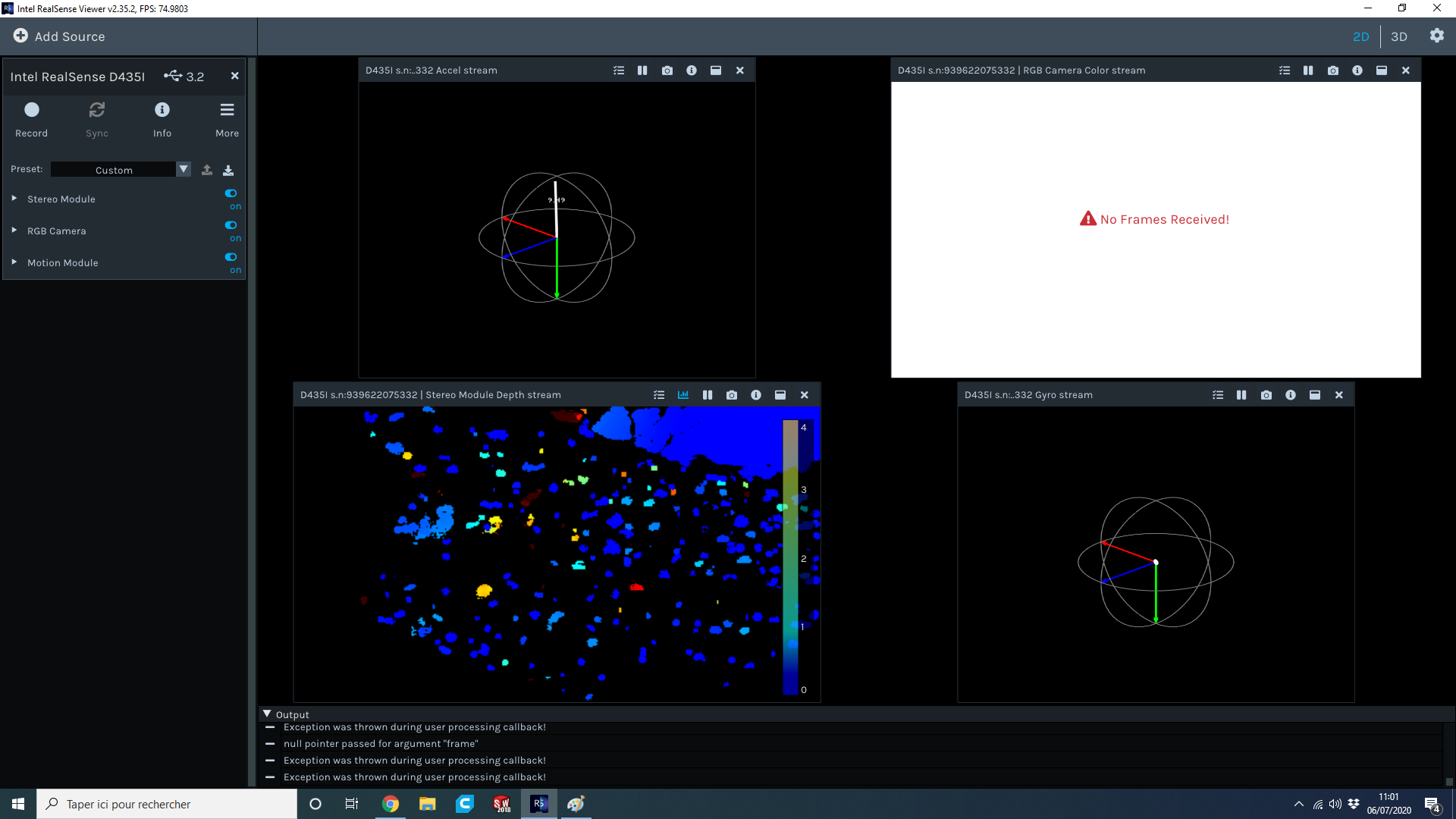
You can see on the snapshot that I'm connected through USB 3.2 but I still have "no frames received" message. I was on 5.12.3 firmware.
-
If you are experiencing the same issue on multiple computers, then it narrows the most likely options down to:
- A faulty USB cable that cannot cope with streaming high volumes of data
- Faulty firmware (unlikely, as you have downgraded and re-upgraded)
- Bad calibration
It may be worth performing a Gold Reset on the camera to reset it to its factory-new internal configuration. This can be done with the following steps:
1. Install the Dynamic Calibrator software for the 400 Series cameras.
https://downloadcenter.intel.com/download/29618/Intel-RealSense-D400-Series-Dynamic-Calibration-Tool
This also installs a program called CustomRW.
2. In the CustomRW program, input the command below to initiate a Gold Reset to factory defaults:
Intel.RealSense.CustomRW -g
BTW, what happens if you activate the RGB stream first and then the Stereo Module? Do you still get a degradation in performance if you activate the streams in that order?
Please sign in to leave a comment.
Comments
15 comments