L515 Drone Applications
Hi, I apologise that possibly some of my following questions will appear uneducated, please ignore anything not directly relevent.
I want to explore using the l515 on a small autonomous drone for small building room mapping, i'm guessing size restraints would mean that the drone would not be integrated to the sensor, it ideally would be more like a gopro you could start to record, then retrieve afterwards. Within the realms of arduino level knowledge/capability and assuming that the on board data storage, power supply and (pushing it for my ability but prob ok) memory buffer requirements could be met by myself, what else would you need to pin those measurements to an xyz model even for the sensors perspective, just for the measurement process.
I'm sorry this is the uneducated part, i'm ok with sensor mechanics and INS, but to be honest i don't understand what is creating the point of focus and perspective in the model that all measurements (current or future) refer to, i appreciate the camera has depth camera capabilities and these would definitely need big processing for point cloud generation, but with big scanning drones, they have LIDAR and INS and GPS (appreciate is measuring section of globe), that doesn't need perspective as the gps provides position, and the results are recorded and retrieved after the flight. If compared to someone room scanning with a L515 attached to an ipad, what is necessarily provided by the tablet (accelerometers i got)? where does the position and point of reference for the sensor come from? does it need something like dot3D to conduct the operation or would it be possible to have something drone scale that could generate and hold a cloud model until later?
Any help appreciated.
-
Hi Wesleymulroy Intel developed an advanced proprietary MEMS mirror inside the L515 that enables a laser light beam to be projected out from the camera and the distance to an object measured. The MEMS mirror enables the L515 to be a much smaller package with lower power usage than previous lidar cameras.
The height and length of the L515 is comparable to a tennis ball, though it is of course thinner in terms of front-to-back width. This makes it ideal for attaching to handheld devices such as tablets.

The data sheet document for the L515 provides the following explanation of how the camera works:
"The Intel RealSense LiDAR Camera L515 uses an IR laser, a MEMS, an IR photodiode, an RGB imager, a MEMS controller, and a vision ASIC. The MEMS is used to scan the IR laser beam over the entire field-of-view (FOV). The L515 vision ASIC will process the data from the reflected beam captured by the photodiode and will output a depth point representing the accurate distance of a specific point in the scene from the camera. Aggregation of the depth points will generate a point cloud depth data representing the full scene".
In regard to what provides the position and angle of the L515, the camera has a built in IMU (Inertial Measurement Unit) with accelerometer and gyro like the RealSense D435i and D455 stereo depth camera models. It can detect acceleration and rotation in 3 dimensions.
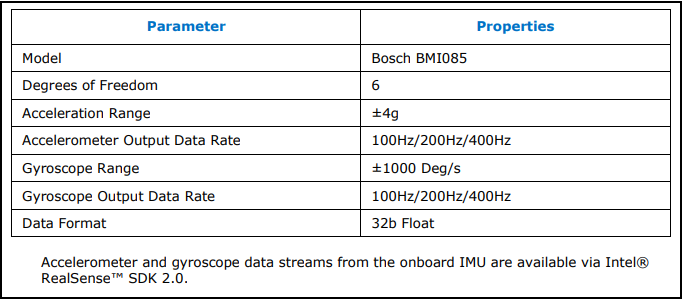
The L515 is compatible with 99% of the RealSense SDK software's functions at launch, so you should be able to create your own application to record a point cloud or use the pre-made RealSense Viewer program to do so.
The data sheet document for the L515 can be found here:
https://dev.intelrealsense.com/docs/lidar-camera-l515-datasheet
-
Hi Marty, thanks for the reply, wow that's great information, i'm sorry i couldn't find that before, preventing the expenditure of your time unnecesarily, I pre-ordered the sensor and am just (excitedly) waiting for it to arrive. So it looks like Intel have taken care of any of the difficult bits as regards standalone application and basic position requirements (i don't need mm accuracy), thanks, awesome. I think that's all i could expect and possibly need to ask other people this next bit. Now i know at any given measurement the unit can know where it is, but, can i just record those measurements over time and either your realsense viewer program or something 3rd party could construct it after, or wait! is distance data in stored in metadata in the video (that many points?) do i just need an SD card reader and anything supporting to that attached or for that matter transferred via drones video TX for real time construction on the user end? that's interesting.
-
Don't worry, it's no trouble at all to answer any questions that you have. :) Technical questions for the L515 are being handled on the RealSense GitHub forum, so please post new questions there by visiting the link below and clicking on the 'New Issue' button.
https://github.com/IntelRealSense/librealsense/issues
I'm happy to answer your current question about recording though. You could record data to a storage device on the drone (either a hard drive, or an SD card if you need to minimise weight).
Alternatively, you could transmit data to a ground-station computer via wi-fi. Intel recently published a paper on networking RealSense cameras with an open-source ethernet or wi-fi connection.
Others have taken the approach of using wi-fi via a drone flight controller such as PX4.
https://github.com/IntelRealSense/librealsense/issues/4392
A gstreamer plugin for RealSense SDK was also recently created, though I don't think it has been tested with L515 yet:
-
You are very welcome!
A drone article was published on the official RealSense blog this week that should be a useful reference too:
-
The L515 cameras support multi-camera hardware sync, yes. The RealSense SDK does also allow use of metadata to sync with streams from non-RealSense cameras (for example, depth from RealSense and RGB color from a non-RealSense camera).
https://github.com/IntelRealSense/librealsense/issues/2186
Using the Lepton with the L515 as an infrared camera may be problematic, as the L515's image can be degraded by external infrared (hence why it is an indoor camera, to avoid sunlight). It may be okay if the Lepton is used as the RGB source though, so long as it is not projecting infrared light into the path of the L515's vision.
Please sign in to leave a comment.
Comments
8 comments