Inaccurate depth value - when trying to measure distance to object from Camera
I am seeing inaccurate depth measurement when trying to measure object to distance from camera at given depth point .
If Object is in Center of the image i.e (for 640 x 480 rgb res) if object center is at 320, 240 - I am getting correct distance measurment.
If I move my object little left/right (away from center) - I am getting in accurate measurement.
I did couple of experiments
- Like calculating how far the object is frame center and try to get angle (at which object is placed from center of camera) value from center of camera and apply Pythagoras theorem to get measurement (point 1: is Distance to center of image, Point 2: Distance from Center of image to Object Point 3: (Unknown - Distance from camera to object))
But, still results are inaccurate...any guidance ...on how to solve this puzzle
-
If you are using a 400 Series camera such as D415 or D435, accuracy increases as resolution is increased. This is because the Stereo (left and right) depth sensing technology in the 400 Series derives its performance from the ability to match the positions of objects on the left and right side images. The optimal depth resolution is 848x480 for D435 and 1280x720 for D415.
If you are using a 400 Series camera and must use 640x480 instead of the camera's optimal resolution, it is recommended to use a post-processing filter called a Decimation Filter.
-
I am using D435 camera - below are my resolutions that I set for depth and color sensor's
self.config.enable_stream(rs.stream.depth, 848, 480, rs.format.z16, 30)
self.config.enable_stream(rs.stream.color, 640, 480, rs.format.bgr8, 30)Below is the decimation filter settings I am using
def set_filters(self):
self.colorizer = rs.colorizer()
self.decfilt = rs.decimation_filter()
self.depth2disparity = rs.disparity_transform()
self.disparity2depth = rs.disparity_transform(False)
self.spat = rs.spatial_filter()
self.temp = rs.temporal_filter()
# 0 - Jet, 1 - Classic, 2 - WhiteToBlack, 3 - BlackToWhite, 4-Bio, 5-Cold
# 6 - Warm, 7 - Quantized, 8 - Pattern
self.colorizer.set_option(rs.option.color_scheme, 0)
self.decfilt.set_option(rs.option.filter_magnitude, 2)
self.spat.set_option(rs.option.holes_fill, 5)And this is how I am processing depth_frame
self.depth_frame = self.decfilt.process(self.depth_frame)
self.depth_frame = self.depth2disparity.process(self.depth_frame)
self.depth_frame = self.spat.process(self.depth_frame)
self.depth_frame = self.temp.process(self.depth_frame)
self.depth_frame = self.disparity2depth.process(self.depth_frame)And this is how I am measuring the distance to object:
df = self.aligned_frames.get_depth_frame()
width = df.get_width();
height = df.get_height();dist_to_point_in_meters = df.get_distance(point[0], point[1])
Point is my [x, y] (Pixel coordinates)
With above logic - I am getting inaccurate results if x, y is not [640/2, 480/2] i.e center of the image...
-
It looks as though you are writing your own script that uses alignment instead of using a pre-made tool such as the RealSense Viewer. Is that correct, please?
If you are aligning depth to color, something to bear in mind is that depth will be aligned to the FOV size of the color imager. This is because on the D435 cameras, the left and right IR imagers that generate the depth frame have a larger ("wide") FOV than the FOV of the color imager. On the D415 model, color and IR imagers use the same component.
Also, if you are writing your own script, alignment should be applied after post-processing filters such as decimation have been applied, to help avoid distortion effects such as aliasing (jagged lines).
-
Thanks for the reply.
Yes - I am writing own script that uses alignment - not using RealSense Viewer.
Where can i find details on FOV of Color imager (for D435)...? I think this is very critical setting I have to make..so that FOV of Color and Depth sensors are set to same, is that right? Any guidance on how to set FOV for both Color and Depth IR sensors.
Yes - I am applying alignment after post-processing.
Thank you
-
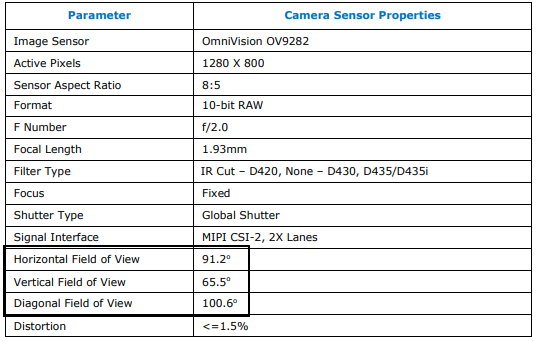
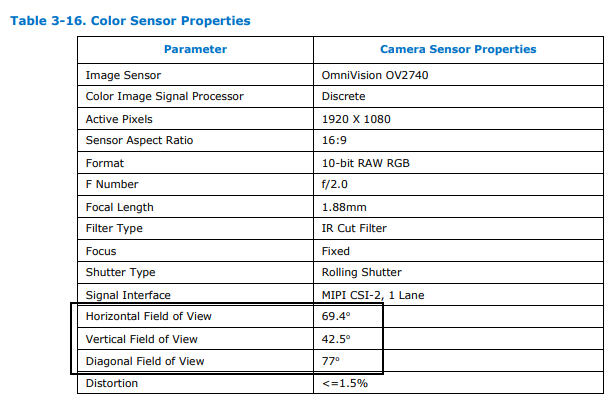
The FOV details for all of the RealSense camera imagers are in the data sheet document for the 400 Series cameras, which you can find at the link below. I have also posted an extract of the wide IR imager and color imager details below for your convenience.
https://dev.intelrealsense.com/docs/intel-realsense-d400-series-product-family-datasheet
WIDE IR IMAGER
COLOR IMAGER
-
The physical FOV size is fixed because it is set by the particular imager component used.
Some have approached the problem by getting a Depth Module Kit (a caseless version of the camera) and looking at adding their own choice of RGB imager component (a "MIPI" type module) instead of the standard 'Omnivision 2740' one used in RealSense cased cameras (D415, D435, D435i and L515). This is possible because all of the Depth Module Kit boards except the D415 lack an RGB imager (on the D415 Depth Module Kit, the RGB imager is integrated into its circuit board).
The easiest way to get a matching physical FOV size for the RGB and IR imagers would be to use the cased D415 camera model.
Please sign in to leave a comment.
Comments
7 comments