D415 Dynamic Calibration Crashing
Hi guys,
I've got a new D415 that arrived functional, but the scans were pretty inaccurate. When attempting to calibrate, I successfully capture the 15 shots for scale calibration, but it crashes before the next steps. Last message from the log states "#15: Start scale calibration"
Using software version 2.6.8.0
-
For D415 and D435 cameras, a final stage that comes after scale calibration is RGB camera calibration. This may be what the application is crashing out at.
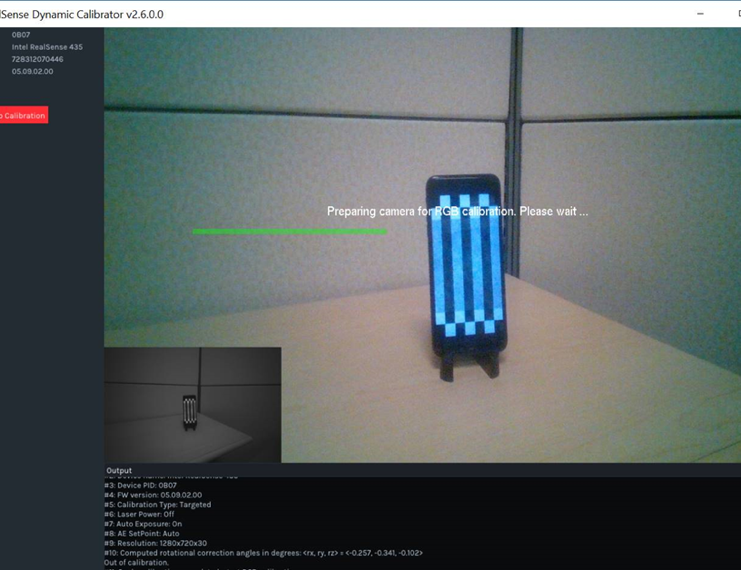
The description in the guide suggests that the overall calibration result will not be written to the camera unless the full process, including RGB calibration, is completed.
The Dynamic Calibrator tool may not be necessary for what you are trying to achieve (improving accuracy) though. The Dynamic Calibrator can correct some of the most severe image problems, such as pictures that look completely broken and randomly pixellated.
There is now a lightweight alternative to the Dynamic Calibrator that is built into the RealSense Viewer though. It is called On-Chip Calibration, and can help to reduce depth noise. It can be found under the 'More' option of the Viewer's options side-panel.
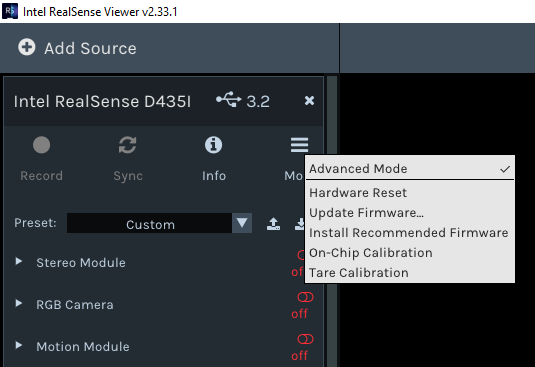
Intel recently published a "white paper" guide document to On-Chip calibration
https://dev.intelrealsense.com/docs/self-calibration-for-depth-cameras
RealSense cameras are also calibrated in the factory and so should have very good calibration when new out of the box. There may be other factors such as environment (e.g lighting conditions) that are negatively affecting your accuracy results. Could you tell us more please about the location in which you are using the camera. Thanks!
Please sign in to leave a comment.
Comments
1 comment