Multiple Questions on D415
Hello,
1) According to the BKMs_Tuning_RealSense_D4XX_Cam.pdf whitepaper, step 5 has a figure with the caption
"
Looking at Slanted Plane:
-
1. Looking at the quoted section in the paper, its mention of Left = High Density and Right = High Accuracy is referring to how the two illustrations are using different Visual Presets to achieve their results. Visual Presets are pre-made configurations for the camera that can favor certain properties (greater accuracy, less holes in the image, etc). Instead of giving a good balance of all configuration settings, they represent gaining an advantage in certain properties at the expense of other properties, depending on what your priorities are for the output image.
As well as the presets supplied with the SDK, you can also create your own custom presets. More information on Visual Presets can be found in the link below.
https://github.com/IntelRealSense/librealsense/wiki/D400-Series-Visual-Presets
In regard to the mention of MinZ ... the cameras have a minimum distance that they should be placed away from observed objects, and if the camera gets near enough to the object that it goes below the minimum distance then the image progressively breaks up as the camera gets closer and closer. Around 20 cm away will be the ultimate limit, below which the left and right IR sensors of the camera start getting confused.
As the paper says, you can reduce minimum distance to get the camera closer to an object by reducing the image resolution that you are using. If you need high resolution at close range, you can alternatively increase the value of a setting called Disparity Shift. This reduces the minimum distance, though also reduces the maximum depth sensing range of the camera.
These settings can be controlled through the menu interface of the RealSense Viewer software, or with code in your own application.
2. You can learn about the A-Factor in a white paper document Intel have published on the subject of Sub-Pixel Linearity.
3. There is not a lot of information about on-chip tare at the time of writing this, though Intel have said that they will publish a white paper document on the subject soon.
-
Hi Marty,
Thanks for your quick response. In regards to
1) I am currently using the disparity shift at resolution of 1280x720 to "see" and object at around 20 cm. However some of the object (parts that I dont care about) are closer than 20cm. This causes erroneous depth values like the figure I referenced above. Since these bad depth outliers cause my processing pipeline to produce inaccuracies, perhaps using the high accuracy preset can prevent this. I was originally under the assumption that I was able to apply different presets to the left vs the right stereo sensors but now I understand that is not the case and that the figure meant Left/Right images within the figure.
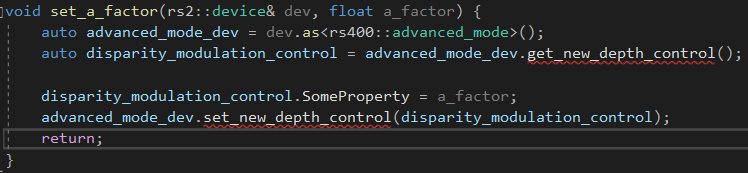
2) I read the Sub Pixel Linearity paper but I was not able to access the DepthControlGroup struct through the Advanced mode API with the call get_new_depth_control(). Is this available in the 2.29 SDK?
Thanks again in advance for your help.
-
1. There is a post-processing setting called the Threshold Filter that allows you to set a Depth Clamp (a minimum and maximum sensing distance), Values outside of these min and max depth ranges get excluded from the image.
You can test this in the 'Post Processing' section of the Viewer side-panel, in the 'Threshold Filter' options of that section. You can also set up a threshold filter with C++ code. A C++ script demonstrating setup of a threshold filter can be found in the link below.
https://stackoverflow.com/questions/59054413/intel-realsense-depth-camera-d435i-noises-and-mounds
2. It was introduced in SDK version 2.23.0 in June 2019. Please make sure your camera's firmware is version 5.11.11.100 or newer to access sub-pixel linearity functions in Advanced Mode. Also make sure that Advanced Mode is enabled.
-
1) Thanks for the tips I will be sure to try it out.
2) My firmware is indeed newer than 5.11.11.100. I am also able to set the A-factor through the SDK but I cant find any examples online on how to do it. Here is my code given the hints in the SubPix Linearity Whitepaper. I know its something I'm doing wrong programatically because of the build errors but I cant figure out what I'm doing wrong.
-
The only code reference for A-Factor that I know of is this:
Please sign in to leave a comment.
Comments
5 comments