How to convert units of .ply files to Millimeters in Intel Realsense Viewer
I am saving point cloud using intel realsense viewer using D435. The units in Viewer by Default are in Meters. On saving of .ply files the units remains in meters.
When I import point cloud to Third party software it is showing that the object is very small less then 1 mm but actually is about 400 mm object.
Now i want to change the units to Millimeters.
I this Possible.................?
-
Others have encountered this scaling problem in the past. The scale in the RealSense Viewer has to be set to the same scale as the program that the ply is being imported into.
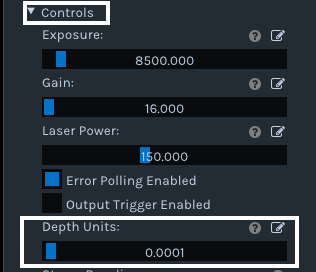
Under the 'Controls' section of the Viewer's side-panel options there is a setting called 'Depth Units' whose values are in millimeters (meters / 1000). Its default value is '0.001' (1 meter), and it can be reduced to a minimum of '0.0001' (0.1 meters) or increased to a maximum of '0.0100' (10 meters).
Please sign in to leave a comment.
Comments
1 comment