Resolution Configuration Options on Real Sense D435 for Raspberry Pi-4 4 GB RAM
Hi,
I could not find resolution depth and colour configuration options on RealSense D435 compatible with Raspberry Pi-4, 4 GB RAM.
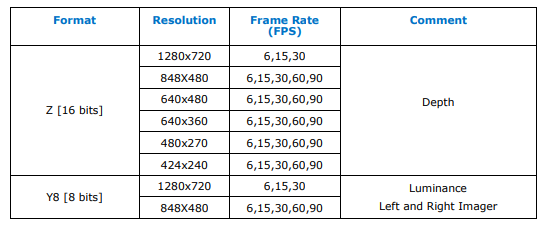
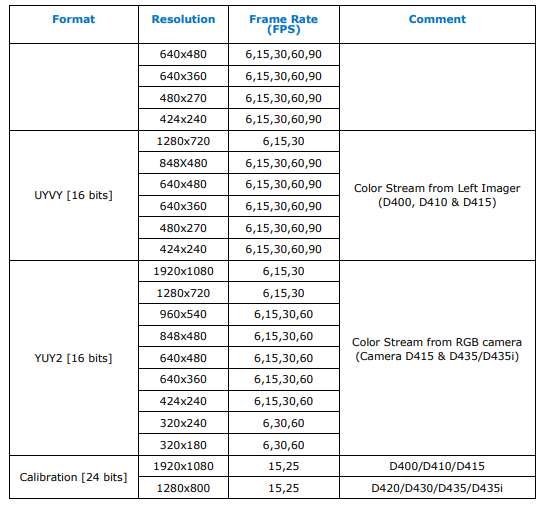
What are the Resolution Configuration Options on Real Sense D435 for Raspberry Pi-4 4 GB RAM that I can code on Python?
Thanks,
Eren
-
The RealSense SDK has a tool called rs-enumerate-devices that can list the supported modes on the specific hardware that it is run on.
https://github.com/IntelRealSense/librealsense/tree/master/tools/enumerate-devices
-
If you have access to a Windows PC, there is a pre-built executable version of rs-enumerate-devices in the following RealSense SDK folder location:
C: > Program Files (x86) > Intel RealSense SDK 2.0 > Tools
I would think though that if you are using Pi4 with the D435 camera in a USB 3 port, the list of supported modes probably corresponds to the standard list of supported stream modes for a USB 3 port.
-
Dear Marty,
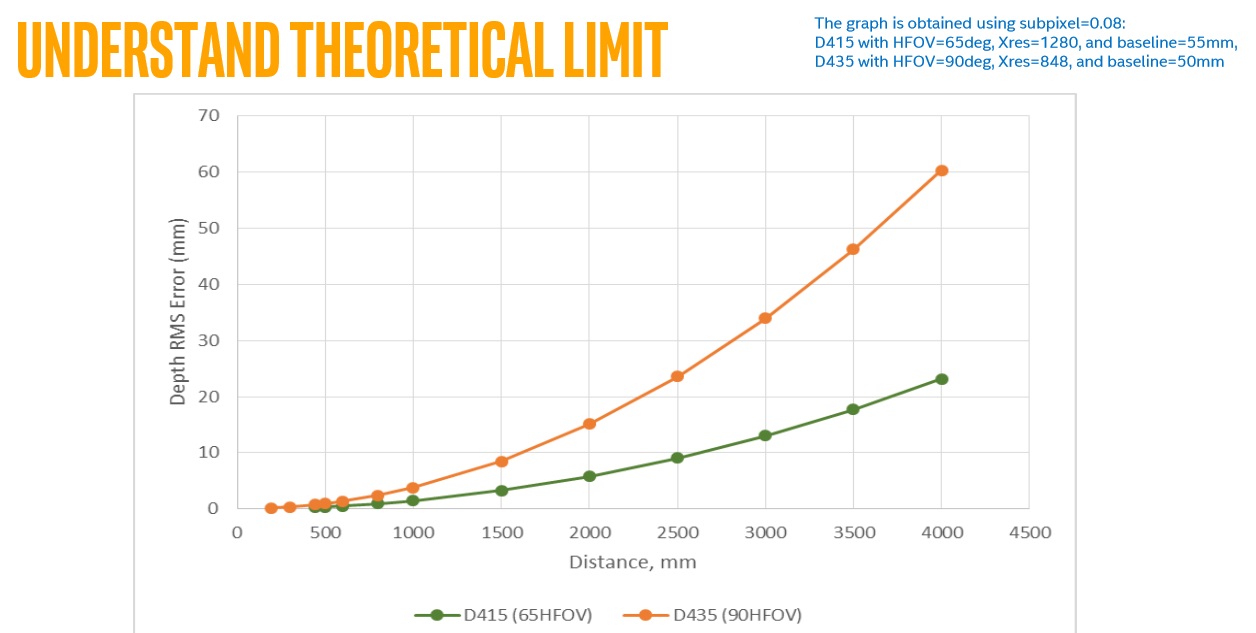
Thank you for your clear answer. It helped us a lot. We are also wondering whether you have bias-distance and precision-distance information or graphs so as to decide the distance we plan between the target object and camera.
I would be grateful if you can provide them with us.
Kind regards,
Eren
-
I do not have bias information. The chart below illustrates accuracy over distance ("RMS error") for the D415 and D435 camera models though. The D415 has about 2x better accuracy over distance than the D435 model. The error factor increases linearly over distance.
Page 3 of the RealSense camera tuning guide discusses the math of RMS error,
https://www.intelrealsense.com/wp-content/uploads/2019/11/BKMs_Tuning_RealSense_D4xx_Cam.pdf
Please sign in to leave a comment.
Comments
5 comments